# Testing

The following scenarios to open the transition screen available:

1. **My Dashboard** &gt; **My Applications** &gt; Choose the project &gt; Actions column &gt; **Process** option;
2. **Project menu** &gt; **Dashboards** &gt; **Overview** &gt; **Your assignments** module &gt; Choose the application &gt; Actions column &gt; **Process** option;
3. **Project menu** &gt; **Dashboards** &gt; **Portfolio** &gt; Actions column &gt; **Process** option;
4. **Project menu** &gt; **Import** &gt; **Start import** &gt; **Classic import / Import from CSV file / SCCM Import /Catalogue &amp; UM Import** &gt; Application upload session &gt; **Finish**

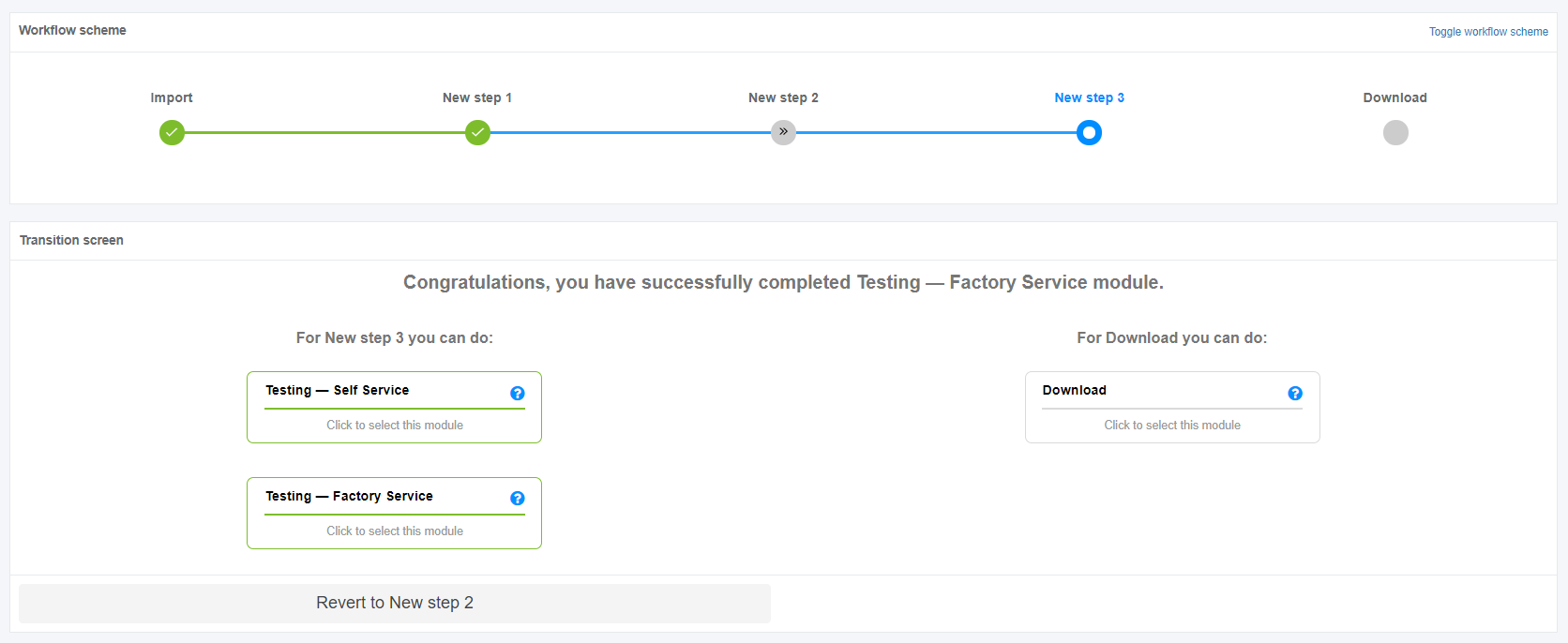
Apptimized shows the following screen when successful:

[![testing_01.PNG](https://docs.apptimized.com/uploads/images/gallery/2020-04/scaled-1680-/RoVdvsTNEv0KAGk2-testing_01.PNG)](https://docs.apptimized.com/uploads/images/gallery/2020-04/RoVdvsTNEv0KAGk2-testing_01.PNG)

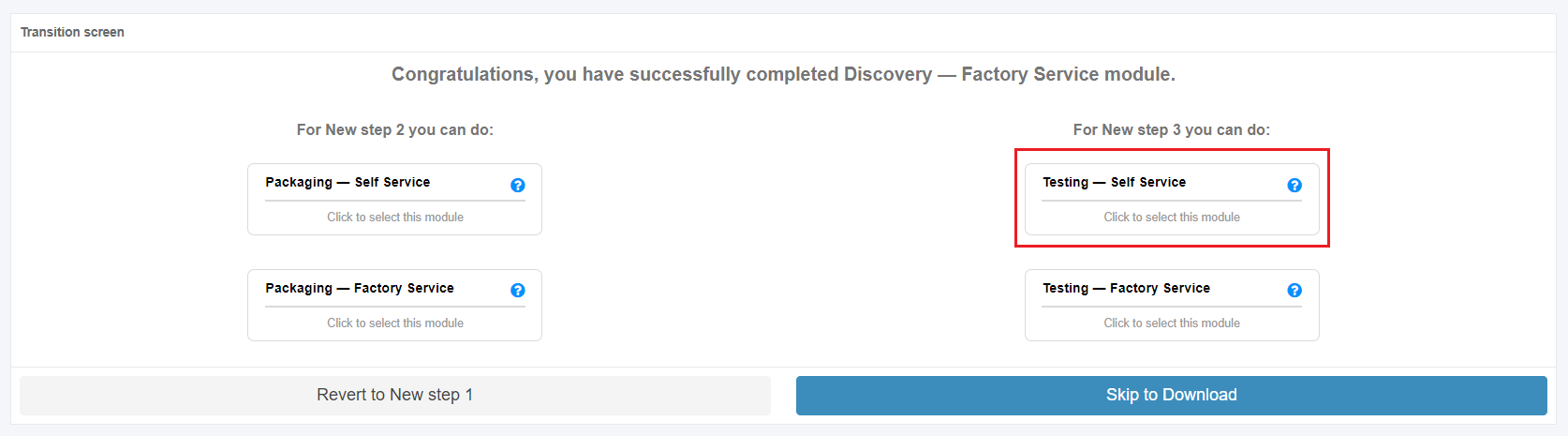
The testing process starts by clicking on the **Skip to \[Step name\]** button (before or after discovery step) and clicking in the Testing module on the Transition screen. An imported application into a project is a prerequisite.

[![testing_02.PNG](https://docs.apptimized.com/uploads/images/gallery/2020-04/scaled-1680-/Bg1ga7JXht0PjHFY-testing_02.PNG)](https://docs.apptimized.com/uploads/images/gallery/2020-04/Bg1ga7JXht0PjHFY-testing_02.PNG)

Two testing scenarios available in Apptimized portal:

- Testing – Self Service;
- Testing – Factory Service.

<p class="callout info">**Note.** A source for Testing step downloads at the **Import** step (see [Classic impor](https://docs.apptimized.com/books/apptimized-platform-user-manual/page/classic-import "Classic Import")t, [CSV import](https://docs.apptimized.com/books/apptimized-platform-user-manual/page/csv-import "CSV Import"), [SCCM import](https://docs.apptimized.com/books/apptimized-platform-user-manual/page/sccm-import "SCCM Import"), [Catalogue &amp; UM Import](https://docs.apptimized.com/books/apptimized-platform-user-manual/page/catalogue-um-import "Catalogue & UM Import")). Depending on the project workflow structure, a source can be an EXE file, a package).  
Next, the most common cases with the Testing are provided:  
1. The project workflow consists of 3 steps (Discovery - Self Service, Packaging - Factory Service, Testing - Self Service). A user uses a Classic import option to import the source (**EXE** file). The user goes through the steps sequentially. When the package is ready the user starts the Testing step with the package (i.e., Selects the testing platform &gt; Starts VM &gt; Opens **Packages** folder &gt;Launches **install.cmd** file **&gt;** Performs the testing actions &gt; Finish VM &gt; Reviews the testing results).  
2. The project workflow consists of 3 steps (Discovery - Self Service, Packaging - Factory Service, Testing - Self Service). A user uses a Classic import option to import the source (**EXE** file). The user skips the Discovery - Self Service and Packaging - Factory Service steps. The user starts the Testing step with the existing source (i.e., Selects the testing platform &gt; Starts VM &gt; Opens **Source** folder &gt;Launches **EXE** file **&gt;** Performs the testing actions &gt; Finish VM &gt; Reviews the testing results).  
3. The project workflow consists of 1 step (Testing - Self Service). A user uses a Classic import option to import the source (**MSI** file). The user starts the Testing step with the existing source (i.e., Selects the testing platform &gt; Starts VM &gt; Opens **Source** folder &gt;Launches package file **&gt;** Performs the testing actions &gt; Finish VM &gt; Reviews the testing results).</p>

#### **Testing – Self Service**

A user can record a guide to install and configure the application on Apptimized VMs. Also, a customer can enable a testing option and set the status of testing.

Testing - Self Service characteristics:

- A user tests created packages on his own.
- A user runs and documents test cases.
- A user logs installation or functional errors.
- A user provides debugging guidance.

The Testing - Self Service option is available under the **Testing - Self Service** module in the **Transition** screen.

[![testing_03.PNG](https://docs.apptimized.com/uploads/images/gallery/2020-04/scaled-1680-/4lc8TrNjqRniRpqc-testing_03.PNG)](https://docs.apptimized.com/uploads/images/gallery/2020-04/4lc8TrNjqRniRpqc-testing_03.PNG)
Apptimized shows the following screen when successful:

[![VM.png](https://docs.apptimized.com/uploads/images/gallery/2026-03/scaled-1680-/lnLvm.png)](https://docs.apptimized.com/uploads/images/gallery/2026-03/lnLvm.png)
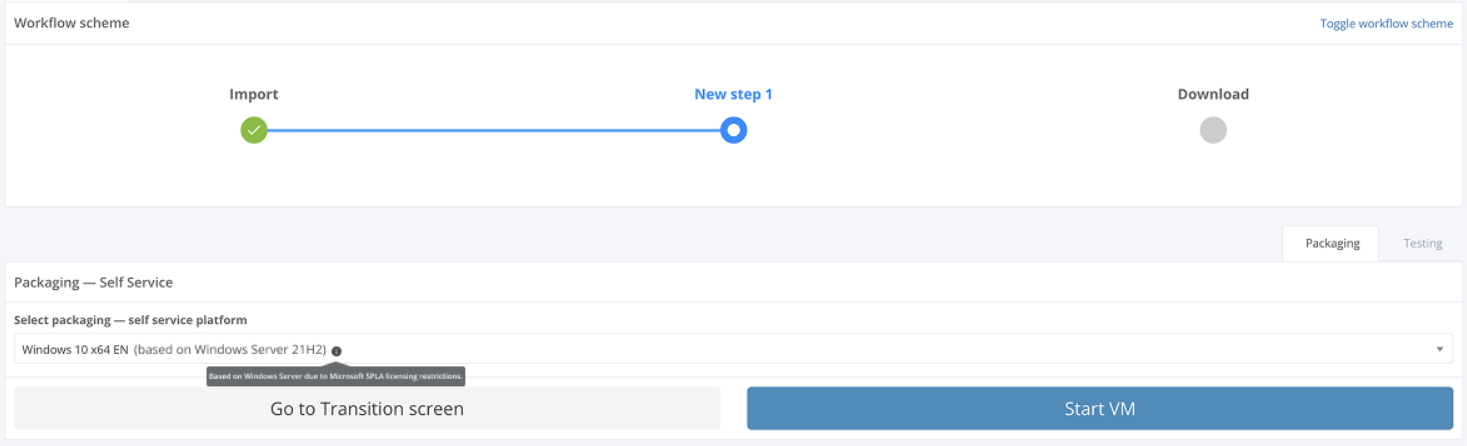
A field "**Select testing – self service platform**" is filled automatically and can be changed if needed. To change the testing – self service platform, click the drop-down menu as it is shown in the screenshot below:

[![testing_05.png](https://docs.apptimized.com/uploads/images/gallery/2020-04/scaled-1680-/Bkp1vD7RBrJRNIDh-testing_05.png)](https://docs.apptimized.com/uploads/images/gallery/2020-04/Bkp1vD7RBrJRNIDh-testing_05.png)
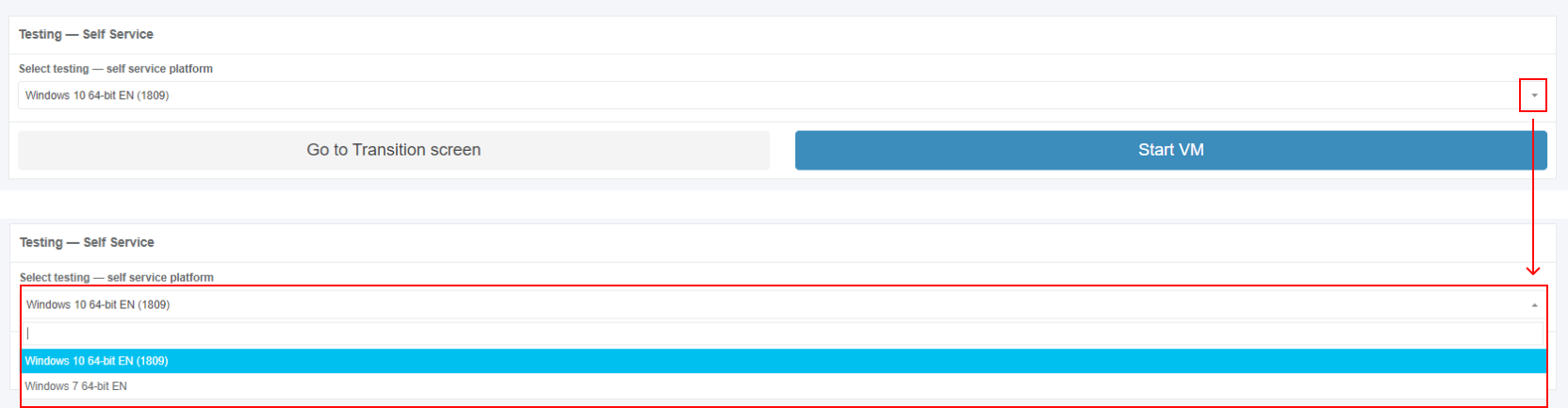
The option to revert to the transition screen is available under the **Go to Transition screen** button.

##### **Testing – Self Service process**

The option to start the testing – self service process is available under the **Start VM** button.

Apptimized shows the following screen when successful:

[![testing_06_2.png](https://docs.apptimized.com/uploads/images/gallery/2020-10/scaled-1680-/os806Wjo3UaTMqYL-testing_06_2.png)](https://docs.apptimized.com/uploads/images/gallery/2020-10/os806Wjo3UaTMqYL-testing_06_2.png)
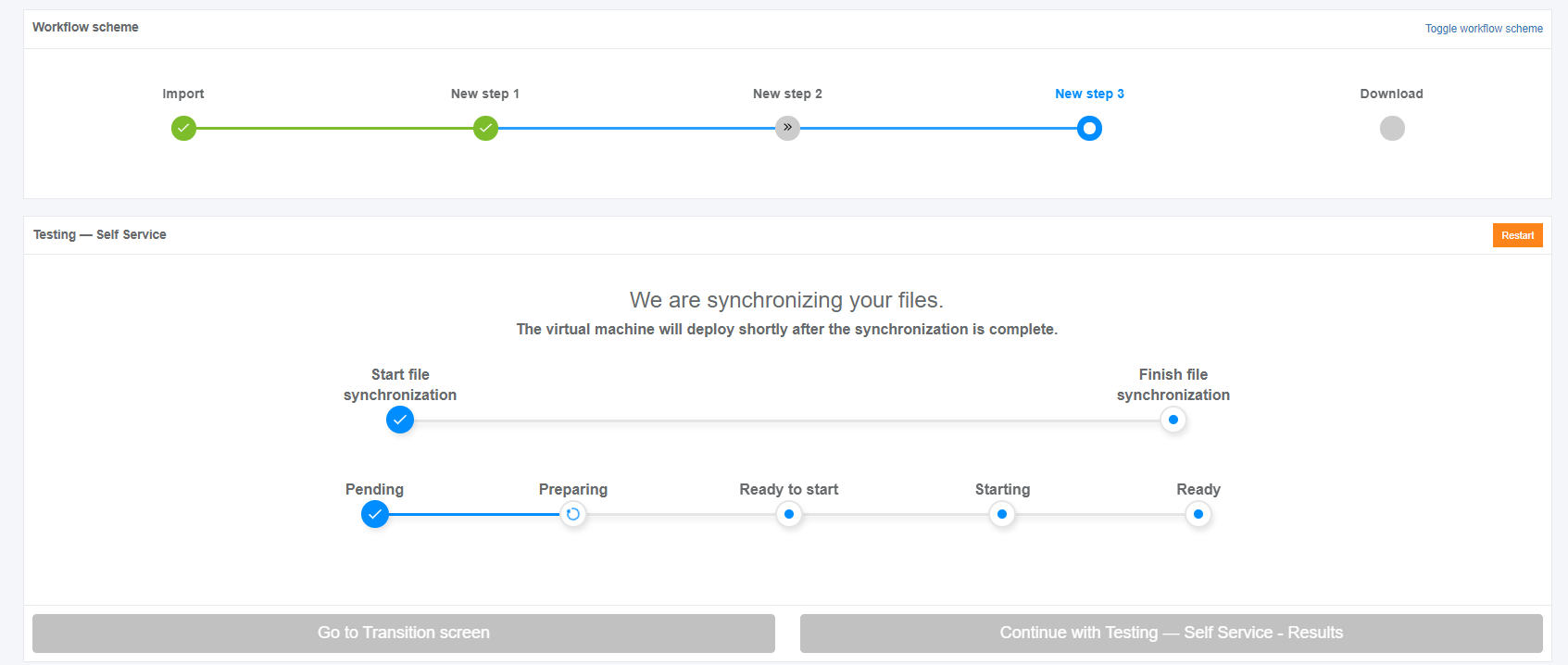
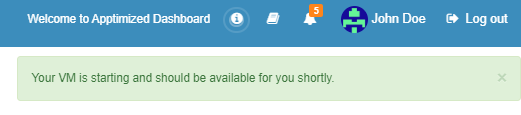
The file synchronization process may take few moments. Apptimized shows the following notification:

[![testing_06_3.png](https://docs.apptimized.com/uploads/images/gallery/2020-04/scaled-1680-/5mg2x63FX7ZMYA3g-testing_06_3.png)](https://docs.apptimized.com/uploads/images/gallery/2020-04/5mg2x63FX7ZMYA3g-testing_06_3.png)
<p class="callout info">**Note.** There is often a situation when a user has already run 2 VMs in parallel. To continue planned activities within the current workflow step, a user must terminate an irrelevant VM. In this case, Apptimized shows the warning box with a list of VMs which are currently running by the user:  
[![listvm_01.png](https://docs.apptimized.com/uploads/images/gallery/2020-07/scaled-1680-/uh1YFhfTV4ZZGU24-listvm_01.png)](https://docs.apptimized.com/uploads/images/gallery/2020-07/uh1YFhfTV4ZZGU24-listvm_01.png)  

The information is grouped into the following categories in the modal window:   
1. Application  
2. VM started time  
3. Workflow progress  
4. Link  
The option to select a VM for termination is available under the **Go to VM** link. A new tab opens when successful:  
[![03_testing_02-(1).png](https://docs.apptimized.com/uploads/images/gallery/2021-06/scaled-1680-/OYyQkjVRJGJ36FBU-03_testing_02-(1).png)](https://docs.apptimized.com/uploads/images/gallery/2021-06/OYyQkjVRJGJ36FBU-03_testing_02-(1).png)  
When a VM is terminated, a user returns to the screen where he needs to restart a VM (previously a user started a VM but received a modal window with a list of running VMs).</p>

When the synchronization process is finished, Apptimized shows the following screen:

[![testing_07_02-(2).png](https://docs.apptimized.com/uploads/images/gallery/2021-08/scaled-1680-/JctdlQuWfxZGMGux-testing_07_02-(2).png)](https://docs.apptimized.com/uploads/images/gallery/2021-08/JctdlQuWfxZGMGux-testing_07_02-(2).png)

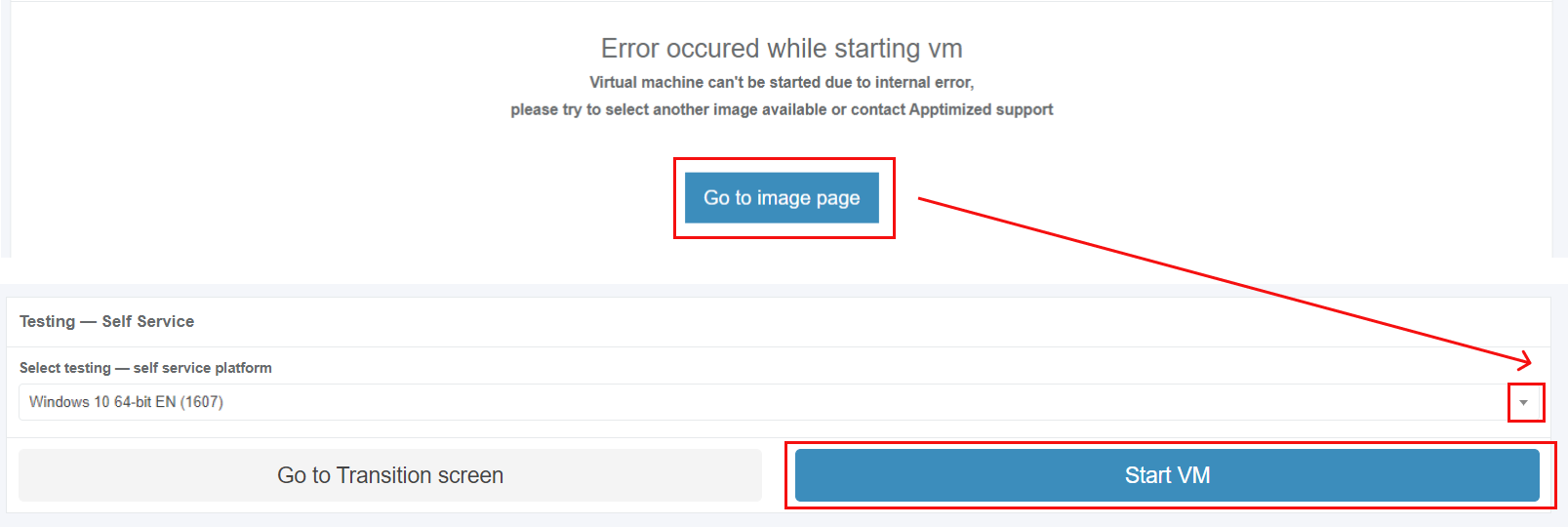
<p class="callout info">Note. If the internal error while starting VM occurred, Apptimized shows the following screen:  
[![testing_error-massage_02.png](https://docs.apptimized.com/uploads/images/gallery/2020-07/scaled-1680-/dXL1QeFeTaXiNvPc-testing_error-massage_02.png)](https://docs.apptimized.com/uploads/images/gallery/2020-07/dXL1QeFeTaXiNvPc-testing_error-massage_02.png)  
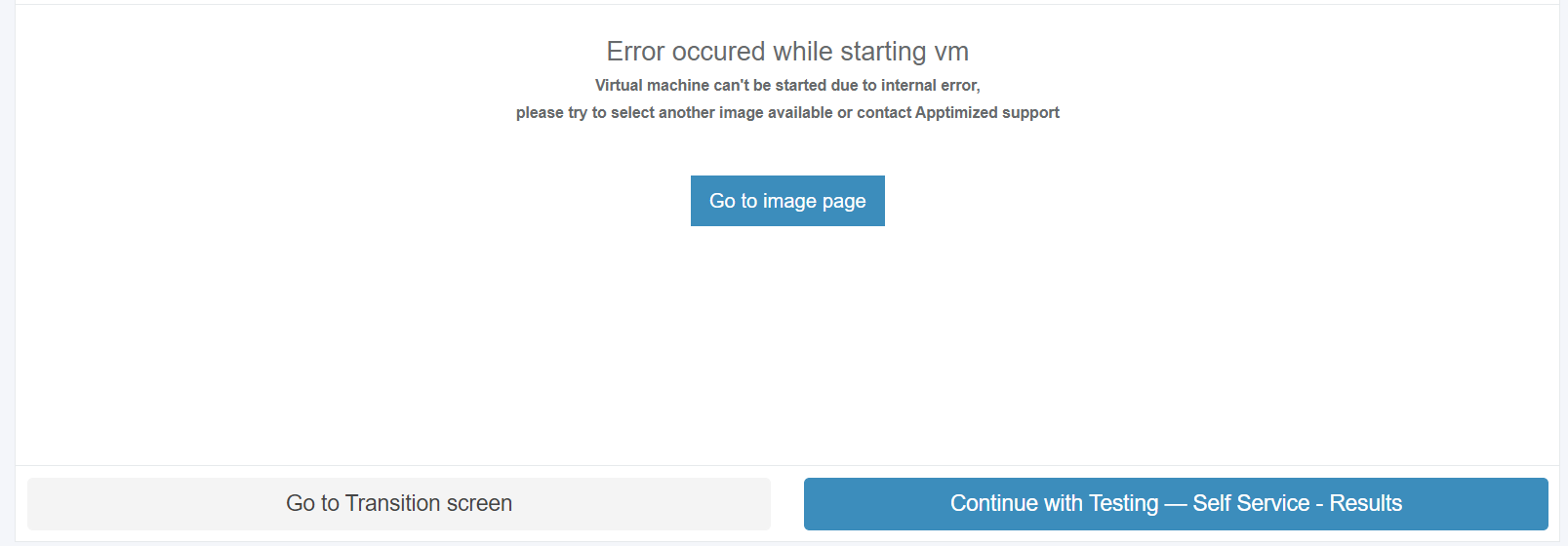
The following actions are recommended for consideration by a user:  
1. Contact the Apptimized support  
2. **Go to image page** button &gt; **Select discovery – self-service platform** field &gt; **Start VM** button  
[![testing_error-massage_01.png](https://docs.apptimized.com/uploads/images/gallery/2020-07/scaled-1680-/u7YzzDU8TFo8O9TU-testing_error-massage_01.png)](https://docs.apptimized.com/uploads/images/gallery/2020-07/u7YzzDU8TFo8O9TU-testing_error-massage_01.png)</p>

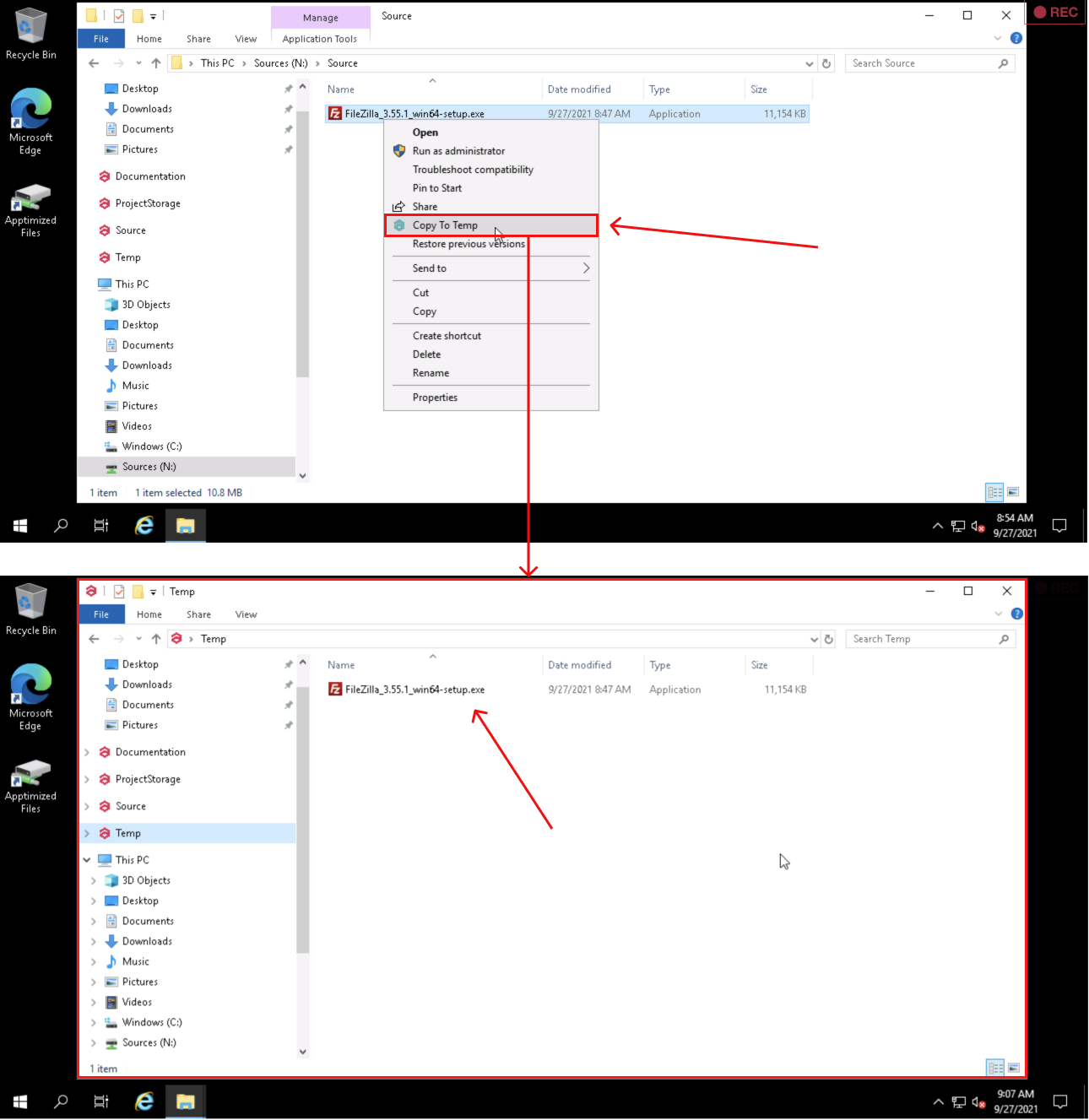
The option to copy files to **Temp storage** is available under **Explorer context menu** &gt; **Copy To Temp**:

[![discovery_x_temp.png](https://docs.apptimized.com/uploads/images/gallery/2021-09/scaled-1680-/4rQFL20TVySxJ7hi-discovery_x_temp.png)](https://docs.apptimized.com/uploads/images/gallery/2021-09/4rQFL20TVySxJ7hi-discovery_x_temp.png)

The uploaded files locate in the **Apptimized files** folder on the VM desktop.

To start the installation process, a user opens the **.EXE** file located in the Source folder.

[![testing_08_02-(1).png](https://docs.apptimized.com/uploads/images/gallery/2021-06/scaled-1680-/tjjHQA8l5PBaKMFA-testing_08_02-(1).png)](https://docs.apptimized.com/uploads/images/gallery/2021-06/tjjHQA8l5PBaKMFA-testing_08_02-(1).png)

Every action is captured as a screenshot which is shown in green boxes appearing on the right-hand side:

[![testing_08_2-(1).png](https://docs.apptimized.com/uploads/images/gallery/2021-06/scaled-1680-/C87kOcnP6CADHUbG-testing_08_2-(1).png)](https://docs.apptimized.com/uploads/images/gallery/2021-06/C87kOcnP6CADHUbG-testing_08_2-(1).png)

When application installation is completed, a user can provide further configurations (only the **Edit** and **Settings** categories).

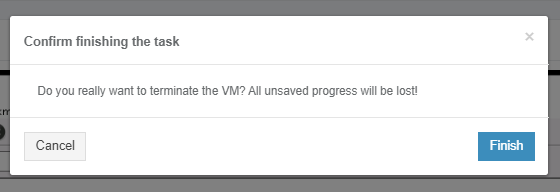
The options to finish the VM session is available under the **Finish** button.

[![testing_10.png](https://docs.apptimized.com/uploads/images/gallery/2020-04/scaled-1680-/rs8jchnEax728gm9-testing_10.png)](https://docs.apptimized.com/uploads/images/gallery/2020-04/rs8jchnEax728gm9-testing_10.png)
The following interface will appear when recording session with Apptimized VM finishes:

[![testing_13_2-(1).png](https://docs.apptimized.com/uploads/images/gallery/2021-08/scaled-1680-/xCTeWE1bfeLdSCJy-testing_13_2-(1).png)](https://docs.apptimized.com/uploads/images/gallery/2021-08/xCTeWE1bfeLdSCJy-testing_13_2-(1).png)

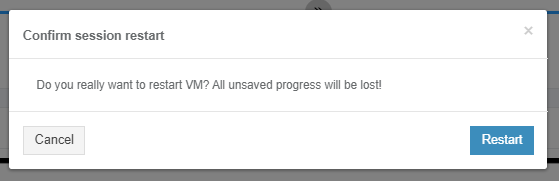
The option to restart the VM testing session is available under the **Restart** button. To confirm the restarting the VM Apptimized shows the following modal window:

[![testing_12.png](https://docs.apptimized.com/uploads/images/gallery/2020-04/scaled-1680-/HZdbfJe2ewpeOsSf-testing_12.png)](https://docs.apptimized.com/uploads/images/gallery/2020-04/HZdbfJe2ewpeOsSf-testing_12.png)
##### **VM control menu**

The VM control menu panel is available in the upper right corner of the VM interface.

[![testing_01_2-(1).png](https://docs.apptimized.com/uploads/images/gallery/2021-06/scaled-1680-/9kLhZQfEshhc61xD-testing_01_2-(1).png)](https://docs.apptimized.com/uploads/images/gallery/2021-06/9kLhZQfEshhc61xD-testing_01_2-(1).png)

Next, each settings category is shown in more detail.

[![testing_02_2-(1).png](https://docs.apptimized.com/uploads/images/gallery/2021-06/scaled-1680-/0500ZvsAFpk8lCzK-testing_02_2-(1).png)](https://docs.apptimized.com/uploads/images/gallery/2021-06/0500ZvsAFpk8lCzK-testing_02_2-(1).png)

Table 1. VM control menu

<table border="1" id="bkmrk-%C2%A0-control-menu-categ" style="width: 800px; height: 6577px;"><tbody><tr style="height: 57px;"><td style="height: 57px; width: 53.9931px;"></td><td style="height: 57px; width: 130.99px;">**Control menu category**

</td><td style="height: 57px; width: 613.993px;">**Details**

</td></tr><tr style="height: 79px;"><td style="height: 79px; width: 53.9931px;">1

</td><td style="height: 79px; width: 130.99px;">Screenshots

</td><td style="height: 79px; width: 613.993px;">This setting indicates the screenshot mode.

**On** and **Off** options available.

The default value is **On**.

</td></tr><tr style="height: 3278px;"><td style="height: 3278px; width: 53.9931px;">2

</td><td style="height: 3278px; width: 130.99px;">Add prerequisites

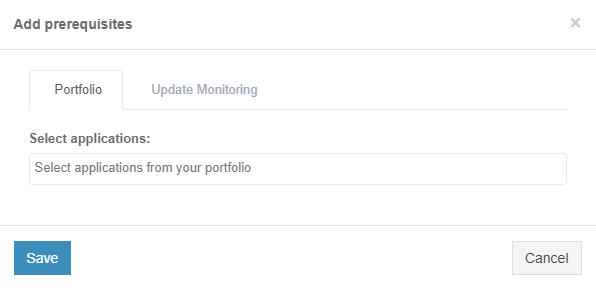
</td><td style="height: 3278px; width: 613.993px;">This setting enables a user to add prerequisite applications.

**Portfolio** tab is available by default. **Update Monitoring** &amp; **Catalogue** tabs become available if there are delivered packages on them.

[![discovery_15_3.png](https://docs.apptimized.com/uploads/images/gallery/2021-06/scaled-1680-/gKl7jlo4mZEY9n7Y-discovery_15_3.png)](https://docs.apptimized.com/uploads/images/gallery/2021-06/gKl7jlo4mZEY9n7Y-discovery_15_3.png)
**Portfolio** tab

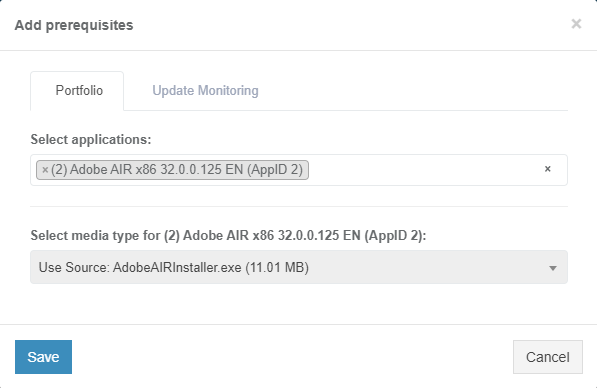
The option to select application is available under **Select applications** field.

[![discovery_15_4-(1).png](https://docs.apptimized.com/uploads/images/gallery/2021-06/scaled-1680-/aVX1wrTkkFHsI6Uu-discovery_15_4-(1).png)](https://docs.apptimized.com/uploads/images/gallery/2021-06/aVX1wrTkkFHsI6Uu-discovery_15_4-(1).png)

The option to select media type for applications is available after the application was selected.

The following media types available:

- Package
- Source

[![discovery_x_1.png](https://docs.apptimized.com/uploads/images/gallery/2021-06/scaled-1680-/9rTFu3uO8jQBfLgz-discovery_x_1.png)](https://docs.apptimized.com/uploads/images/gallery/2021-06/9rTFu3uO8jQBfLgz-discovery_x_1.png)
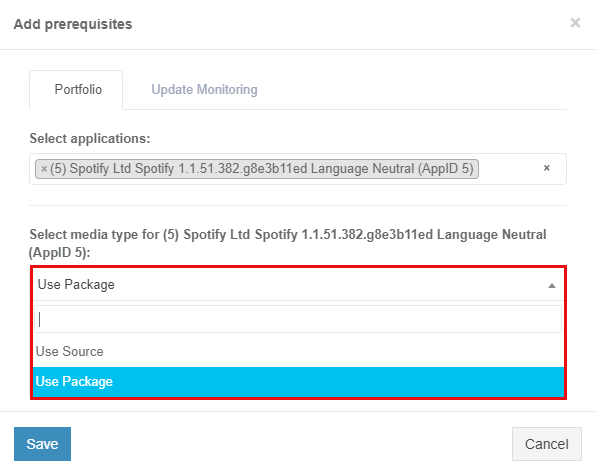
<p class="callout info">**Note**. One media type is automatically selected if others are missing.</p>

<p class="callout info">[![discovery_x_2.png](https://docs.apptimized.com/uploads/images/gallery/2021-06/scaled-1680-/RRzaEg7knQYdW6AG-image-73.png)](https://docs.apptimized.com/uploads/images/gallery/2021-06/RRzaEg7knQYdW6AG-image-73.png)</p>

The option to use Source media type is available under **Use Source** &gt; **Select Media** &gt; select source file.

[![discovery_x_2-(1).png](https://docs.apptimized.com/uploads/images/gallery/2021-06/scaled-1680-/09nzmMPTTY0PjnNz-discovery_x_2-(1).png)](https://docs.apptimized.com/uploads/images/gallery/2021-06/09nzmMPTTY0PjnNz-discovery_x_2-(1).png)

<span class="TextRun SCXW38531778 BCX8" data-contrast="none" lang="EN-US" xml:lang="EN-US"><span class="NormalTextRun SCXW38531778 BCX8">The option</span><span class="NormalTextRun SCXW38531778 BCX8"> to use Package media type is available under </span></span><span class="TextRun SCXW38531778 BCX8" data-contrast="none" lang="EN-US" xml:lang="EN-US"><span class="NormalTextRun SCXW38531778 BCX8">**Use Package** &gt; **Select Media** &gt; </span></span><span class="TextRun SCXW38531778 BCX8" data-contrast="none" lang="EN-US" xml:lang="EN-US"><span class="NormalTextRun SCXW38531778 BCX8">select package file.</span></span><span class="EOP SCXW38531778 BCX8" data-ccp-props="{"201341983":0,"335559740":259}"> </span>

<span class="EOP SCXW38531778 BCX8" data-ccp-props="{"201341983":0,"335559740":259}">[![discovery_x_3-(1).png](https://docs.apptimized.com/uploads/images/gallery/2021-06/scaled-1680-/UTvHlXMeOp8T6RGS-discovery_x_3-(1).png)](https://docs.apptimized.com/uploads/images/gallery/2021-06/UTvHlXMeOp8T6RGS-discovery_x_3-(1).png)</span>

**<span data-contrast="none">Update Monitoring</span>**<span data-ccp-props="{"201341983":0,"335559740":259}"> </span>

<span data-ccp-props="{"201341983":0,"335559740":259}"> </span>

<span data-contrast="none">Update Monitoring tab allows to add prerequisites as applications from </span>**<span data-contrast="none">Update Monitoring </span>**<span data-contrast="none">delivered packages.</span><span data-ccp-props="{"201341983":0,"335559740":259}"> </span>

<span data-ccp-props="{"201341983":0,"335559740":259}"> </span>

<span data-contrast="none">The option to Select application from Update Monitoring is available under </span>**<span data-contrast="none">Select applications: </span>**<span data-contrast="none">field &gt; </span>**<span data-contrast="none">Select Version for application</span>**<span data-contrast="none">.</span><span data-ccp-props="{"201341983":0,"335559740":259}"> </span>

[![discovery_X_4-(1).png](https://docs.apptimized.com/uploads/images/gallery/2021-06/scaled-1680-/dDiIZZi1WXOAJvwx-discovery_X_4-(1).png)](https://docs.apptimized.com/uploads/images/gallery/2021-06/dDiIZZi1WXOAJvwx-discovery_X_4-(1).png)

**<span data-contrast="none">Catalogue</span>**<span data-ccp-props="{"201341983":0,"335559740":259}"> </span>

<span data-ccp-props="{"201341983":0,"335559740":259}"> </span>

**<span data-contrast="none">Catalogue </span>**<span data-contrast="none">tab allows to add prerequisites as applications from </span>**<span data-contrast="none">Catalogue </span>**<span data-contrast="none">delivered packages.</span><span data-ccp-props="{"201341983":0,"335559740":259}"> </span>

<span data-ccp-props="{"201341983":0,"335559740":259}"> </span>

<span data-contrast="none">The option to select applications from the </span>**<span data-contrast="none">Catalogue </span>**<span data-contrast="none">is available under </span>**<span data-contrast="none">Selec applications: </span>**<span data-contrast="none">field &gt; </span>**<span data-contrast="none">Select Version for application</span>**<span data-contrast="none">.</span><span data-ccp-props="{"201341983":0,"335559740":259}"> </span>

[![discovery_x_5-(1).png](https://docs.apptimized.com/uploads/images/gallery/2021-06/scaled-1680-/BqSiCGZbcUL99MGL-discovery_x_5-(1).png)](https://docs.apptimized.com/uploads/images/gallery/2021-06/BqSiCGZbcUL99MGL-discovery_x_5-(1).png)

<span data-contrast="none">The option to Save Changes is available under </span>**<span data-contrast="none">Save </span>**<span data-contrast="none">button.</span><span data-ccp-props="{"201341983":0,"335559740":259}"> </span>

<span data-ccp-props="{"201341983":0,"335559740":259}"> </span>

<span data-contrast="none">Apptimized shows the following notifications when successful:</span><span data-ccp-props="{"201341983":0,"335559740":259}"> </span>

[![image-1624347161356.png](https://docs.apptimized.com/uploads/images/gallery/2021-06/scaled-1680-/cIBw78yPri9MfFL0-image-1624347161356.png)](https://docs.apptimized.com/uploads/images/gallery/2021-06/cIBw78yPri9MfFL0-image-1624347161356.png)

The option to **Edit prerequisites** becomes available after the prerequisites were added.  
  
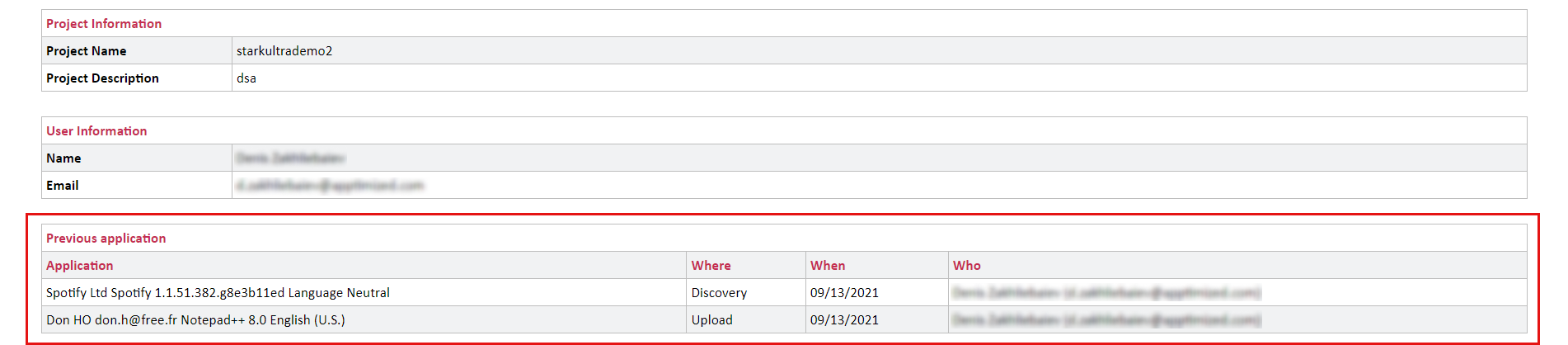
<p class="callout info">**Note**. Uploaded prerequisites are shown in the testing documentation under the Previous application section.  
[![testing_x_3.png](https://docs.apptimized.com/uploads/images/gallery/2021-09/scaled-1680-/x5QHLowiN9ncxI6S-testing_x_3.png)](https://docs.apptimized.com/uploads/images/gallery/2021-09/x5QHLowiN9ncxI6S-testing_x_3.png)</p>
</td></tr><tr style="height: 1986px;"><td style="height: 1986px; width: 53.9931px;">3

</td><td style="height: 1986px; width: 130.99px;">RDP

</td><td style="height: 1986px; width: 613.993px;">This setting enables a user to work on the VM directly via RDP rather than a browser window.

[![discovery_16_2-(2).png](https://docs.apptimized.com/uploads/images/gallery/2021-06/scaled-1680-/HoX3kAP5nmG43g2y-discovery_16_2-(2).png)](https://docs.apptimized.com/uploads/images/gallery/2021-06/HoX3kAP5nmG43g2y-discovery_16_2-(2).png)

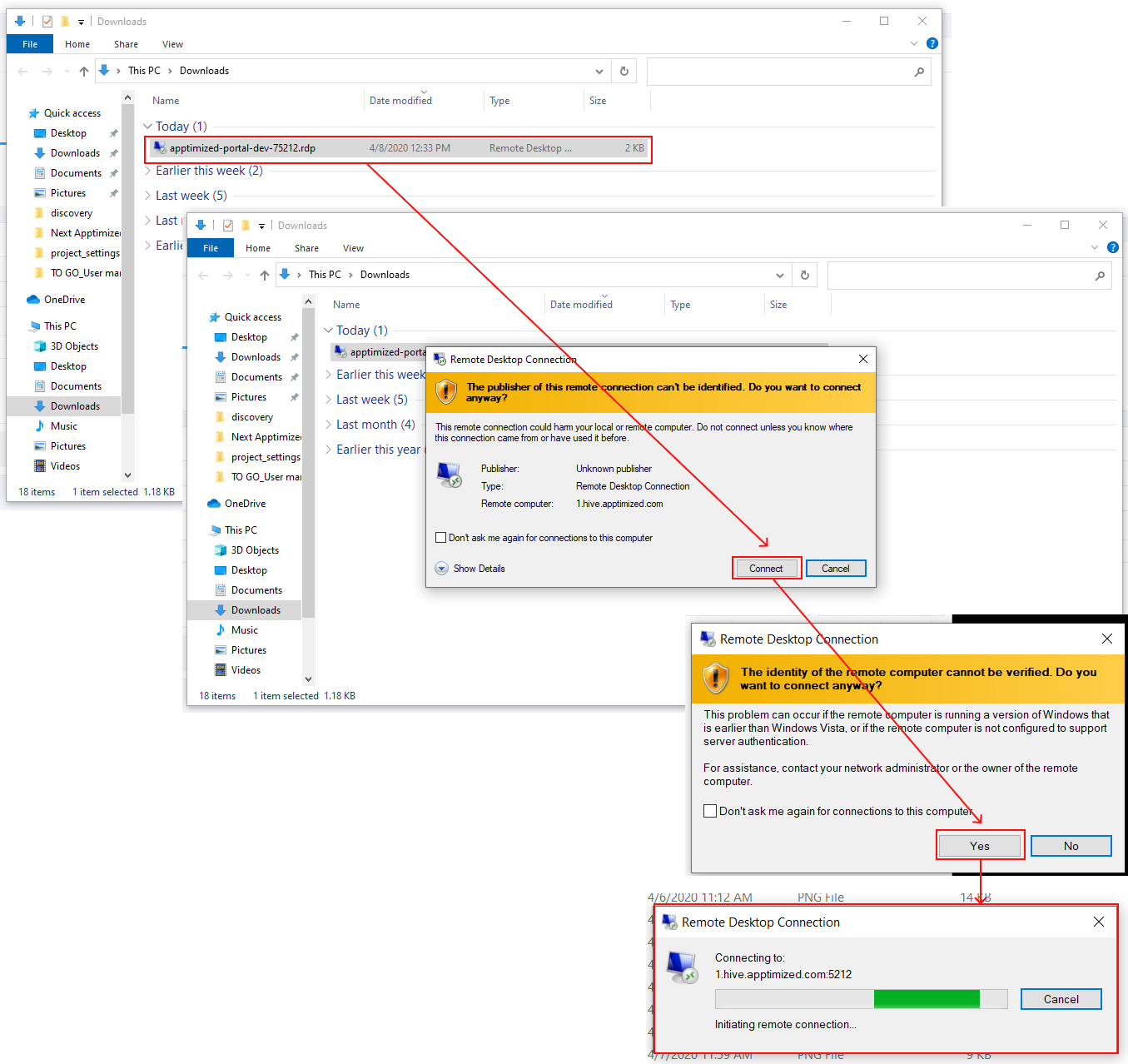
The option to download a file is available under the Download RDP file.

The RDP file is available in the Downloads folder in user’s PC.

[![discovery_16_10.png](https://docs.apptimized.com/uploads/images/gallery/2020-04/scaled-1680-/4LNxnwGiKsP3xR8V-discovery_16_10.png)](https://docs.apptimized.com/uploads/images/gallery/2020-04/4LNxnwGiKsP3xR8V-discovery_16_10.png)
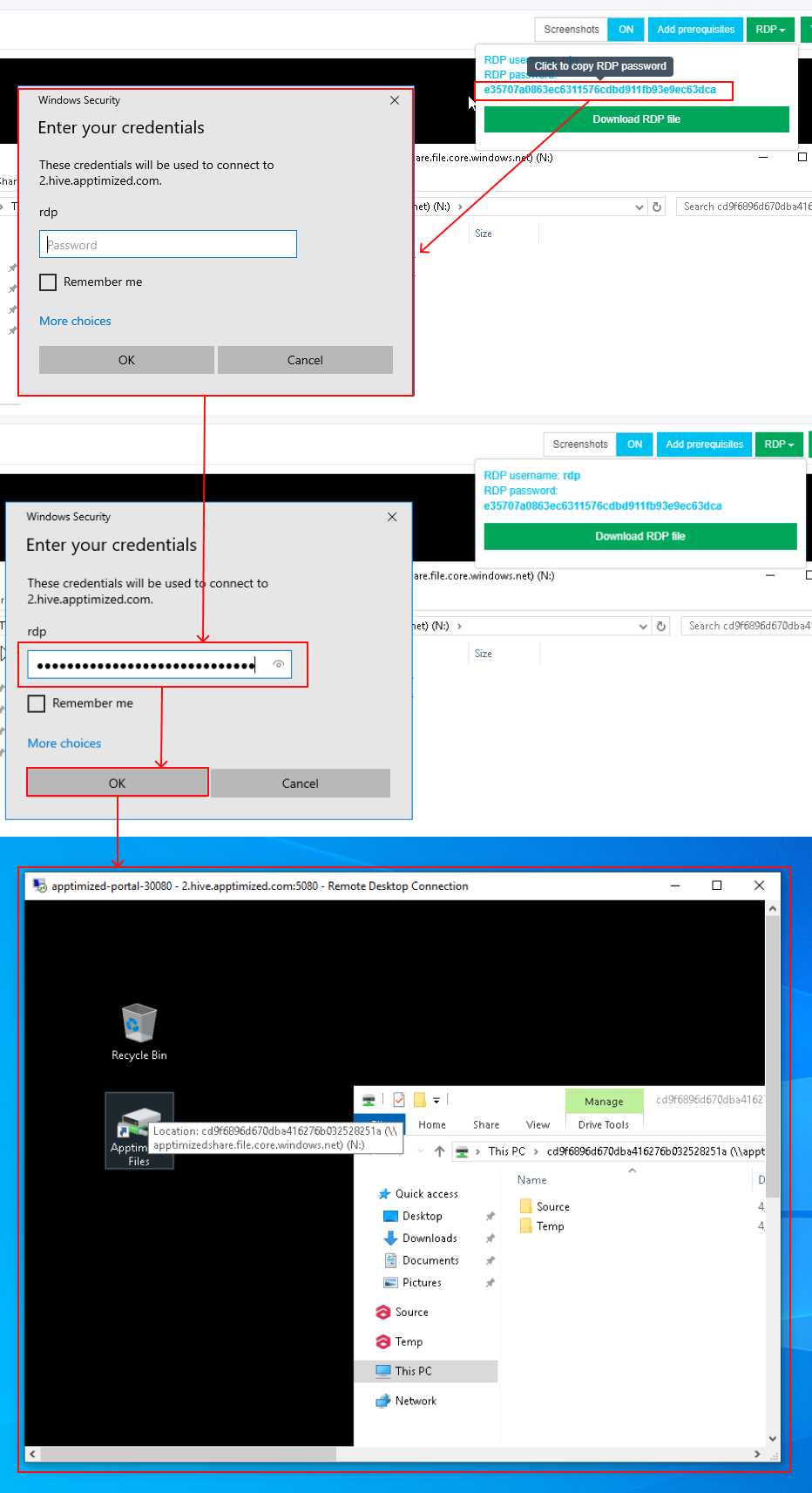
When the remote connection is set, copy the RDP password paste to the modal window. The remote desktop connection window appears when successful:

[![image-1624351495562.png](https://docs.apptimized.com/uploads/images/gallery/2021-06/scaled-1680-/9a5OQxKprJBf8nkp-image-1624351495562.png)](https://docs.apptimized.com/uploads/images/gallery/2021-06/9a5OQxKprJBf8nkp-image-1624351495562.png)
</td></tr><tr style="height: 377px;"><td style="height: 377px; width: 53.9931px;">4

</td><td style="height: 377px; width: 130.99px;">VM Snapshots

</td><td style="height: 377px; width: 613.993px;">The setting enables to create a snapshot of the VM to save its current state or to revert to a state saved earlier.

This is applicable when the application has prerequisites that need to be present before a certain action (i.e., Discovery, Packaging, or Testing) can be started.

[![image-1624351510953.png](https://docs.apptimized.com/uploads/images/gallery/2021-06/scaled-1680-/rdCtBy8uzwa7Ghb6-image-1624351510953.png)](https://docs.apptimized.com/uploads/images/gallery/2021-06/rdCtBy8uzwa7Ghb6-image-1624351510953.png)
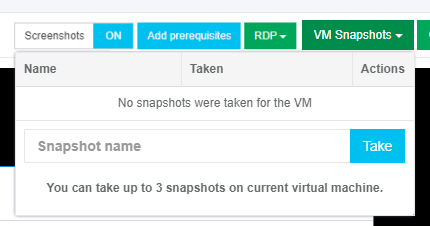
The snapshot option is available under the **VM snapshot** button &gt; **Snapshot name** field &gt; **Take** button.

</td></tr><tr style="height: 318px;"><td style="height: 318px; width: 53.9931px;">5

</td><td style="height: 318px; width: 130.99px;">Clipboard

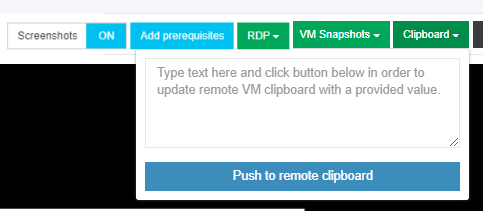
</td><td style="height: 318px; width: 613.993px;">This setting enables a user to put text from the user’s system to the VM clipboard. Transferring clipboard content between the host machine and the VM is performed via "Cut &amp; Paste" in most user scenarios. If the user experiences any issues with "Cut &amp; Paste", the Clipboard button can be used to put the text to the VM's clipboard.

[![image-1624351522416.png](https://docs.apptimized.com/uploads/images/gallery/2021-06/scaled-1680-/16yANwuiav4hqtWc-image-1624351522416.png)](https://docs.apptimized.com/uploads/images/gallery/2021-06/16yANwuiav4hqtWc-image-1624351522416.png)
</td></tr><tr style="height: 35px;"><td style="height: 35px; width: 53.9931px;">6

</td><td style="height: 35px; width: 130.99px;">Ctrl+Alt+Del

</td><td style="height: 35px; width: 613.993px;">This setting enables to open security options menu at the VM.

</td></tr><tr style="height: 35px;"><td style="height: 35px; width: 53.9931px;">7

</td><td style="height: 35px; width: 130.99px;">Fullscreen

</td><td style="height: 35px; width: 613.993px;">This setting enables to put a browser in a full-screen mode.

</td></tr><tr style="height: 377px;"><td style="height: 377px; width: 53.9931px;">8

</td><td style="height: 377px; width: 130.99px;">Restart

</td><td style="height: 377px; width: 613.993px;">This setting enables a user to redo the testing session on a restarted VM.

The following restart options available:

- OS (Operating system restart. Equal to Power &gt; Restart);
- VM (Equal to the Reset button on the real PC);
- Session (Restart current session. All unsaved progress will be lost).

[![discovery_19.png](https://docs.apptimized.com/uploads/images/gallery/2020-04/scaled-1680-/qoxJ3iMvBZKP4Ihr-discovery_19.png)](https://docs.apptimized.com/uploads/images/gallery/2020-04/qoxJ3iMvBZKP4Ihr-discovery_19.png)
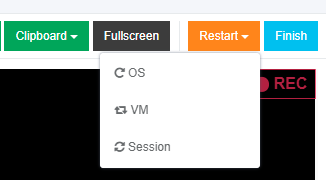
When the restart option is chosen, the confirmation model window appears.

</td></tr><tr style="height: 35px;"><td style="height: 35px; width: 53.9931px;">9

</td><td style="height: 35px; width: 130.99px;">Finish

</td><td style="height: 35px; width: 613.993px;">This setting finishes the VM when the testing session is completed.

</td></tr></tbody></table>

##### **Testing – Self Service screenshots**

The option to edit the screenshots is available under the **Continue with Testing – Self Service screenshots** button.

[![testing_14.png](https://docs.apptimized.com/uploads/images/gallery/2020-04/scaled-1680-/enfAttfmYWDedukw-testing_14.png)](https://docs.apptimized.com/uploads/images/gallery/2020-04/enfAttfmYWDedukw-testing_14.png)

Apptimized shows the following screen when successful:

[![testing_16_2.png](https://docs.apptimized.com/uploads/images/gallery/2021-08/scaled-1680-/40fbcugvVWiUGICJ-testing_16_2.png)](https://docs.apptimized.com/uploads/images/gallery/2021-08/40fbcugvVWiUGICJ-testing_16_2.png)

The following options to log test session results are available:

- Untested;
- Success;
- Failed.

[![testing_17_1.png](https://docs.apptimized.com/uploads/images/gallery/2020-04/scaled-1680-/6OVUcp9IdEHTyrT8-testing_17_1.png)](https://docs.apptimized.com/uploads/images/gallery/2020-04/6OVUcp9IdEHTyrT8-testing_17_1.png)

The default value is **Untested**.

The field **Optional comment** can stay blank.

[![testing_17_2.png](https://docs.apptimized.com/uploads/images/gallery/2020-04/scaled-1680-/FSBOQC5uzByaUPbF-testing_17_2.png)](https://docs.apptimized.com/uploads/images/gallery/2020-04/FSBOQC5uzByaUPbF-testing_17_2.png)

Screenshots can be excluded from testing by clicking the **Delete** button.

[![testing_19.png](https://docs.apptimized.com/uploads/images/gallery/2020-04/scaled-1680-/JOihivjdaAVVTQPm-testing_19.png)](https://docs.apptimized.com/uploads/images/gallery/2020-04/JOihivjdaAVVTQPm-testing_19.png)

Screenshots can be excluded from testing in a multiple mode by unticking checkboxes in front of their ID and clicking the **Delete selected screenshots** button.

[![testing_18.png](https://docs.apptimized.com/uploads/images/gallery/2020-04/scaled-1680-/9bz0Hrl2Qqqjtm6r-testing_18.png)](https://docs.apptimized.com/uploads/images/gallery/2020-04/9bz0Hrl2Qqqjtm6r-testing_18.png)

Apptimized shows the following modal window:

[![testing_20.png](https://docs.apptimized.com/uploads/images/gallery/2020-04/scaled-1680-/UcBEsL1106tMyRf6-testing_20.png)](https://docs.apptimized.com/uploads/images/gallery/2020-04/UcBEsL1106tMyRf6-testing_20.png)

When clicking on the Confirm button, Apptimized shows the notification:

[![testing_21.png](https://docs.apptimized.com/uploads/images/gallery/2020-04/scaled-1680-/vWl3N93J0M9KhP36-testing_21.png)](https://docs.apptimized.com/uploads/images/gallery/2020-04/vWl3N93J0M9KhP36-testing_21.png)

Screenshots sequence can be changed in testing by clicking the **Up** or **Down** buttons.

[![testing_22.png](https://docs.apptimized.com/uploads/images/gallery/2020-04/scaled-1680-/MC7Ic0vPbvOOBdWi-testing_22.png)](https://docs.apptimized.com/uploads/images/gallery/2020-04/MC7Ic0vPbvOOBdWi-testing_22.png)

[![testing_23.png](https://docs.apptimized.com/uploads/images/gallery/2020-04/scaled-1680-/ErCz9YZTfh45Okbk-testing_23.png)](https://docs.apptimized.com/uploads/images/gallery/2020-04/ErCz9YZTfh45Okbk-testing_23.png)

Comments to the screenshots can be edited by clicking on the comment cell.

[![testing_24.png](https://docs.apptimized.com/uploads/images/gallery/2020-04/scaled-1680-/AXEqBsOnDlrTQwmz-testing_24.png)](https://docs.apptimized.com/uploads/images/gallery/2020-04/AXEqBsOnDlrTQwmz-testing_24.png)

The **Additional comment (Optional)** field can stay blank.

[![testing_25.png](https://docs.apptimized.com/uploads/images/gallery/2020-04/scaled-1680-/1uDarx2lNiVezdvm-testing_25.png)](https://docs.apptimized.com/uploads/images/gallery/2020-04/1uDarx2lNiVezdvm-testing_25.png)

If any problems occur, the option to contact support is available under the **Did you run into problems?** button.

[![testing_26.png](https://docs.apptimized.com/uploads/images/gallery/2020-04/scaled-1680-/xdEv2ac4xQw1Xv5f-testing_26.png)](https://docs.apptimized.com/uploads/images/gallery/2020-04/xdEv2ac4xQw1Xv5f-testing_26.png)

Apptimized shows the following modal window:

[![testing_27.png](https://docs.apptimized.com/uploads/images/gallery/2020-04/scaled-1680-/8lbriAJEv04kh8m6-testing_27.png)](https://docs.apptimized.com/uploads/images/gallery/2020-04/8lbriAJEv04kh8m6-testing_27.png)

When the **Contact support** option is chosen, the live chat with the support team appears:

[![testing_28.png](https://docs.apptimized.com/uploads/images/gallery/2020-04/scaled-1680-/Bf7n2A7kRmxqhPwG-testing_28.png)](https://docs.apptimized.com/uploads/images/gallery/2020-04/Bf7n2A7kRmxqhPwG-testing_28.png)

When the **Log problem** option is chosen, the modal window appears:

[![testing_29.png](https://docs.apptimized.com/uploads/images/gallery/2020-04/scaled-1680-/yHi0QZ36xswXY89H-testing_29.png)](https://docs.apptimized.com/uploads/images/gallery/2020-04/yHi0QZ36xswXY89H-testing_29.png)

The problem category can be chosen by ticking checkboxes in front of their names.

Screenshots editing mode finalizes when clicking the **Save changes** button.

Apptimized shows the following interface when successful:

[![testing_30.png](https://docs.apptimized.com/uploads/images/gallery/2020-04/scaled-1680-/bLMZBR9qu2gstgx4-testing_30.png)](https://docs.apptimized.com/uploads/images/gallery/2020-04/bLMZBR9qu2gstgx4-testing_30.png)

The generated document is available in **PDF** and **HTML** formats. To download a document, click the **Download generated HTML document** or **Download generated PDF document** buttons.  
  
A generated HTML document first page sample is available:

[![testing_x_2.png](https://docs.apptimized.com/uploads/images/gallery/2021-09/scaled-1680-/UdKoVoigO7BcJkrD-testing_x_2.png)](https://docs.apptimized.com/uploads/images/gallery/2021-09/UdKoVoigO7BcJkrD-testing_x_2.png)

The option to edit a testing document is available under the **Edit generated document** button. The document editing finalizes by clicking the **Save** button.

[![testing_31.png](https://docs.apptimized.com/uploads/images/gallery/2020-04/scaled-1680-/M8Fva3XQaupObnT8-testing_31.png)](https://docs.apptimized.com/uploads/images/gallery/2020-04/M8Fva3XQaupObnT8-testing_31.png)

The option to return to the testing self-service screen mode is available under the **Revert to Testing – Self Service Self Service** button.

The option to finish the testing process is available under the **Finish** button.

Apptimized shows the following screen:

[![testing_32.png](https://docs.apptimized.com/uploads/images/gallery/2020-04/scaled-1680-/iw8XG2ZLsMTVTIb2-testing_32.png)](https://docs.apptimized.com/uploads/images/gallery/2020-04/iw8XG2ZLsMTVTIb2-testing_32.png)

#### **Testing – Factory Service**

Testing – Factory Service characteristics:

- Apptimized tests created packages for a user.
- Apptimized runs and documents test cases based on user’s requirements.
- Apptimized logs installation or functional errors.
- Apptimized debugging guidance.

The Testing - Factory Service option is available under the **Testing - Factory Service** module in the **Transition screen**.

[![testing_33.png](https://docs.apptimized.com/uploads/images/gallery/2020-04/scaled-1680-/jhHBMwDkb5SjVi0r-testing_33.png)](https://docs.apptimized.com/uploads/images/gallery/2020-04/jhHBMwDkb5SjVi0r-testing_33.png)

Apptimized shows the following screen when successful:

[![testing_34.png](https://docs.apptimized.com/uploads/images/gallery/2020-04/scaled-1680-/IRJ9fLQ1Bt0LXKCv-testing_34.png)](https://docs.apptimized.com/uploads/images/gallery/2020-04/IRJ9fLQ1Bt0LXKCv-testing_34.png)

All required fields are marked with an asterisk <span style="color: #ff0000;">\*</span>.

The option to provide a comment is available under the **Reference** field.

The option to choose the discovery platform is available under the **Testing platform** field.

[![testing_35.png](https://docs.apptimized.com/uploads/images/gallery/2020-04/scaled-1680-/glrXpL3BYSzG41xn-testing_35.png)](https://docs.apptimized.com/uploads/images/gallery/2020-04/glrXpL3BYSzG41xn-testing_35.png)

Two priority options are available: **Normal** and **Urgent**. The default value is **Normal**.

The option to submit the testing request is available the **Submit request** button.

Apptimized shows the following modal window:

[![Make Urgent Button.png](https://docs.apptimized.com/uploads/images/gallery/2026-02/scaled-1680-/C9umake-urgent-button.png)](https://docs.apptimized.com/uploads/images/gallery/2026-02/C9umake-urgent-button.png)

The option to change the **Normal** priority to **Urgent** before approving the request is available under the **Make Urgent** button.

After the request is created, the current priority is displayed on the Factory Service page. Clicking the **Priority** field opens a modal window allowing the priority to be increased to **Urgent**.

[![Priority.png](https://docs.apptimized.com/uploads/images/gallery/2026-02/scaled-1680-/cKjpriority.png)](https://docs.apptimized.com/uploads/images/gallery/2026-02/cKjpriority.png)

The option to create the request is available under the **OK** button.

Apptimized shows the following screen when successful:

[![testing_37_2-(2).png](https://docs.apptimized.com/uploads/images/gallery/2021-06/scaled-1680-/dB1gV1uirp5V5w4P-testing_37_2-(2).png)](https://docs.apptimized.com/uploads/images/gallery/2021-06/dB1gV1uirp5V5w4P-testing_37_2-(2).png)

This is an initial screen, and all blocks except the **Status** block are empty.

This screen provides information on the Apptimized **Testing – Factory Service** request (i.e., request progress and status). Additional information that might be needed during the testing process will be exchanged here.

Next, each **Testing – Factory Service** block is shown in more detail.

##### **Status block**

The Status block shows testing progress. The following request statuses appear depending on the **Testing – Factory Service** progress:

Table 2. Testing request statuses

<table border="1" id="bkmrk-request-status-descr" style="width: 800px;" width="800"><tbody><tr><td width="179">**Request status**

</td><td width="445">**Description**

</td></tr><tr><td width="179">Incoming check

</td><td width="445">The request has not been processed by the Apptimized team yet. The request is in the queue.

</td></tr><tr><td width="179">In progress

</td><td width="445">The request was processed by the Apptimized team. The request is in progress.

</td></tr><tr><td width="179">Action required

</td><td width="445">The Apptimized team asked the user a question. The user answer is needed.

</td></tr><tr><td width="179">Delivered

</td><td width="445">Testing results are available to the user.

Testing results can be provided in **PDF** and **HTML** formats.

</td></tr><tr><td width="179">Error analysis

</td><td width="445">The user rejected the Testing results. Apptimized team fixes bugs in the Testing document.

</td></tr><tr><td width="179">Approved

</td><td width="445">The user has confirmed the Testing results.

</td></tr><tr><td width="179">Canceled

</td><td width="445">The user canceled the Testing request at the processing stage.

</td></tr></tbody></table>

The option to cancel the request is available under the **Cancel Request** button.

[![testing_38.png](https://docs.apptimized.com/uploads/images/gallery/2020-04/scaled-1680-/hpleLPvee0wKRIUl-testing_38.png)](https://docs.apptimized.com/uploads/images/gallery/2020-04/hpleLPvee0wKRIUl-testing_38.png)

[![testing_39.png](https://docs.apptimized.com/uploads/images/gallery/2020-04/scaled-1680-/Bu33Gv6fwL7IweiM-testing_39.png)](https://docs.apptimized.com/uploads/images/gallery/2020-04/Bu33Gv6fwL7IweiM-testing_39.png)

Apptimized shows the following modal window to confirm the request cancellation:

[![testing_40.png](https://docs.apptimized.com/uploads/images/gallery/2020-04/scaled-1680-/hUnuaXgVmjBKRMRH-testing_40.png)](https://docs.apptimized.com/uploads/images/gallery/2020-04/hUnuaXgVmjBKRMRH-testing_40.png)

Apptimized shows the following modal window when successful:

[![testing_41_2.png](https://docs.apptimized.com/uploads/images/gallery/2021-08/scaled-1680-/wO394LCXR90RSWB7-testing_41_2.png)](https://docs.apptimized.com/uploads/images/gallery/2021-08/wO394LCXR90RSWB7-testing_41_2.png)

A user can cancel the discovery request until the **Delivered** status is achieved, and the discovery deliverables are available.

[![testing_42_2-(1).png](https://docs.apptimized.com/uploads/images/gallery/2021-06/scaled-1680-/SxBjPdNdFBibeVC6-testing_42_2-(1).png)](https://docs.apptimized.com/uploads/images/gallery/2021-06/SxBjPdNdFBibeVC6-testing_42_2-(1).png)

<span class="TextRun SCXW24015347 BCX8" data-contrast="auto" lang="EN-GB" xml:lang="EN-GB"><span class="NormalTextRun SCXW24015347 BCX8">If a user is not satisfied with the testing results, they can </span><span class="NormalTextRun SCXW24015347 BCX8">be </span><span class="NormalTextRun SCXW24015347 BCX8">rejected in the </span></span>**<span class="TextRun SCXW24015347 BCX8" data-contrast="auto" lang="EN-GB" xml:lang="EN-GB"><span class="NormalTextRun SCXW24015347 BCX8">Factory request</span></span>**<span class="TextRun SCXW24015347 BCX8" data-contrast="auto" lang="EN-GB" xml:lang="EN-GB"><span class="NormalTextRun SCXW24015347 BCX8"> </span><span class="NormalTextRun SCXW24015347 BCX8">section</span><span class="NormalTextRun SCXW24015347 BCX8"> under the </span></span><span class="TextRun SCXW24015347 BCX8" data-contrast="auto" lang="EN-GB" xml:lang="EN-GB"><span class="NormalTextRun SCXW24015347 BCX8">**Factory activity** </span></span><span class="TextRun SCXW24015347 BCX8" data-contrast="auto" lang="EN-GB" xml:lang="EN-GB"><span class="NormalTextRun SCXW24015347 BCX8">block.</span></span>

When a user is satisfied with the testing results, they must be approved in the **Status** block. The option to approve the request is available under the **Approve Request** button. The **Approve Request** button becomes active when the **Delivered** status is achieved, and the testing deliverables are available.

Apptimized shows the following modal window to confirm the request approval:

[![testing_43.png](https://docs.apptimized.com/uploads/images/gallery/2020-04/scaled-1680-/89VIxSJ6JlxK02jL-testing_43.png)](https://docs.apptimized.com/uploads/images/gallery/2020-04/89VIxSJ6JlxK02jL-testing_43.png)

Apptimized shows the following screen window when successful:

[![testing_44-(2).png](https://docs.apptimized.com/uploads/images/gallery/2021-08/scaled-1680-/rRGXCllBUnvhyxcY-testing_44-(2).png)](https://docs.apptimized.com/uploads/images/gallery/2021-08/rRGXCllBUnvhyxcY-testing_44-(2).png)

<p class="callout info">**Note.** When a user approves the request, the option can`t be canceled.</p>

##### **Deliverables block**

This block provides the testing results to a user. Discovery results can be provided in **PDF** and **HTML** formats.

The option to download the testing results is available under the **Download** button.

[![testing_45-(4).png](https://docs.apptimized.com/uploads/images/gallery/2021-06/scaled-1680-/G4lZNY42fznaUeCG-testing_45-(4).png)](https://docs.apptimized.com/uploads/images/gallery/2021-06/G4lZNY42fznaUeCG-testing_45-(4).png)

<span class="TextRun SCXW263759060 BCX8" data-contrast="auto" lang="EN-GB" xml:lang="EN-GB"><span class="NormalTextRun SCXW263759060 BCX8">If a user is not satisfied with the testing results, they can be rejected to further processing by the Apptimized team. The option to reject the testing results is available under the </span></span>**<span class="TextRun SCXW263759060 BCX8" data-contrast="auto" lang="EN-GB" xml:lang="EN-GB"><span class="NormalTextRun SCXW263759060 BCX8">Factory request</span></span>**<span class="TextRun SCXW263759060 BCX8" data-contrast="auto" lang="EN-GB" xml:lang="EN-GB"><span class="NormalTextRun SCXW263759060 BCX8"> section under the </span></span><span class="TextRun SCXW263759060 BCX8" data-contrast="auto" lang="EN-GB" xml:lang="EN-GB"><span class="NormalTextRun SCXW263759060 BCX8">**Factory activity** </span></span><span class="TextRun SCXW263759060 BCX8" data-contrast="auto" lang="EN-GB" xml:lang="EN-GB"><span class="NormalTextRun SCXW263759060 BCX8">block (see </span></span><span class="TextRun SCXW263759060 BCX8" data-contrast="auto" lang="EN-GB" xml:lang="EN-GB"><span class="NormalTextRun SCXW263759060 BCX8">[**Factory activity**](https://docs.apptimized.com/books/apptimized-platform-user-manual/page/testing#bkmrk-comments-%26-attachmen) block</span></span><span class="TextRun SCXW263759060 BCX8" data-contrast="auto" lang="EN-GB" xml:lang="EN-GB"><span class="NormalTextRun SCXW263759060 BCX8">).</span></span><span class="EOP SCXW263759060 BCX8" data-ccp-props="{"201341983":0,"335559739":160,"335559740":259}"> </span>

##### **Factory activity block**

The option to contact specialists from the Apptimized team and provide comments or attachments is available under the **Factory activity** block.

[![testing_19-(1).png](https://docs.apptimized.com/uploads/images/gallery/2021-06/scaled-1680-/YlwstSfuT9FI0rjL-testing_19-(1).png)](https://docs.apptimized.com/uploads/images/gallery/2021-06/YlwstSfuT9FI0rjL-testing_19-(1).png)

<span class="TextRun SCXW213877278 BCX8" data-contrast="auto" lang="EN-GB" xml:lang="EN-GB"><span class="NormalTextRun SCXW213877278 BCX8">The option to write a message in the **Factory request** is available under the</span></span><span class="TextRun SCXW213877278 BCX8" data-contrast="auto" lang="EN-GB" xml:lang="EN-GB"><span class="NormalTextRun SCXW213877278 BCX8"> </span></span><span class="TextRun SCXW213877278 BCX8" data-contrast="auto" lang="EN-GB" xml:lang="EN-GB"><span class="NormalTextRun SCXW213877278 BCX8">**Write a message**... </span></span><span class="TextRun SCXW213877278 BCX8" data-contrast="auto" lang="EN-GB" xml:lang="EN-GB"><span class="NormalTextRun SCXW213877278 BCX8">field</span></span><span class="TextRun SCXW213877278 BCX8" data-contrast="auto" lang="EN-GB" xml:lang="EN-GB"><span class="NormalTextRun SCXW213877278 BCX8">.</span></span><span class="EOP SCXW213877278 BCX8" data-ccp-props="{"201341983":0,"335559739":160,"335559740":259}"> </span>

<span class="EOP SCXW213877278 BCX8" data-ccp-props="{"201341983":0,"335559739":160,"335559740":259}">[![testing_19-(2).png](https://docs.apptimized.com/uploads/images/gallery/2021-06/scaled-1680-/h315FWHzD66iibAX-testing_19-(2).png)](https://docs.apptimized.com/uploads/images/gallery/2021-06/h315FWHzD66iibAX-testing_19-(2).png)</span>

<span class="EOP SCXW213877278 BCX8" data-ccp-props="{"201341983":0,"335559739":160,"335559740":259}"><span class="TextRun SCXW9030112 BCX8" data-contrast="auto" lang="EN-GB" xml:lang="EN-GB"><span class="NormalTextRun SCXW9030112 BCX8">The option to add optional attachments to the comment</span><span class="NormalTextRun SCXW9030112 BCX8">,</span><span class="NormalTextRun SCXW9030112 BCX8"> such as screenshots or additional files (max 10 MB per file)</span><span class="NormalTextRun SCXW9030112 BCX8">,</span><span class="NormalTextRun SCXW9030112 BCX8"> is available under the </span></span><span class="TextRun SCXW9030112 BCX8" data-contrast="auto" lang="EN-GB" xml:lang="EN-GB">**<span class="NormalTextRun SCXW9030112 BCX8">Select </span>**<span class="NormalTextRun ContextualSpellingAndGrammarErrorV2 SCXW9030112 BCX8">**file**.</span></span></span>

<span class="EOP SCXW213877278 BCX8" data-ccp-props="{"201341983":0,"335559739":160,"335559740":259}"><span class="TextRun SCXW9030112 BCX8" data-contrast="auto" lang="EN-GB" xml:lang="EN-GB"><span class="NormalTextRun ContextualSpellingAndGrammarErrorV2 SCXW9030112 BCX8">[![testing_20-(1).png](https://docs.apptimized.com/uploads/images/gallery/2021-06/scaled-1680-/V0XMRQ9aUtChb1DP-testing_20-(1).png)](https://docs.apptimized.com/uploads/images/gallery/2021-06/V0XMRQ9aUtChb1DP-testing_20-(1).png)</span></span></span>

<span class="EOP SCXW213877278 BCX8" data-ccp-props="{"201341983":0,"335559739":160,"335559740":259}"><span class="TextRun SCXW9030112 BCX8" data-contrast="auto" lang="EN-GB" xml:lang="EN-GB"><span class="NormalTextRun ContextualSpellingAndGrammarErrorV2 SCXW9030112 BCX8"><span class="TextRun SCXW71035068 BCX8" data-contrast="auto" lang="EN-GB" xml:lang="EN-GB"><span class="NormalTextRun SCXW71035068 BCX8">The option to send </span><span class="NormalTextRun SCXW71035068 BCX8">a </span><span class="NormalTextRun SCXW71035068 BCX8">message is available under the </span></span><span class="TextRun SCXW71035068 BCX8" data-contrast="auto" lang="EN-GB" xml:lang="EN-GB"><span class="NormalTextRun SCXW71035068 BCX8">**Add** </span></span><span class="TextRun SCXW71035068 BCX8" data-contrast="auto" lang="EN-GB" xml:lang="EN-GB"><span class="NormalTextRun SCXW71035068 BCX8">button.</span></span></span></span></span>

<span class="EOP SCXW213877278 BCX8" data-ccp-props="{"201341983":0,"335559739":160,"335559740":259}"><span class="TextRun SCXW9030112 BCX8" data-contrast="auto" lang="EN-GB" xml:lang="EN-GB"><span class="NormalTextRun ContextualSpellingAndGrammarErrorV2 SCXW9030112 BCX8"><span class="TextRun SCXW71035068 BCX8" data-contrast="auto" lang="EN-GB" xml:lang="EN-GB"><span class="NormalTextRun SCXW71035068 BCX8">[![testing_21-(2).png](https://docs.apptimized.com/uploads/images/gallery/2021-06/scaled-1680-/67ICxWEm1JC9Ci81-testing_21-(2).png)](https://docs.apptimized.com/uploads/images/gallery/2021-06/67ICxWEm1JC9Ci81-testing_21-(2).png)</span></span></span></span></span>

<span class="EOP SCXW213877278 BCX8" data-ccp-props="{"201341983":0,"335559739":160,"335559740":259}"><span class="TextRun SCXW9030112 BCX8" data-contrast="auto" lang="EN-GB" xml:lang="EN-GB"><span class="NormalTextRun ContextualSpellingAndGrammarErrorV2 SCXW9030112 BCX8"><span class="TextRun SCXW71035068 BCX8" data-contrast="auto" lang="EN-GB" xml:lang="EN-GB"><span class="NormalTextRun SCXW71035068 BCX8"><span class="TextRun SCXW82104072 BCX8" data-contrast="none" lang="EN-GB" xml:lang="EN-GB"><span class="NormalTextRun SCXW82104072 BCX8">The option to provide additional comments or attachments to the Apptimized team is available under the </span></span><span class="TextRun SCXW82104072 BCX8" data-contrast="none" lang="EN-GB" xml:lang="EN-GB"><span class="NormalTextRun SCXW82104072 BCX8">**Factory activity** block</span></span><span class="TextRun SCXW82104072 BCX8" data-contrast="none" lang="EN-GB" xml:lang="EN-GB"><span class="NormalTextRun SCXW82104072 BCX8"> after the Factory request was solved.</span></span><span class="EOP SCXW82104072 BCX8" data-ccp-props="{"201341983":0,"335559739":160,"335559740":259}"> </span></span></span></span></span></span>

<span class="EOP SCXW213877278 BCX8" data-ccp-props="{"201341983":0,"335559739":160,"335559740":259}"><span class="TextRun SCXW9030112 BCX8" data-contrast="auto" lang="EN-GB" xml:lang="EN-GB"><span class="NormalTextRun ContextualSpellingAndGrammarErrorV2 SCXW9030112 BCX8"><span class="TextRun SCXW71035068 BCX8" data-contrast="auto" lang="EN-GB" xml:lang="EN-GB"><span class="NormalTextRun SCXW71035068 BCX8"><span class="EOP SCXW82104072 BCX8" data-ccp-props="{"201341983":0,"335559739":160,"335559740":259}">[![testing_21-(3).png](https://docs.apptimized.com/uploads/images/gallery/2021-06/scaled-1680-/z2morkP3D7ugBMel-testing_21-(3).png)](https://docs.apptimized.com/uploads/images/gallery/2021-06/z2morkP3D7ugBMel-testing_21-(3).png)</span></span></span></span></span></span>

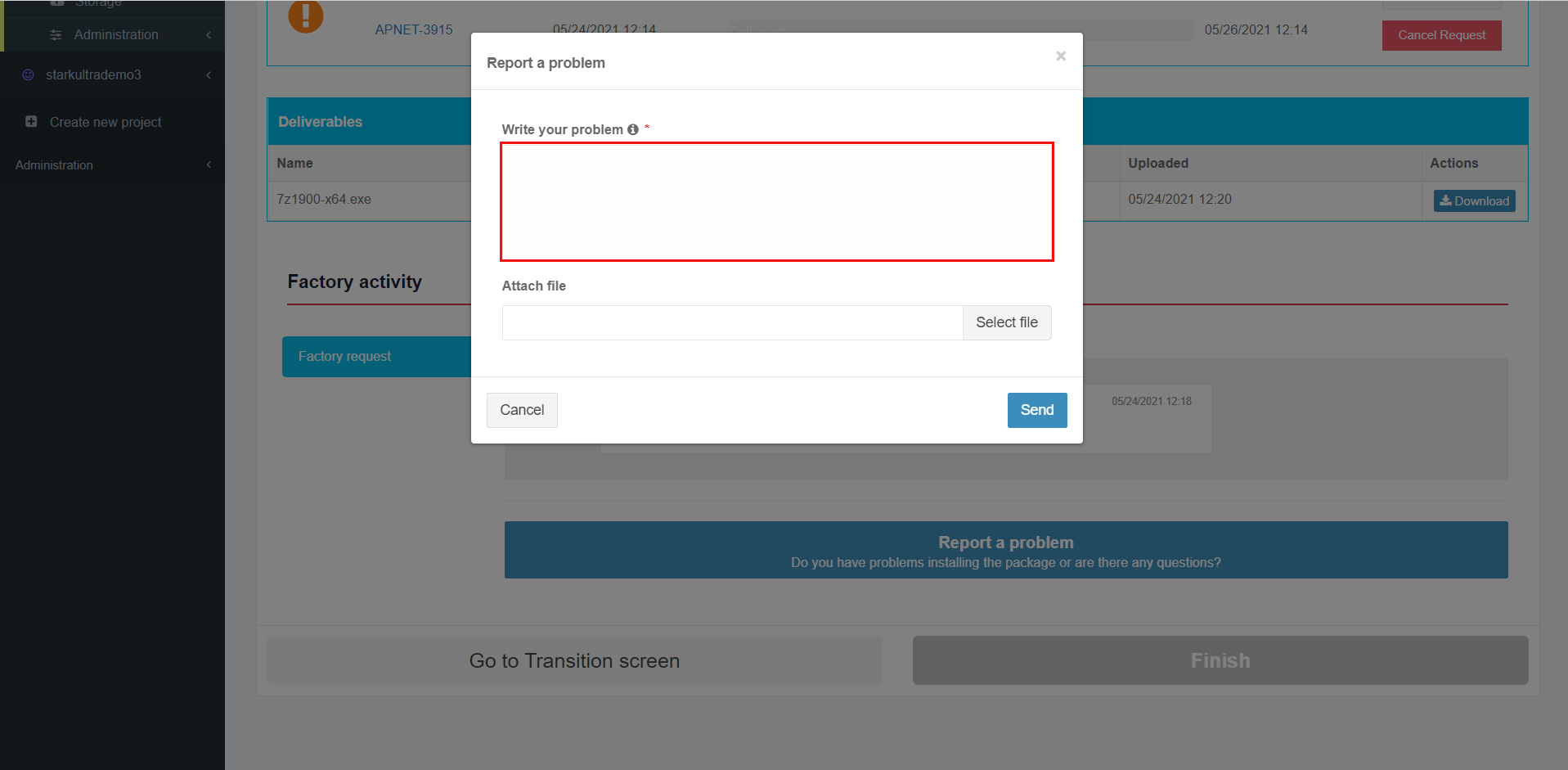
<span class="EOP SCXW213877278 BCX8" data-ccp-props="{"201341983":0,"335559739":160,"335559740":259}"><span class="TextRun SCXW9030112 BCX8" data-contrast="auto" lang="EN-GB" xml:lang="EN-GB"><span class="NormalTextRun ContextualSpellingAndGrammarErrorV2 SCXW9030112 BCX8"><span class="TextRun SCXW71035068 BCX8" data-contrast="auto" lang="EN-GB" xml:lang="EN-GB"><span class="NormalTextRun SCXW71035068 BCX8"><span class="EOP SCXW82104072 BCX8" data-ccp-props="{"201341983":0,"335559739":160,"335559740":259}"><span class="TextRun SCXW227610288 BCX8" data-contrast="auto" lang="EN-GB" xml:lang="EN-GB"><span class="NormalTextRun SCXW227610288 BCX8">The option to ask additional questions to the Apptimized team is available under the </span></span><span class="TextRun SCXW227610288 BCX8" data-contrast="auto" lang="EN-GB" xml:lang="EN-GB"><span class="NormalTextRun SCXW227610288 BCX8">**Report a problem** </span></span><span class="TextRun SCXW227610288 BCX8" data-contrast="auto" lang="EN-GB" xml:lang="EN-GB"><span class="NormalTextRun ContextualSpellingAndGrammarErrorV2 SCXW227610288 BCX8">button.</span></span></span></span></span></span></span></span>

<span class="EOP SCXW213877278 BCX8" data-ccp-props="{"201341983":0,"335559739":160,"335559740":259}"><span class="TextRun SCXW9030112 BCX8" data-contrast="auto" lang="EN-GB" xml:lang="EN-GB"><span class="NormalTextRun ContextualSpellingAndGrammarErrorV2 SCXW9030112 BCX8"><span class="TextRun SCXW71035068 BCX8" data-contrast="auto" lang="EN-GB" xml:lang="EN-GB"><span class="NormalTextRun SCXW71035068 BCX8"><span class="EOP SCXW82104072 BCX8" data-ccp-props="{"201341983":0,"335559739":160,"335559740":259}"><span class="TextRun SCXW227610288 BCX8" data-contrast="auto" lang="EN-GB" xml:lang="EN-GB"><span class="NormalTextRun ContextualSpellingAndGrammarErrorV2 SCXW227610288 BCX8">[![testing_22-(1).png](https://docs.apptimized.com/uploads/images/gallery/2021-06/scaled-1680-/z20K3BlSMV2HfFMc-testing_22-(1).png)](https://docs.apptimized.com/uploads/images/gallery/2021-06/z20K3BlSMV2HfFMc-testing_22-(1).png)</span></span></span></span></span></span></span></span>

<span class="EOP SCXW213877278 BCX8" data-ccp-props="{"201341983":0,"335559739":160,"335559740":259}"><span class="TextRun SCXW9030112 BCX8" data-contrast="auto" lang="EN-GB" xml:lang="EN-GB"><span class="NormalTextRun ContextualSpellingAndGrammarErrorV2 SCXW9030112 BCX8"><span class="TextRun SCXW71035068 BCX8" data-contrast="auto" lang="EN-GB" xml:lang="EN-GB"><span class="NormalTextRun SCXW71035068 BCX8"><span class="EOP SCXW82104072 BCX8" data-ccp-props="{"201341983":0,"335559739":160,"335559740":259}"><span class="TextRun SCXW227610288 BCX8" data-contrast="auto" lang="EN-GB" xml:lang="EN-GB"><span class="NormalTextRun ContextualSpellingAndGrammarErrorV2 SCXW227610288 BCX8"><span class="TextRun SCXW30179752 BCX8" data-contrast="auto" lang="EN-GB" xml:lang="EN-GB"><span class="NormalTextRun SCXW30179752 BCX8">Apptimized provides the following modal window when successful:</span></span><span class="LineBreakBlob BlobObject DragDrop SCXW30179752 BCX8"><span class="SCXW30179752 BCX8"> </span></span>  
</span></span></span></span></span></span></span></span>

<span class="EOP SCXW213877278 BCX8" data-ccp-props="{"201341983":0,"335559739":160,"335559740":259}"><span class="TextRun SCXW9030112 BCX8" data-contrast="auto" lang="EN-GB" xml:lang="EN-GB"><span class="NormalTextRun ContextualSpellingAndGrammarErrorV2 SCXW9030112 BCX8"><span class="TextRun SCXW71035068 BCX8" data-contrast="auto" lang="EN-GB" xml:lang="EN-GB"><span class="NormalTextRun SCXW71035068 BCX8"><span class="EOP SCXW82104072 BCX8" data-ccp-props="{"201341983":0,"335559739":160,"335559740":259}"><span class="TextRun SCXW227610288 BCX8" data-contrast="auto" lang="EN-GB" xml:lang="EN-GB"><span class="NormalTextRun ContextualSpellingAndGrammarErrorV2 SCXW227610288 BCX8"><span class="LineBreakBlob BlobObject DragDrop SCXW30179752 BCX8"><span class="SCXW30179752 BCX8">[![packaging_23-(2).png](https://docs.apptimized.com/uploads/images/gallery/2021-06/scaled-1680-/N2n2ngaEjbmuGYvS-packaging_23-(2).png)](https://docs.apptimized.com/uploads/images/gallery/2021-06/N2n2ngaEjbmuGYvS-packaging_23-(2).png)</span></span></span></span></span></span></span></span></span></span>

<span data-contrast="auto">The option to write a text message is available under the </span>**<span data-contrast="auto">Write your problem </span>**<span data-contrast="auto">field</span><span data-ccp-props="{"201341983":0,"335559739":160,"335559740":259}"> </span>

<span data-ccp-props="{"201341983":0,"335559739":160,"335559740":259}"> [![packaging_24.png](https://docs.apptimized.com/uploads/images/gallery/2021-06/scaled-1680-/6xoAlvb3jarfH8su-packaging_24.png)](https://docs.apptimized.com/uploads/images/gallery/2021-06/6xoAlvb3jarfH8su-packaging_24.png)</span>

<p class="callout info">**<span data-contrast="auto">Note! </span>**This field is mandatory.</p>

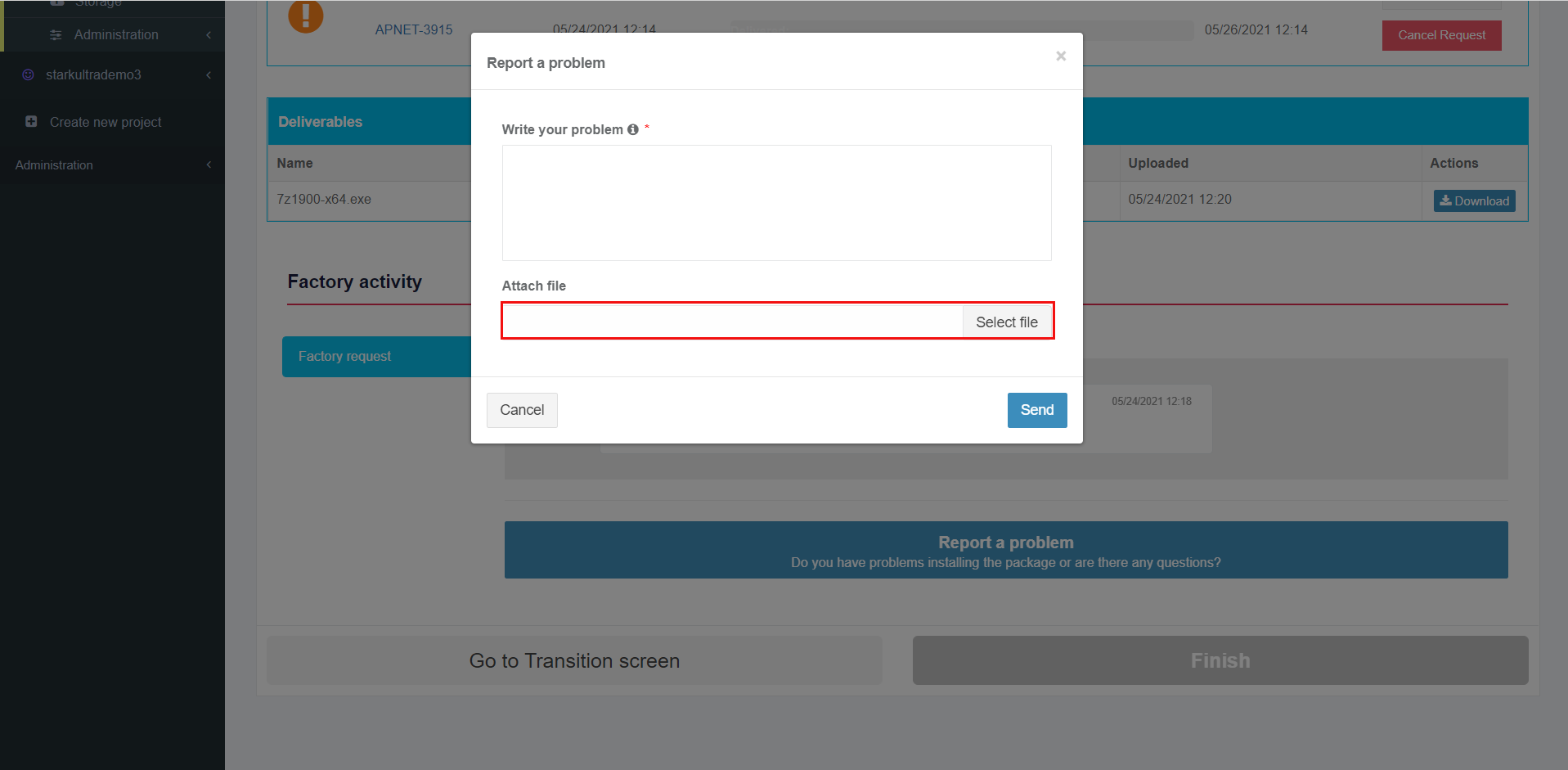
<span data-contrast="auto">The option to attach a file is available under the </span>**<span data-contrast="auto">Select file </span>**<span data-contrast="auto">field</span><span data-ccp-props="{"201341983":0,"335559739":160,"335559740":259}"> </span>

<span data-ccp-props="{"201341983":0,"335559739":160,"335559740":259}"> [![packaging_25.png](https://docs.apptimized.com/uploads/images/gallery/2021-06/scaled-1680-/BohpvVdHQAv8vQD9-packaging_25.png)](https://docs.apptimized.com/uploads/images/gallery/2021-06/BohpvVdHQAv8vQD9-packaging_25.png)</span>

<span data-contrast="auto">The option to change the attached file is available under the </span>**<span data-contrast="auto">Change </span>**<span data-contrast="auto">button.</span><span data-ccp-props="{"201341983":0,"335559739":160,"335559740":259}"> </span>

<span data-ccp-props="{"201341983":0,"335559739":160,"335559740":259}"> [![packaging_26_3-(1).png](https://docs.apptimized.com/uploads/images/gallery/2021-06/scaled-1680-/O39QjMB2hotX9p2z-packaging_26_3-(1).png)](https://docs.apptimized.com/uploads/images/gallery/2021-06/O39QjMB2hotX9p2z-packaging_26_3-(1).png)</span>

<span data-contrast="auto">The option to remove the attached file is available under the </span>**<span data-contrast="auto">Remove </span>**<span data-contrast="auto">button.</span><span data-ccp-props="{"201341983":0,"335559739":160,"335559740":259}"> </span>

<span data-ccp-props="{"201341983":0,"335559739":160,"335559740":259}"> [![packaging-27-(1).png](https://docs.apptimized.com/uploads/images/gallery/2021-06/scaled-1680-/ITBYIKfheqDvVfxR-packaging-27-(1).png)](https://docs.apptimized.com/uploads/images/gallery/2021-06/ITBYIKfheqDvVfxR-packaging-27-(1).png)</span>

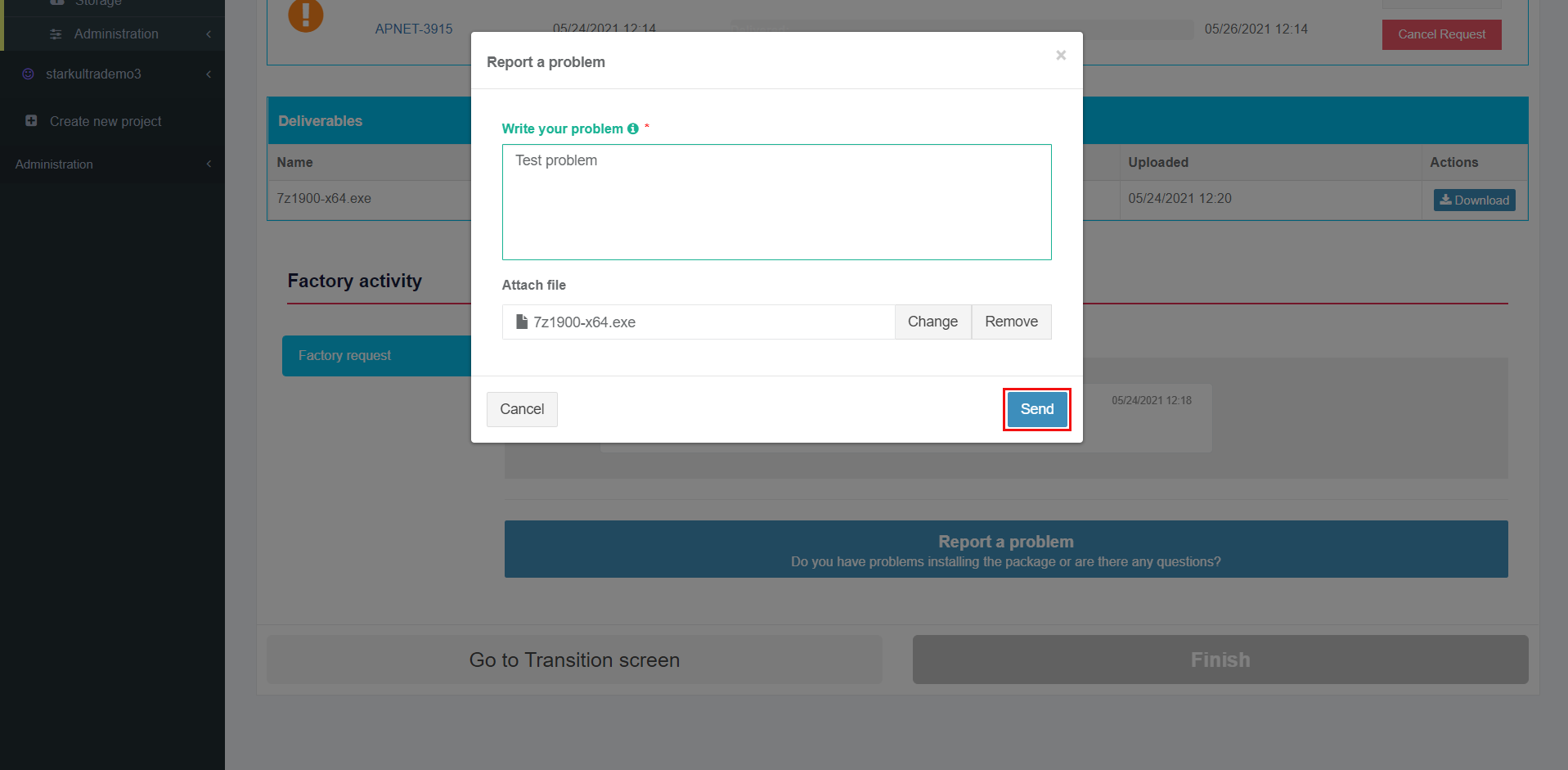
<span data-contrast="auto">The option to send a message is available under </span>**<span data-contrast="auto">Send </span>**<span data-contrast="auto">field. </span>**<span data-contrast="auto">Cancel – </span>**<span data-contrast="auto">reverts to </span>**<span data-contrast="auto">general Factory process </span>**<span data-contrast="auto">workflow.</span><span data-ccp-props="{"201341983":0,"335559739":160,"335559740":259}"> </span>

<span class="EOP SCXW213877278 BCX8" data-ccp-props="{"201341983":0,"335559739":160,"335559740":259}"><span class="TextRun SCXW9030112 BCX8" data-contrast="auto" lang="EN-GB" xml:lang="EN-GB"><span class="NormalTextRun ContextualSpellingAndGrammarErrorV2 SCXW9030112 BCX8"><span class="TextRun SCXW71035068 BCX8" data-contrast="auto" lang="EN-GB" xml:lang="EN-GB"><span class="NormalTextRun SCXW71035068 BCX8"><span class="EOP SCXW82104072 BCX8" data-ccp-props="{"201341983":0,"335559739":160,"335559740":259}"><span class="TextRun SCXW227610288 BCX8" data-contrast="auto" lang="EN-GB" xml:lang="EN-GB"><span class="NormalTextRun ContextualSpellingAndGrammarErrorV2 SCXW227610288 BCX8">[![packaging_28.png](https://docs.apptimized.com/uploads/images/gallery/2021-06/scaled-1680-/9UTowLyYgK7MB2ZW-packaging_28.png)](https://docs.apptimized.com/uploads/images/gallery/2021-06/9UTowLyYgK7MB2ZW-packaging_28.png)</span></span></span></span></span></span></span></span>

<span class="EOP SCXW213877278 BCX8" data-ccp-props="{"201341983":0,"335559739":160,"335559740":259}"><span class="TextRun SCXW9030112 BCX8" data-contrast="auto" lang="EN-GB" xml:lang="EN-GB"><span class="NormalTextRun ContextualSpellingAndGrammarErrorV2 SCXW9030112 BCX8"><span class="TextRun SCXW71035068 BCX8" data-contrast="auto" lang="EN-GB" xml:lang="EN-GB"><span class="NormalTextRun SCXW71035068 BCX8"><span class="EOP SCXW82104072 BCX8" data-ccp-props="{"201341983":0,"335559739":160,"335559740":259}"><span class="TextRun SCXW227610288 BCX8" data-contrast="auto" lang="EN-GB" xml:lang="EN-GB"><span class="NormalTextRun ContextualSpellingAndGrammarErrorV2 SCXW227610288 BCX8"><span class="TextRun SCXW144233970 BCX8" data-contrast="auto" lang="EN-GB" xml:lang="EN-GB"><span class="NormalTextRun SCXW144233970 BCX8">Apptimized shows the message history interface when successful:  
</span></span></span></span></span></span></span></span></span></span>

<span class="EOP SCXW213877278 BCX8" data-ccp-props="{"201341983":0,"335559739":160,"335559740":259}"><span class="TextRun SCXW9030112 BCX8" data-contrast="auto" lang="EN-GB" xml:lang="EN-GB"><span class="NormalTextRun ContextualSpellingAndGrammarErrorV2 SCXW9030112 BCX8"><span class="TextRun SCXW71035068 BCX8" data-contrast="auto" lang="EN-GB" xml:lang="EN-GB"><span class="NormalTextRun SCXW71035068 BCX8"><span class="EOP SCXW82104072 BCX8" data-ccp-props="{"201341983":0,"335559739":160,"335559740":259}"><span class="TextRun SCXW227610288 BCX8" data-contrast="auto" lang="EN-GB" xml:lang="EN-GB"><span class="NormalTextRun ContextualSpellingAndGrammarErrorV2 SCXW227610288 BCX8"><span class="TextRun SCXW144233970 BCX8" data-contrast="auto" lang="EN-GB" xml:lang="EN-GB"><span class="NormalTextRun SCXW144233970 BCX8">[![testing_29_2-(2).png](https://docs.apptimized.com/uploads/images/gallery/2021-06/scaled-1680-/i3XL2e5klwz3fbxU-testing_29_2-(2).png)](https://docs.apptimized.com/uploads/images/gallery/2021-06/i3XL2e5klwz3fbxU-testing_29_2-(2).png)</span></span></span></span></span></span></span></span></span></span>

<p class="callout info"><span class="EOP SCXW213877278 BCX8" data-ccp-props="{"201341983":0,"335559739":160,"335559740":259}"><span class="TextRun SCXW9030112 BCX8" data-contrast="auto" lang="EN-GB" xml:lang="EN-GB"><span class="NormalTextRun ContextualSpellingAndGrammarErrorV2 SCXW9030112 BCX8"><span class="TextRun SCXW71035068 BCX8" data-contrast="auto" lang="EN-GB" xml:lang="EN-GB"><span class="NormalTextRun SCXW71035068 BCX8"><span class="EOP SCXW82104072 BCX8" data-ccp-props="{"201341983":0,"335559739":160,"335559740":259}"><span class="TextRun SCXW227610288 BCX8" data-contrast="auto" lang="EN-GB" xml:lang="EN-GB"><span class="NormalTextRun ContextualSpellingAndGrammarErrorV2 SCXW227610288 BCX8"><span class="TextRun SCXW144233970 BCX8" data-contrast="auto" lang="EN-GB" xml:lang="EN-GB"><span class="NormalTextRun SCXW144233970 BCX8">**<span class="TextRun SCXW193083055 BCX8" data-contrast="auto" lang="EN-GB" xml:lang="EN-GB"><span class="NormalTextRun SCXW193083055 BCX8">Note</span></span>**<span class="TextRun SCXW193083055 BCX8" data-contrast="auto" lang="EN-GB" xml:lang="EN-GB"><span class="NormalTextRun SCXW193083055 BCX8">**.** </span><span class="NormalTextRun SCXW193083055 BCX8">The a</span><span class="NormalTextRun SCXW193083055 BCX8">ttached </span><span class="NormalTextRun SCXW193083055 BCX8">files appear above the message history interface.</span></span><span class="EOP SCXW193083055 BCX8" data-ccp-props="{"201341983":0,"335559739":160,"335559740":259}"> </span></span></span></span></span></span></span></span></span></span></span></p>

<span class="EOP SCXW213877278 BCX8" data-ccp-props="{"201341983":0,"335559739":160,"335559740":259}"><span class="TextRun SCXW9030112 BCX8" data-contrast="auto" lang="EN-GB" xml:lang="EN-GB"><span class="NormalTextRun ContextualSpellingAndGrammarErrorV2 SCXW9030112 BCX8"><span class="TextRun SCXW71035068 BCX8" data-contrast="auto" lang="EN-GB" xml:lang="EN-GB"><span class="NormalTextRun SCXW71035068 BCX8"><span class="EOP SCXW82104072 BCX8" data-ccp-props="{"201341983":0,"335559739":160,"335559740":259}"><span class="TextRun SCXW227610288 BCX8" data-contrast="auto" lang="EN-GB" xml:lang="EN-GB"><span class="NormalTextRun ContextualSpellingAndGrammarErrorV2 SCXW227610288 BCX8">[![testing_30.png](https://docs.apptimized.com/uploads/images/gallery/2021-06/scaled-1680-/6zqNc6MUuSSIu5Tl-packaging_30-(4).png)](https://docs.apptimized.com/uploads/images/gallery/2021-06/6zqNc6MUuSSIu5Tl-packaging_30-(4).png)</span></span></span></span></span></span></span></span>

<span class="EOP SCXW213877278 BCX8" data-ccp-props="{"201341983":0,"335559739":160,"335559740":259}"><span class="TextRun SCXW9030112 BCX8" data-contrast="auto" lang="EN-GB" xml:lang="EN-GB"><span class="NormalTextRun ContextualSpellingAndGrammarErrorV2 SCXW9030112 BCX8"><span class="TextRun SCXW71035068 BCX8" data-contrast="auto" lang="EN-GB" xml:lang="EN-GB"><span class="NormalTextRun SCXW71035068 BCX8"><span class="EOP SCXW82104072 BCX8" data-ccp-props="{"201341983":0,"335559739":160,"335559740":259}"><span class="TextRun SCXW227610288 BCX8" data-contrast="auto" lang="EN-GB" xml:lang="EN-GB"><span class="NormalTextRun ContextualSpellingAndGrammarErrorV2 SCXW227610288 BCX8"><span class="TextRun SCXW209065614 BCX8" data-contrast="none" lang="EN-GB" xml:lang="EN-GB"><span class="NormalTextRun SCXW209065614 BCX8">If Apptimized needs some additional information, a user will receive notifications and a warning icon in the dashboard:</span></span><span class="EOP SCXW209065614 BCX8" data-ccp-props="{"201341983":0,"335559739":160,"335559740":259}"> </span></span></span></span></span></span></span></span></span>

<span class="EOP SCXW213877278 BCX8" data-ccp-props="{"201341983":0,"335559739":160,"335559740":259}"><span class="TextRun SCXW9030112 BCX8" data-contrast="auto" lang="EN-GB" xml:lang="EN-GB"><span class="NormalTextRun ContextualSpellingAndGrammarErrorV2 SCXW9030112 BCX8"><span class="TextRun SCXW71035068 BCX8" data-contrast="auto" lang="EN-GB" xml:lang="EN-GB"><span class="NormalTextRun SCXW71035068 BCX8"><span class="EOP SCXW82104072 BCX8" data-ccp-props="{"201341983":0,"335559739":160,"335559740":259}"><span class="TextRun SCXW227610288 BCX8" data-contrast="auto" lang="EN-GB" xml:lang="EN-GB"><span class="NormalTextRun ContextualSpellingAndGrammarErrorV2 SCXW227610288 BCX8"><span class="EOP SCXW209065614 BCX8" data-ccp-props="{"201341983":0,"335559739":160,"335559740":259}">[![discovery_40-(2).png](https://docs.apptimized.com/uploads/images/gallery/2021-06/scaled-1680-/YrFbKwxmH57iw66m-discovery_40-(2).png)](https://docs.apptimized.com/uploads/images/gallery/2021-06/YrFbKwxmH57iw66m-discovery_40-(2).png)</span></span></span></span></span></span></span></span></span>

<span class="EOP SCXW213877278 BCX8" data-ccp-props="{"201341983":0,"335559739":160,"335559740":259}"><span class="TextRun SCXW9030112 BCX8" data-contrast="auto" lang="EN-GB" xml:lang="EN-GB"><span class="NormalTextRun ContextualSpellingAndGrammarErrorV2 SCXW9030112 BCX8"><span class="TextRun SCXW71035068 BCX8" data-contrast="auto" lang="EN-GB" xml:lang="EN-GB"><span class="NormalTextRun SCXW71035068 BCX8"><span class="EOP SCXW82104072 BCX8" data-ccp-props="{"201341983":0,"335559739":160,"335559740":259}"><span class="TextRun SCXW227610288 BCX8" data-contrast="auto" lang="EN-GB" xml:lang="EN-GB"><span class="NormalTextRun ContextualSpellingAndGrammarErrorV2 SCXW227610288 BCX8"><span class="EOP SCXW209065614 BCX8" data-ccp-props="{"201341983":0,"335559739":160,"335559740":259}">[![testing_34-(2).png](https://docs.apptimized.com/uploads/images/gallery/2021-06/scaled-1680-/wOXOlkXFF2qxytGi-testing_34-(2).png)](https://docs.apptimized.com/uploads/images/gallery/2021-06/wOXOlkXFF2qxytGi-testing_34-(2).png)</span></span></span></span></span></span></span></span></span>

<span class="EOP SCXW213877278 BCX8" data-ccp-props="{"201341983":0,"335559739":160,"335559740":259}"><span class="TextRun SCXW9030112 BCX8" data-contrast="auto" lang="EN-GB" xml:lang="EN-GB"><span class="NormalTextRun ContextualSpellingAndGrammarErrorV2 SCXW9030112 BCX8"><span class="TextRun SCXW71035068 BCX8" data-contrast="auto" lang="EN-GB" xml:lang="EN-GB"><span class="NormalTextRun SCXW71035068 BCX8"><span class="EOP SCXW82104072 BCX8" data-ccp-props="{"201341983":0,"335559739":160,"335559740":259}"><span class="TextRun SCXW227610288 BCX8" data-contrast="auto" lang="EN-GB" xml:lang="EN-GB"><span class="NormalTextRun ContextualSpellingAndGrammarErrorV2 SCXW227610288 BCX8"><span class="EOP SCXW209065614 BCX8" data-ccp-props="{"201341983":0,"335559739":160,"335559740":259}"><span class="TextRun SCXW229755695 BCX8" data-contrast="auto" lang="EN-GB" xml:lang="EN-GB"><span class="NormalTextRun SCXW229755695 BCX8">If there is </span><span class="NormalTextRun SCXW229755695 BCX8">feedback from the user </span><span class="NormalTextRun SCXW229755695 BCX8">regarding</span><span class="NormalTextRun SCXW229755695 BCX8"> </span><span class="NormalTextRun SCXW229755695 BCX8">the Factory Request, the following notification and status in the dashboard appear:</span></span><span class="EOP SCXW229755695 BCX8" data-ccp-props="{"201341983":0,"335559739":160,"335559740":259}"> </span></span></span></span></span></span></span></span></span></span>

<span class="EOP SCXW213877278 BCX8" data-ccp-props="{"201341983":0,"335559739":160,"335559740":259}"><span class="TextRun SCXW9030112 BCX8" data-contrast="auto" lang="EN-GB" xml:lang="EN-GB"><span class="NormalTextRun ContextualSpellingAndGrammarErrorV2 SCXW9030112 BCX8"><span class="TextRun SCXW71035068 BCX8" data-contrast="auto" lang="EN-GB" xml:lang="EN-GB"><span class="NormalTextRun SCXW71035068 BCX8"><span class="EOP SCXW82104072 BCX8" data-ccp-props="{"201341983":0,"335559739":160,"335559740":259}"><span class="TextRun SCXW227610288 BCX8" data-contrast="auto" lang="EN-GB" xml:lang="EN-GB"><span class="NormalTextRun ContextualSpellingAndGrammarErrorV2 SCXW227610288 BCX8"><span class="EOP SCXW209065614 BCX8" data-ccp-props="{"201341983":0,"335559739":160,"335559740":259}"><span class="EOP SCXW229755695 BCX8" data-ccp-props="{"201341983":0,"335559739":160,"335559740":259}">[![packaging_36-(1).png](https://docs.apptimized.com/uploads/images/gallery/2021-06/scaled-1680-/wsajrhpC8RCdeXuQ-packaging_36-(1).png)](https://docs.apptimized.com/uploads/images/gallery/2021-06/wsajrhpC8RCdeXuQ-packaging_36-(1).png)</span></span></span></span></span></span></span></span></span></span>

<span class="EOP SCXW213877278 BCX8" data-ccp-props="{"201341983":0,"335559739":160,"335559740":259}"><span class="TextRun SCXW9030112 BCX8" data-contrast="auto" lang="EN-GB" xml:lang="EN-GB"><span class="NormalTextRun ContextualSpellingAndGrammarErrorV2 SCXW9030112 BCX8"><span class="TextRun SCXW71035068 BCX8" data-contrast="auto" lang="EN-GB" xml:lang="EN-GB"><span class="NormalTextRun SCXW71035068 BCX8"><span class="EOP SCXW82104072 BCX8" data-ccp-props="{"201341983":0,"335559739":160,"335559740":259}"><span class="TextRun SCXW227610288 BCX8" data-contrast="auto" lang="EN-GB" xml:lang="EN-GB"><span class="NormalTextRun ContextualSpellingAndGrammarErrorV2 SCXW227610288 BCX8">[![testing_36-(1).png](https://docs.apptimized.com/uploads/images/gallery/2021-06/scaled-1680-/2eFgsNYaLCe8zkhO-testing_36-(1).png)](https://docs.apptimized.com/uploads/images/gallery/2021-06/2eFgsNYaLCe8zkhO-testing_36-(1).png)</span></span></span></span></span></span></span></span>

<span class="EOP SCXW213877278 BCX8" data-ccp-props="{"201341983":0,"335559739":160,"335559740":259}"><span class="TextRun SCXW9030112 BCX8" data-contrast="auto" lang="EN-GB" xml:lang="EN-GB"><span class="NormalTextRun ContextualSpellingAndGrammarErrorV2 SCXW9030112 BCX8"><span class="TextRun SCXW71035068 BCX8" data-contrast="auto" lang="EN-GB" xml:lang="EN-GB"><span class="NormalTextRun SCXW71035068 BCX8"><span class="EOP SCXW82104072 BCX8" data-ccp-props="{"201341983":0,"335559739":160,"335559740":259}"><span class="TextRun SCXW227610288 BCX8" data-contrast="auto" lang="EN-GB" xml:lang="EN-GB"><span class="NormalTextRun ContextualSpellingAndGrammarErrorV2 SCXW227610288 BCX8"><span class="TextRun SCXW254385960 BCX8" data-contrast="auto" lang="EN-GB" xml:lang="EN-GB"><span class="NormalTextRun SCXW254385960 BCX8">Apptimized provides the following </span><span class="NormalTextRun SCXW254385960 BCX8">notification and statuses in workflow and dashboard</span><span class="NormalTextRun SCXW254385960 BCX8"> after the request was solved:</span></span><span class="EOP SCXW254385960 BCX8" data-ccp-props="{"201341983":0,"335559739":160,"335559740":259}"> </span></span></span></span></span></span></span></span></span>

<span class="EOP SCXW213877278 BCX8" data-ccp-props="{"201341983":0,"335559739":160,"335559740":259}"><span class="TextRun SCXW9030112 BCX8" data-contrast="auto" lang="EN-GB" xml:lang="EN-GB"><span class="NormalTextRun ContextualSpellingAndGrammarErrorV2 SCXW9030112 BCX8"><span class="TextRun SCXW71035068 BCX8" data-contrast="auto" lang="EN-GB" xml:lang="EN-GB"><span class="NormalTextRun SCXW71035068 BCX8"><span class="EOP SCXW82104072 BCX8" data-ccp-props="{"201341983":0,"335559739":160,"335559740":259}"><span class="TextRun SCXW227610288 BCX8" data-contrast="auto" lang="EN-GB" xml:lang="EN-GB"><span class="NormalTextRun ContextualSpellingAndGrammarErrorV2 SCXW227610288 BCX8">[![packaging_36-(1).png](https://docs.apptimized.com/uploads/images/gallery/2021-06/scaled-1680-/wsajrhpC8RCdeXuQ-packaging_36-(1).png)](https://docs.apptimized.com/uploads/images/gallery/2021-06/wsajrhpC8RCdeXuQ-packaging_36-(1).png)</span></span></span></span></span></span></span></span>

<span class="EOP SCXW213877278 BCX8" data-ccp-props="{"201341983":0,"335559739":160,"335559740":259}"><span class="TextRun SCXW9030112 BCX8" data-contrast="auto" lang="EN-GB" xml:lang="EN-GB"><span class="NormalTextRun ContextualSpellingAndGrammarErrorV2 SCXW9030112 BCX8"><span class="TextRun SCXW71035068 BCX8" data-contrast="auto" lang="EN-GB" xml:lang="EN-GB"><span class="NormalTextRun SCXW71035068 BCX8"><span class="EOP SCXW82104072 BCX8" data-ccp-props="{"201341983":0,"335559739":160,"335559740":259}"><span class="TextRun SCXW227610288 BCX8" data-contrast="auto" lang="EN-GB" xml:lang="EN-GB"><span class="NormalTextRun ContextualSpellingAndGrammarErrorV2 SCXW227610288 BCX8">[![testing_38-(1).png](https://docs.apptimized.com/uploads/images/gallery/2021-06/scaled-1680-/fqPJ8G8nLfm6v2YR-testing_38-(1).png)](https://docs.apptimized.com/uploads/images/gallery/2021-06/fqPJ8G8nLfm6v2YR-testing_38-(1).png)</span></span></span></span></span></span></span></span>

##### **Finish Testing - Factory Service**

The **Finish** button becomes active when a request is approved by a user.

[![testing_46-(2).png](https://docs.apptimized.com/uploads/images/gallery/2021-06/scaled-1680-/eakVwBw4pBy4yzXn-testing_46-(2).png)](https://docs.apptimized.com/uploads/images/gallery/2021-06/eakVwBw4pBy4yzXn-testing_46-(2).png)

The option to create a new request is available under the **Create new request** button. Apptimized shows the following modal window to confirm the request approval:

[![testing_51.png](https://docs.apptimized.com/uploads/images/gallery/2020-04/scaled-1680-/SoQHB7XQjJ7OBbKT-testing_51.png)](https://docs.apptimized.com/uploads/images/gallery/2020-04/SoQHB7XQjJ7OBbKT-testing_51.png)
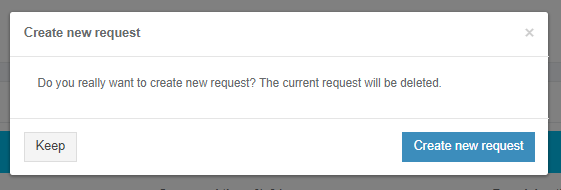
Apptimized shows the following screen when successful:

[![testing_52.png](https://docs.apptimized.com/uploads/images/gallery/2020-04/scaled-1680-/v8gLydmi9ibMYR95-testing_52.png)](https://docs.apptimized.com/uploads/images/gallery/2020-04/v8gLydmi9ibMYR95-testing_52.png)

The option to finish Testing- Factory Service process is available under the **Finish** button.

[![testing_47-(2).png](https://docs.apptimized.com/uploads/images/gallery/2021-06/scaled-1680-/Oc47VHfCwWZXtLk8-testing_47-(2).png)](https://docs.apptimized.com/uploads/images/gallery/2021-06/Oc47VHfCwWZXtLk8-testing_47-(2).png)

Apptimized shows the following screen when successful:

[![testing_54.png](https://docs.apptimized.com/uploads/images/gallery/2020-04/scaled-1680-/kFvfN0pRCsI89O7D-testing_54.png)](https://docs.apptimized.com/uploads/images/gallery/2020-04/kFvfN0pRCsI89O7D-testing_54.png)