# Discovery

The following scenarios to open the transition screen available:

1. **My Dashboard** &gt; **My Applications** &gt; Choose the project &gt; Actions column &gt; **Process** option;
2. **Project menu** &gt; **Dashboards** &gt; **Overview** &gt; **Your assignments** module &gt; Choose the application &gt; Actions column &gt; **Process** option;
3. **Project menu** &gt; **Dashboards** &gt; **Portfolio** &gt; Actions column &gt; **Process** option;
4. **Project menu** &gt; **Import** &gt; **Start import** &gt; **Classic import / Import from CSV file / SCCM Import /Catalogue &amp; UM Import** &gt; Application upload session &gt; **Finish.**

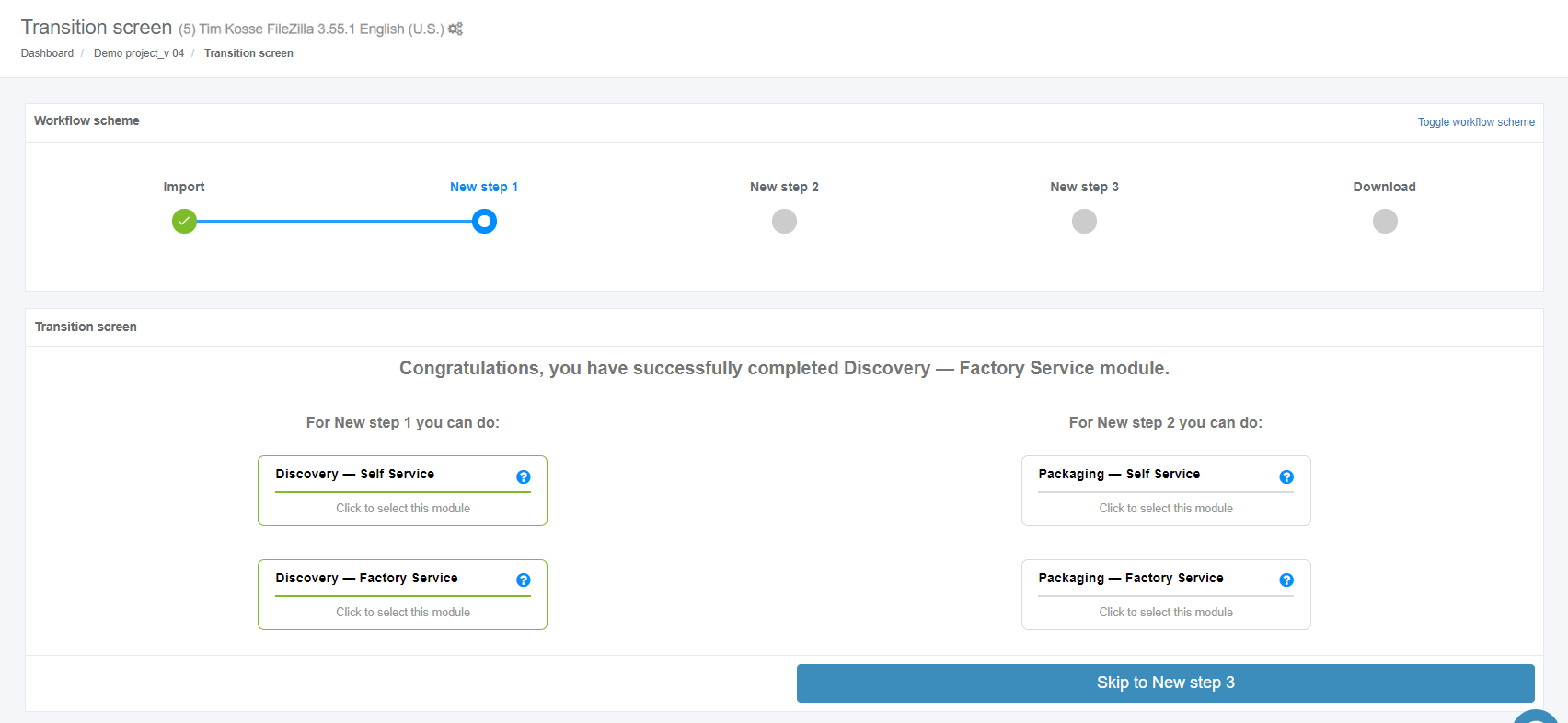
Apptimized shows the following screen when successful:

[![discovery_01.PNG](https://docs.apptimized.com/uploads/images/gallery/2020-04/scaled-1680-/zbEMqxqxEUoLxrpZ-discovery_01.PNG)](https://docs.apptimized.com/uploads/images/gallery/2020-04/zbEMqxqxEUoLxrpZ-discovery_01.PNG)

Two discovery scenarios available in Apptimized portal:

- Discovery – Self Service;
- Discovery – Factory Service.

### **Discovery – Self Service**

A user can record a guide to install and configure the application on Apptimized VMs. A user’s actions are automatically captured as step-by-step screenshots and further described in textual format automatically. Before sending a document (which is available in PDF and HTML formats) to Apptimized, the user can change the scenario that they recorded (i.e., to swap screenshots, to edit comments for each screenshot or to delete unnecessary screenshots). Users can also create custom templates for the document, which are available in two formats.

Discovery - Self Service characteristics:

- A user installs an application on the chosen Microsoft Windows platform.
- A user automatically documents an installation, configuration, and test activities.
- A user can collaborate with his co-workers and Apptimized support staff.

The Discovery - Self Service option is available under the **Discovery - Self Service** module in the **Transition screen**.

[![discovery_03.png](https://docs.apptimized.com/uploads/images/gallery/2020-04/scaled-1680-/xqmJagr7BM1DcKmY-discovery_03.png)](https://docs.apptimized.com/uploads/images/gallery/2020-04/xqmJagr7BM1DcKmY-discovery_03.png)

Apptimized shows the following screen when successful:

[![discovery_04.png](https://docs.apptimized.com/uploads/images/gallery/2020-04/scaled-1680-/oFNWYAwcolnK25Vl-discovery_04.png)](https://docs.apptimized.com/uploads/images/gallery/2020-04/oFNWYAwcolnK25Vl-discovery_04.png)

A field "**Select discovery – self service platform**" is filled automatically and can be changed if needed. To change the discovery – self service platform, click the drop-down menu as it is shown in the screenshot below:

[![discovery_05.png](https://docs.apptimized.com/uploads/images/gallery/2020-04/scaled-1680-/azUn32KW1ZI7Eiu7-discovery_05.png)](https://docs.apptimized.com/uploads/images/gallery/2020-04/azUn32KW1ZI7Eiu7-discovery_05.png)

The option to revert to the transition screen is available under the **Go to Transition screen** button.

The option to request a virtual machine image is available under the **Can’t find the VM image you need? Contact our Support team to request one** link.

[![Can't find the VM image you need.png](https://docs.apptimized.com/uploads/images/gallery/2026-03/scaled-1680-/4p7cant-find-the-vm-image-you-need.png)](https://docs.apptimized.com/uploads/images/gallery/2026-03/4p7cant-find-the-vm-image-you-need.png)

#### **Discovery – Self Service process**

The option to start the discovery – self service process is available under the **Start VM** button.

Apptimized shows the following screen when successful:

[![discovery_06.png](https://docs.apptimized.com/uploads/images/gallery/2020-10/scaled-1680-/zHEz4PWtXo0Sa0dD-discovery_06.png)](https://docs.apptimized.com/uploads/images/gallery/2020-10/zHEz4PWtXo0Sa0dD-discovery_06.png)

The file synchronization process may take few moments. Apptimized shows the following notification:

[![discovery_06_1.png](https://docs.apptimized.com/uploads/images/gallery/2020-04/scaled-1680-/5btXnVwyod541CNH-discovery_06_1.png)](https://docs.apptimized.com/uploads/images/gallery/2020-04/5btXnVwyod541CNH-discovery_06_1.png)

- **Note.** There is often a situation when a user has already run 2 VMs in parallel. To continue planned activities within the current workflow step, a user must terminate an irrelevant VM. In this case, Apptimized shows the warning box with a list of VMs which are currently running by the user:  
    [![listvm_01.png](https://docs.apptimized.com/uploads/images/gallery/2020-07/scaled-1680-/uh1YFhfTV4ZZGU24-listvm_01.png)](https://docs.apptimized.com/uploads/images/gallery/2020-07/uh1YFhfTV4ZZGU24-listvm_01.png)  
    The information is grouped into the following categories in the modal window:   
    1. Application  
    2. VM started time  
    3. Workflow progress  
    4. Link  
    The option to select a VM for termination is available under the **Go to VM** link. A new tab opens when successful:
    
    [![03_02_discovery-(3).png](https://docs.apptimized.com/uploads/images/gallery/2021-06/scaled-1680-/gN7cgXjwQrRFbz93-03_02_discovery-(3).png)](https://docs.apptimized.com/uploads/images/gallery/2021-06/gN7cgXjwQrRFbz93-03_02_discovery-(3).png)
- When a VM is terminated, a user returns to the screen where he needs to restart a VM (previously a user started a VM but received a modal window with a list of running VMs).

When the synchronization process is finished, Apptimized shows the following screen:

[![discovery_07_02-(5).png](https://docs.apptimized.com/uploads/images/gallery/2021-06/scaled-1680-/gMUQuqreIuuLlCFO-discovery_07_02-(5).png)](https://docs.apptimized.com/uploads/images/gallery/2021-06/gMUQuqreIuuLlCFO-discovery_07_02-(5).png)

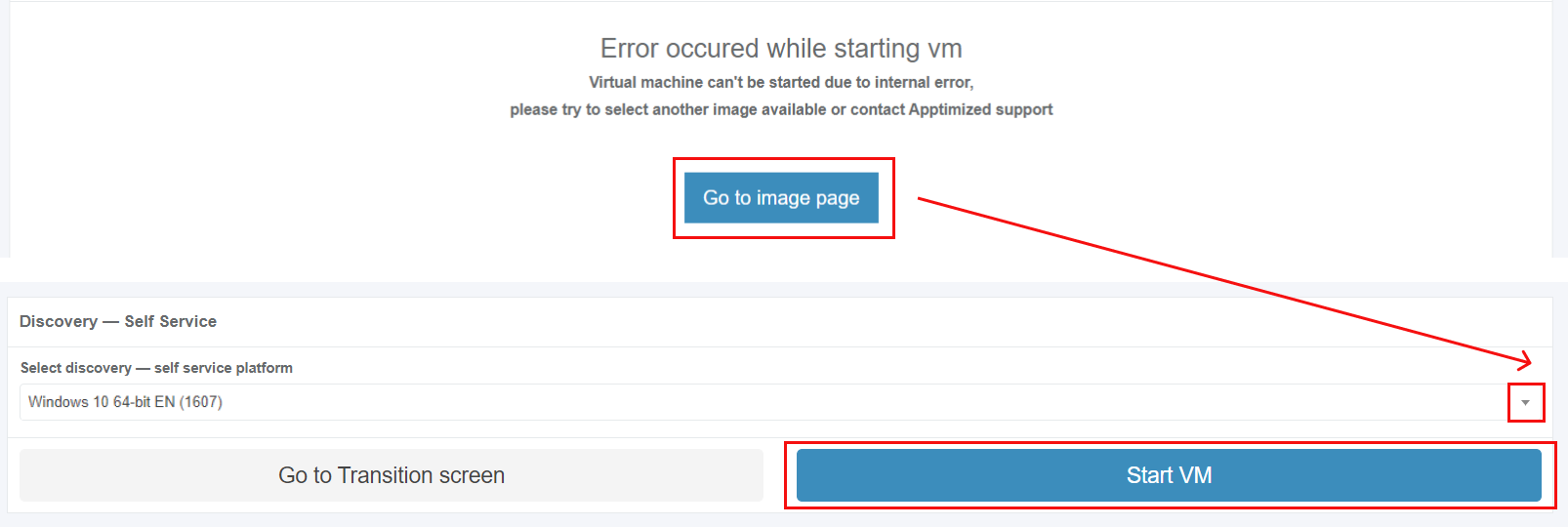
<p class="callout info">**Note.** If the internal error while starting VM occurred, Apptimized shows the following screen:  
[![discovery_error-massage_02.png](https://docs.apptimized.com/uploads/images/gallery/2020-07/scaled-1680-/mfGAyKvousWOgkf1-discovery_error-massage_02.png)](https://docs.apptimized.com/uploads/images/gallery/2020-07/mfGAyKvousWOgkf1-discovery_error-massage_02.png)  
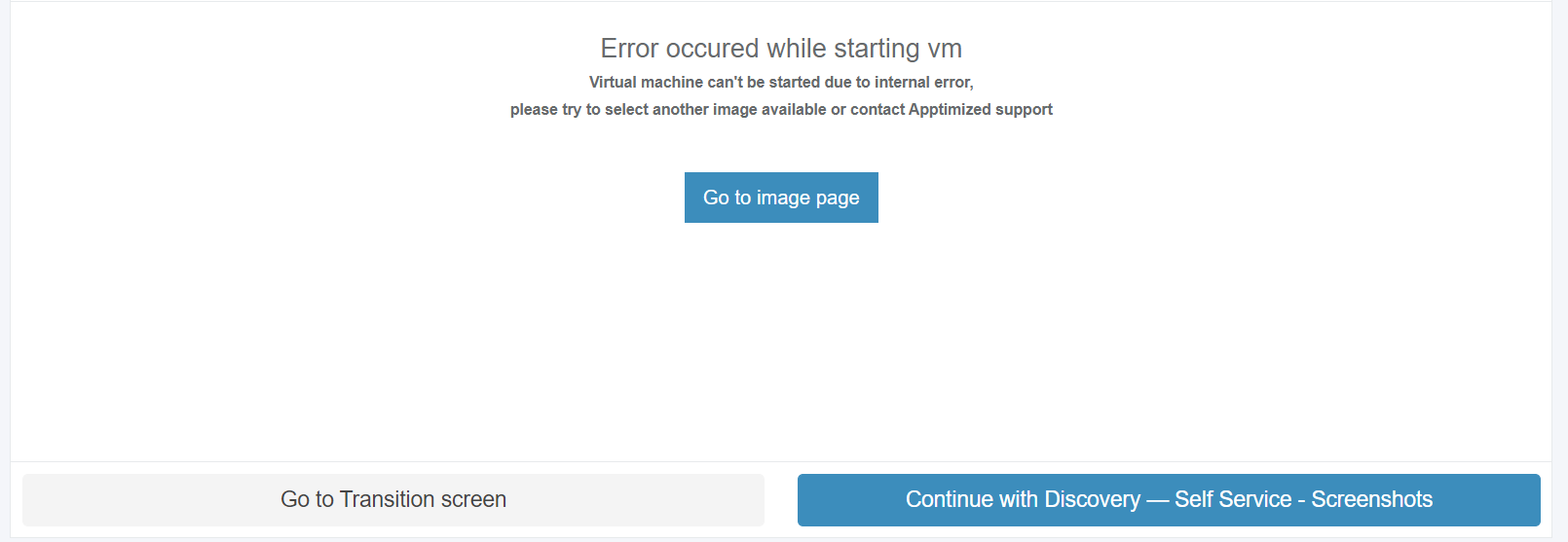
The following actions are recommended for consideration by a user:  
1. Contact the Apptimized support  
2. **Go to image page** button &gt; **Select discovery – self-service platform** field &gt; **Start VM** button  
[![discovery_error-massage_01.png](https://docs.apptimized.com/uploads/images/gallery/2020-07/scaled-1680-/eCL8pyeSSe5jkcw7-discovery_error-massage_01.png)](https://docs.apptimized.com/uploads/images/gallery/2020-07/eCL8pyeSSe5jkcw7-discovery_error-massage_01.png)</p>

The uploaded files locate in the **Apptimized files** folder on the VM desktop.

To start the installation process, a user opens the **.EXE** file located in the **Source** folder.

[![discovery_08_02.png](https://docs.apptimized.com/uploads/images/gallery/2021-06/scaled-1680-/RZgpEpvsqvKyhNNX-discovery_08_02.png)](https://docs.apptimized.com/uploads/images/gallery/2021-06/RZgpEpvsqvKyhNNX-discovery_08_02.png)
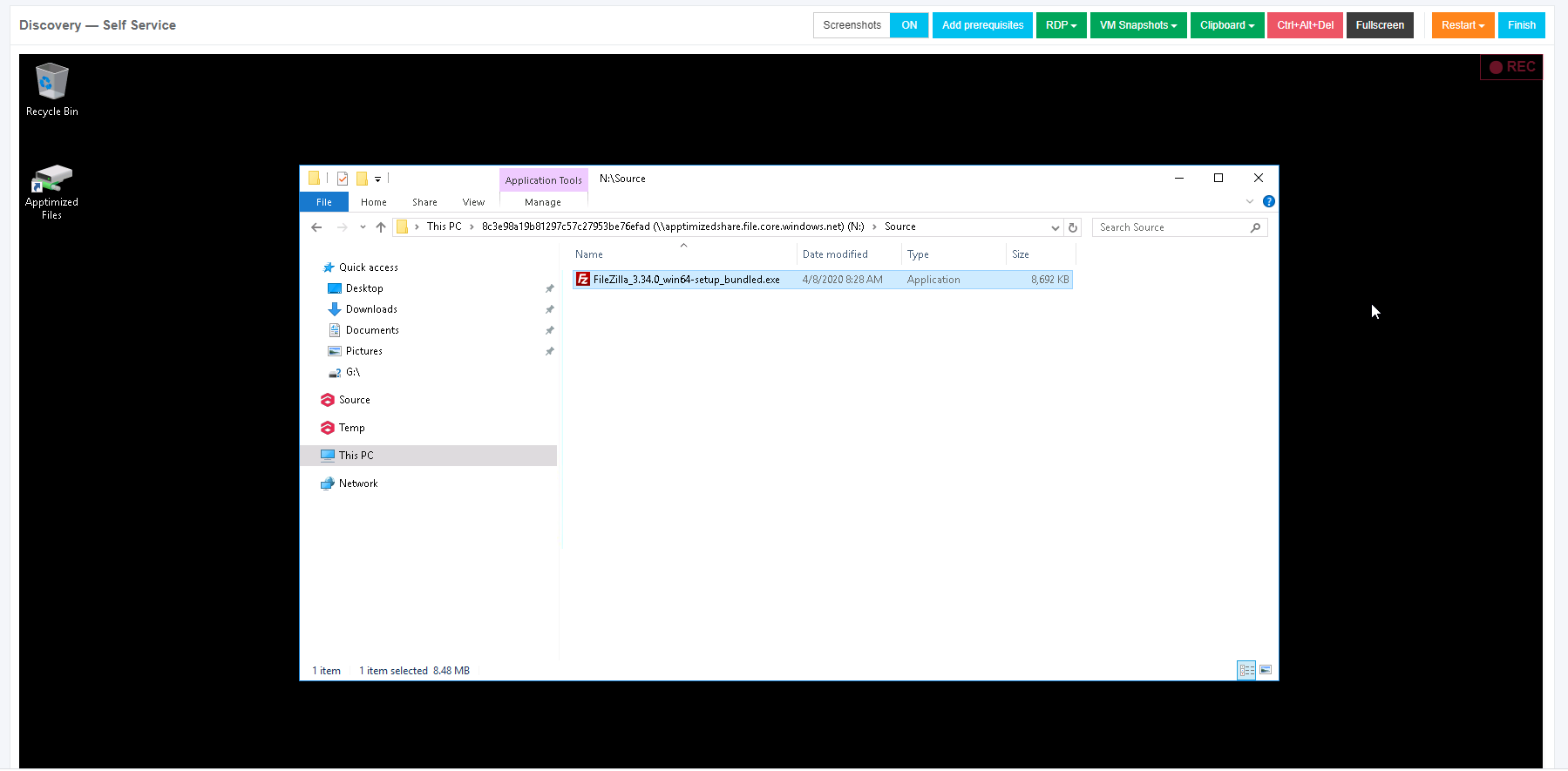
Every action is captured as a screenshot which is shown in green boxes appearing on the right-hand side:

[![discovery_09_02-(2).png](https://docs.apptimized.com/uploads/images/gallery/2021-06/scaled-1680-/gnvqJZaswYsQjSKd-discovery_09_02-(2).png)](https://docs.apptimized.com/uploads/images/gallery/2021-06/gnvqJZaswYsQjSKd-discovery_09_02-(2).png)

When application installation is completed, a user can provide further configurations (only the **Edit** and **Settings** categories).

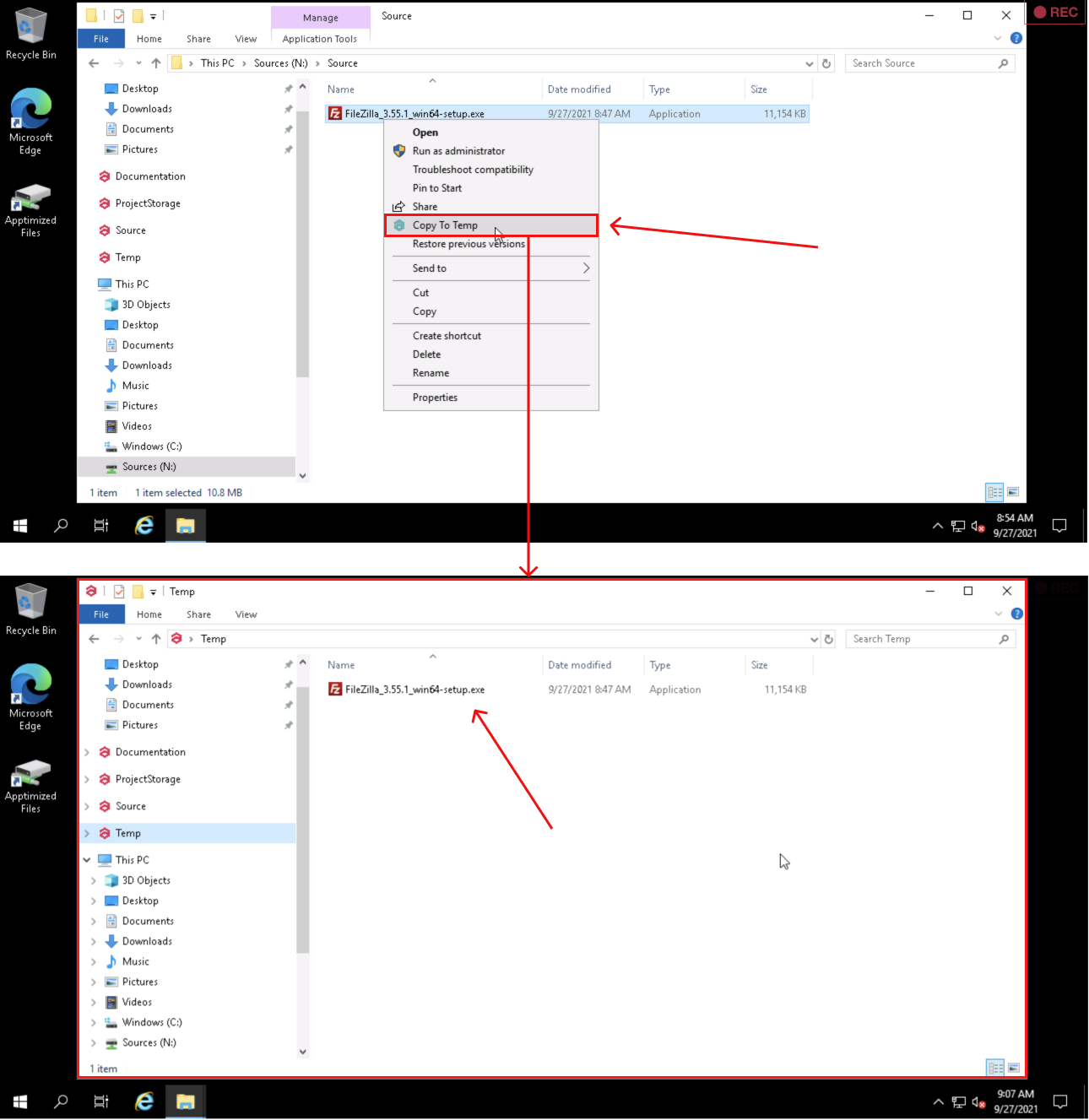
The option to copy files to **Temp storage** is available under **Explorer context menu** &gt; **Copy To Temp**:

[![discovery_x_temp.png](https://docs.apptimized.com/uploads/images/gallery/2021-09/scaled-1680-/4rQFL20TVySxJ7hi-discovery_x_temp.png)](https://docs.apptimized.com/uploads/images/gallery/2021-09/4rQFL20TVySxJ7hi-discovery_x_temp.png)

The options to finish the VM session is available under the **Finish** button.

[![discovery_10.png](https://docs.apptimized.com/uploads/images/gallery/2020-04/scaled-1680-/zN0pb9KcXmEYBjOM-discovery_10.png)](https://docs.apptimized.com/uploads/images/gallery/2020-04/zN0pb9KcXmEYBjOM-discovery_10.png)
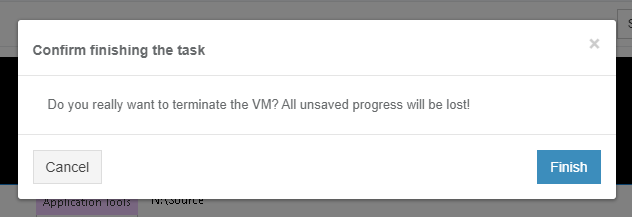
The following interface will appear when recording session with Apptimized VM finishes:

[![discovery_11.png](https://docs.apptimized.com/uploads/images/gallery/2020-04/scaled-1680-/VyEmdrcPwoadnywo-discovery_11.png)](https://docs.apptimized.com/uploads/images/gallery/2020-04/VyEmdrcPwoadnywo-discovery_11.png)
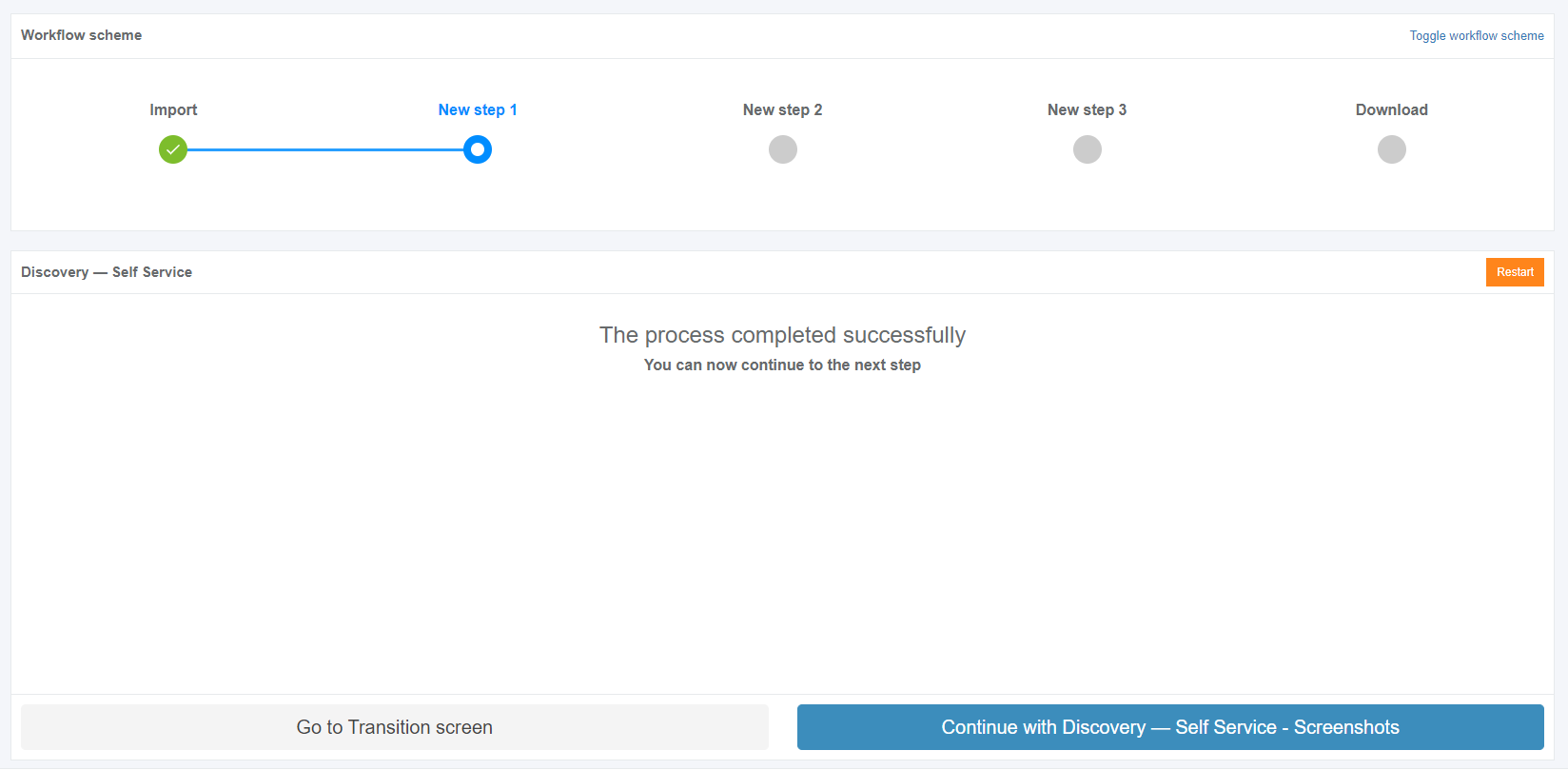
The option to restart the VM discovery session is available under the **Restart** button. To confirm the restarting the VM Apptimized shows the following modal window:

[![discovery_12.png](https://docs.apptimized.com/uploads/images/gallery/2020-04/scaled-1680-/1OYovMcZKX8ySaDX-discovery_12.png)](https://docs.apptimized.com/uploads/images/gallery/2020-04/1OYovMcZKX8ySaDX-discovery_12.png)
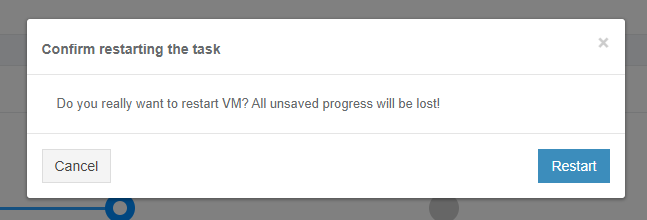
#### **VM control menu**

The VM control menu panel is available in the upper right corner of the VM interface.

[![discovery_14_3-(1).png](https://docs.apptimized.com/uploads/images/gallery/2021-06/scaled-1680-/JoMtbGQZtNLEAKbT-discovery_14_3-(1).png)](https://docs.apptimized.com/uploads/images/gallery/2021-06/JoMtbGQZtNLEAKbT-discovery_14_3-(1).png)

Next, each settings category is shown in more detail.

[![discovery_14_4.png](https://docs.apptimized.com/uploads/images/gallery/2021-06/scaled-1680-/nNEZNAPUcfm13h9N-Group-4-(2).png)](https://docs.apptimized.com/uploads/images/gallery/2021-06/nNEZNAPUcfm13h9N-Group-4-(2).png)

Table 1. VM control menu

<table border="1" id="bkmrk-%C2%A0-control-menu-categ" style="width: 800px; height: 5011px;" width="800"><tbody><tr style="height: 57px;"><td style="width: 47px; height: 57px;"></td><td style="width: 124px; height: 57px;">**Control menu category**

</td><td style="width: 628px; height: 57px;">**Details**

</td></tr><tr style="height: 79px;"><td style="width: 47px; height: 79px;">1

</td><td style="width: 124px; height: 79px;">Screenshots

</td><td style="width: 628px; height: 79px;">This setting indicates the screenshot mode.

**On** and **Off** options available.

The default value is **On**.

</td></tr><tr style="height: 1683px;"><td style="width: 47px; height: 1683px;">2

</td><td style="width: 124px; height: 1683px;">Add prerequisites/Edit prerequisites

</td><td style="width: 628px; height: 1683px;">This setting enables a user to add prerequisite applications.

**Portfolio** tab is available by default. **Update Monitoring** &amp; **Catalogue** tabs become available if there are delivered packages on them.

[![discovery_15_3.png](https://docs.apptimized.com/uploads/images/gallery/2021-06/scaled-1680-/gKl7jlo4mZEY9n7Y-discovery_15_3.png)](https://docs.apptimized.com/uploads/images/gallery/2021-06/gKl7jlo4mZEY9n7Y-discovery_15_3.png)
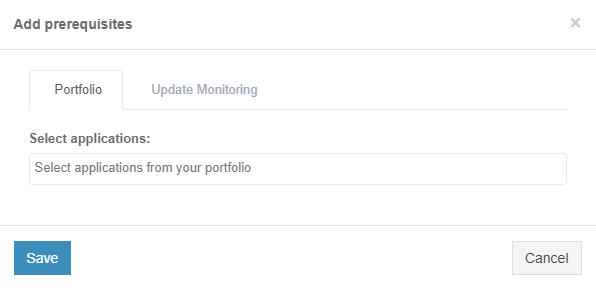
**Portfolio** tab

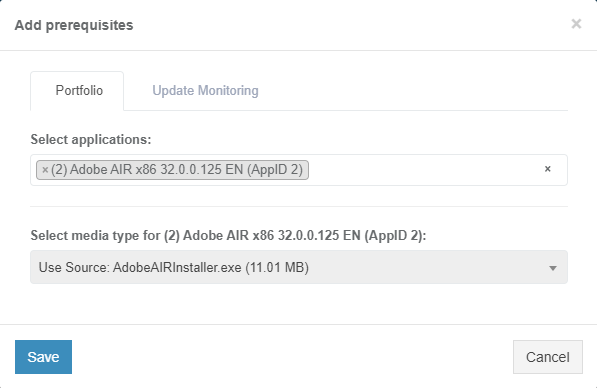
The option to select application is available under **Select applications** field.

[![discovery_15_4-(1).png](https://docs.apptimized.com/uploads/images/gallery/2021-06/scaled-1680-/aVX1wrTkkFHsI6Uu-discovery_15_4-(1).png)](https://docs.apptimized.com/uploads/images/gallery/2021-06/aVX1wrTkkFHsI6Uu-discovery_15_4-(1).png)

The option to select media type for applications is available after the application was selected.

The following media types available:

- Package
- Source

[![discovery_x_1.png](https://docs.apptimized.com/uploads/images/gallery/2021-06/scaled-1680-/9rTFu3uO8jQBfLgz-discovery_x_1.png)](https://docs.apptimized.com/uploads/images/gallery/2021-06/9rTFu3uO8jQBfLgz-discovery_x_1.png)
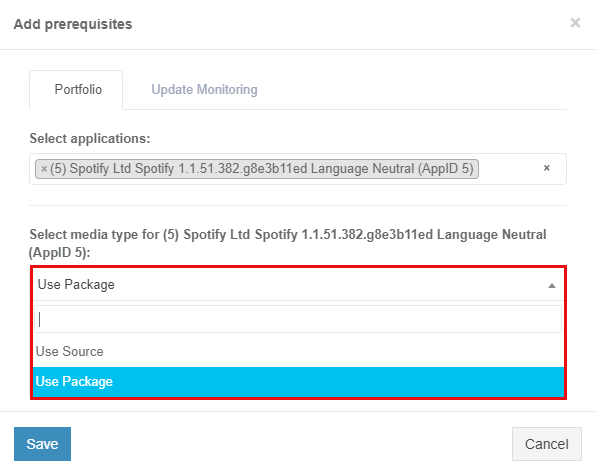
<p class="callout info">**Note**. One media type is automatically selected if others are missing.</p>

<p class="callout info">[![discovery_x_2.png](https://docs.apptimized.com/uploads/images/gallery/2021-06/scaled-1680-/RRzaEg7knQYdW6AG-image-73.png)](https://docs.apptimized.com/uploads/images/gallery/2021-06/RRzaEg7knQYdW6AG-image-73.png)</p>

The option to use Source media type is available under **Use Source** &gt; **Select Media** &gt; select source file.

[![discovery_x_2-(1).png](https://docs.apptimized.com/uploads/images/gallery/2021-06/scaled-1680-/09nzmMPTTY0PjnNz-discovery_x_2-(1).png)](https://docs.apptimized.com/uploads/images/gallery/2021-06/09nzmMPTTY0PjnNz-discovery_x_2-(1).png)

<span class="TextRun SCXW38531778 BCX8" data-contrast="none" lang="EN-US" xml:lang="EN-US"><span class="NormalTextRun SCXW38531778 BCX8">The option</span><span class="NormalTextRun SCXW38531778 BCX8"> to use Package media type is available under </span></span><span class="TextRun SCXW38531778 BCX8" data-contrast="none" lang="EN-US" xml:lang="EN-US"><span class="NormalTextRun SCXW38531778 BCX8">**Use Package** &gt; **Select Media** &gt; </span></span><span class="TextRun SCXW38531778 BCX8" data-contrast="none" lang="EN-US" xml:lang="EN-US"><span class="NormalTextRun SCXW38531778 BCX8">select package file.</span></span><span class="EOP SCXW38531778 BCX8" data-ccp-props="{"201341983":0,"335559740":259}"> </span>

<span class="EOP SCXW38531778 BCX8" data-ccp-props="{"201341983":0,"335559740":259}">[![discovery_x_3-(1).png](https://docs.apptimized.com/uploads/images/gallery/2021-06/scaled-1680-/UTvHlXMeOp8T6RGS-discovery_x_3-(1).png)](https://docs.apptimized.com/uploads/images/gallery/2021-06/UTvHlXMeOp8T6RGS-discovery_x_3-(1).png)</span>

**<span data-contrast="none">Update Monitoring</span>**<span data-ccp-props="{"201341983":0,"335559740":259}"> </span>

<span data-ccp-props="{"201341983":0,"335559740":259}"> </span>

<span data-contrast="none">Update Monitoring tab allows to add prerequisites as applications from </span>**<span data-contrast="none">Update Monitoring </span>**<span data-contrast="none">delivered packages.</span><span data-ccp-props="{"201341983":0,"335559740":259}"> </span>

<span data-ccp-props="{"201341983":0,"335559740":259}"> </span>

<span data-contrast="none">The option to Select application from Update Monitoring is available under </span>**<span data-contrast="none">Select applications: </span>**<span data-contrast="none">field &gt; </span>**<span data-contrast="none">Select Version for application</span>**<span data-contrast="none">.</span><span data-ccp-props="{"201341983":0,"335559740":259}"> </span>

[![discovery_X_4-(1).png](https://docs.apptimized.com/uploads/images/gallery/2021-06/scaled-1680-/dDiIZZi1WXOAJvwx-discovery_X_4-(1).png)](https://docs.apptimized.com/uploads/images/gallery/2021-06/dDiIZZi1WXOAJvwx-discovery_X_4-(1).png)

**<span data-contrast="none">Catalogue</span>**<span data-ccp-props="{"201341983":0,"335559740":259}"> </span>

<span data-ccp-props="{"201341983":0,"335559740":259}"> </span>

**<span data-contrast="none">Catalogue </span>**<span data-contrast="none">tab allows to add prerequisites as applications from </span>**<span data-contrast="none">Catalogue </span>**<span data-contrast="none">delivered packages.</span><span data-ccp-props="{"201341983":0,"335559740":259}"> </span>

<span data-ccp-props="{"201341983":0,"335559740":259}"> </span>

<span data-contrast="none">The option to select applications from the </span>**<span data-contrast="none">Catalogue </span>**<span data-contrast="none">is available under </span>**<span data-contrast="none">Selec applications: </span>**<span data-contrast="none">field &gt; </span>**<span data-contrast="none">Select Version for application</span>**<span data-contrast="none">.</span><span data-ccp-props="{"201341983":0,"335559740":259}"> </span>

[![discovery_x_5-(1).png](https://docs.apptimized.com/uploads/images/gallery/2021-06/scaled-1680-/BqSiCGZbcUL99MGL-discovery_x_5-(1).png)](https://docs.apptimized.com/uploads/images/gallery/2021-06/BqSiCGZbcUL99MGL-discovery_x_5-(1).png)

<span data-contrast="none">The option to Save Changes is available under </span>**<span data-contrast="none">Save </span>**<span data-contrast="none">button.</span><span data-ccp-props="{"201341983":0,"335559740":259}"> </span>

<span data-ccp-props="{"201341983":0,"335559740":259}"> </span>

<span data-contrast="none">Apptimized shows the following notifications when successful:</span><span data-ccp-props="{"201341983":0,"335559740":259}"> </span>

[![image-1624347161356.png](https://docs.apptimized.com/uploads/images/gallery/2021-06/scaled-1680-/cIBw78yPri9MfFL0-image-1624347161356.png)](https://docs.apptimized.com/uploads/images/gallery/2021-06/cIBw78yPri9MfFL0-image-1624347161356.png)

The option to **Edit prerequisites** becomes available after the prerequisites were added.

<p class="callout info">**Note**. Uploaded prerequisites are shown in the discovery documentation under the Previous application section.  
  
[![discovery_x_8.png](https://docs.apptimized.com/uploads/images/gallery/2021-09/scaled-1680-/aZr9gkKZ88d8Edj2-discovery_x_8.png)](https://docs.apptimized.com/uploads/images/gallery/2021-09/aZr9gkKZ88d8Edj2-discovery_x_8.png)</p>
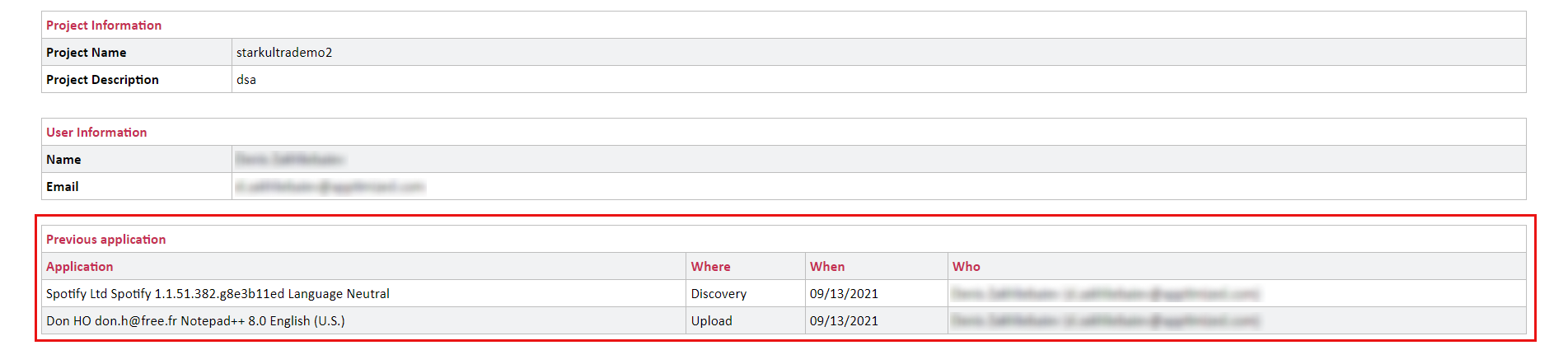
</td></tr><tr style="height: 2015px;"><td style="width: 47px; height: 2015px;">3

</td><td style="width: 124px; height: 2015px;">RDP

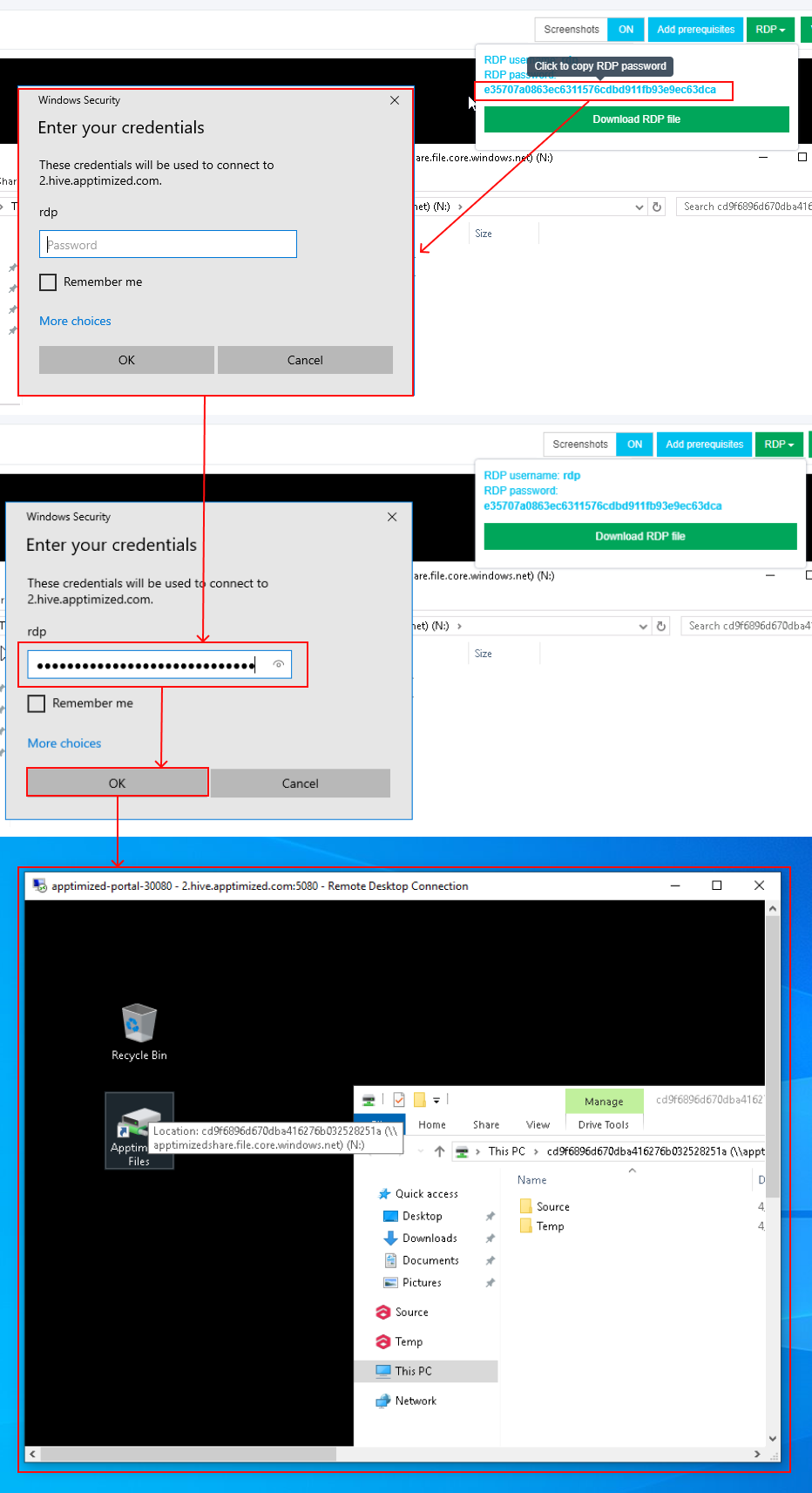
</td><td style="width: 628px; height: 2015px;">This setting enables a user to work on the VM directly via RDP rather than a browser window.

[![discovery_16_2-(1).png](https://docs.apptimized.com/uploads/images/gallery/2021-06/scaled-1680-/q6mRszlhBxoS6Ug7-discovery_16_2-(1).png)](https://docs.apptimized.com/uploads/images/gallery/2021-06/q6mRszlhBxoS6Ug7-discovery_16_2-(1).png)

The option to download a file is available under the **Download RDP** file.

The **RDP file** is available in the **Downloads** folder in user’s PC.

[![discovery_16_10.png](https://docs.apptimized.com/uploads/images/gallery/2020-04/scaled-1680-/rj7D1Na0q3zipAnR-discovery_16_10.png)](https://docs.apptimized.com/uploads/images/gallery/2020-04/rj7D1Na0q3zipAnR-discovery_16_10.png)
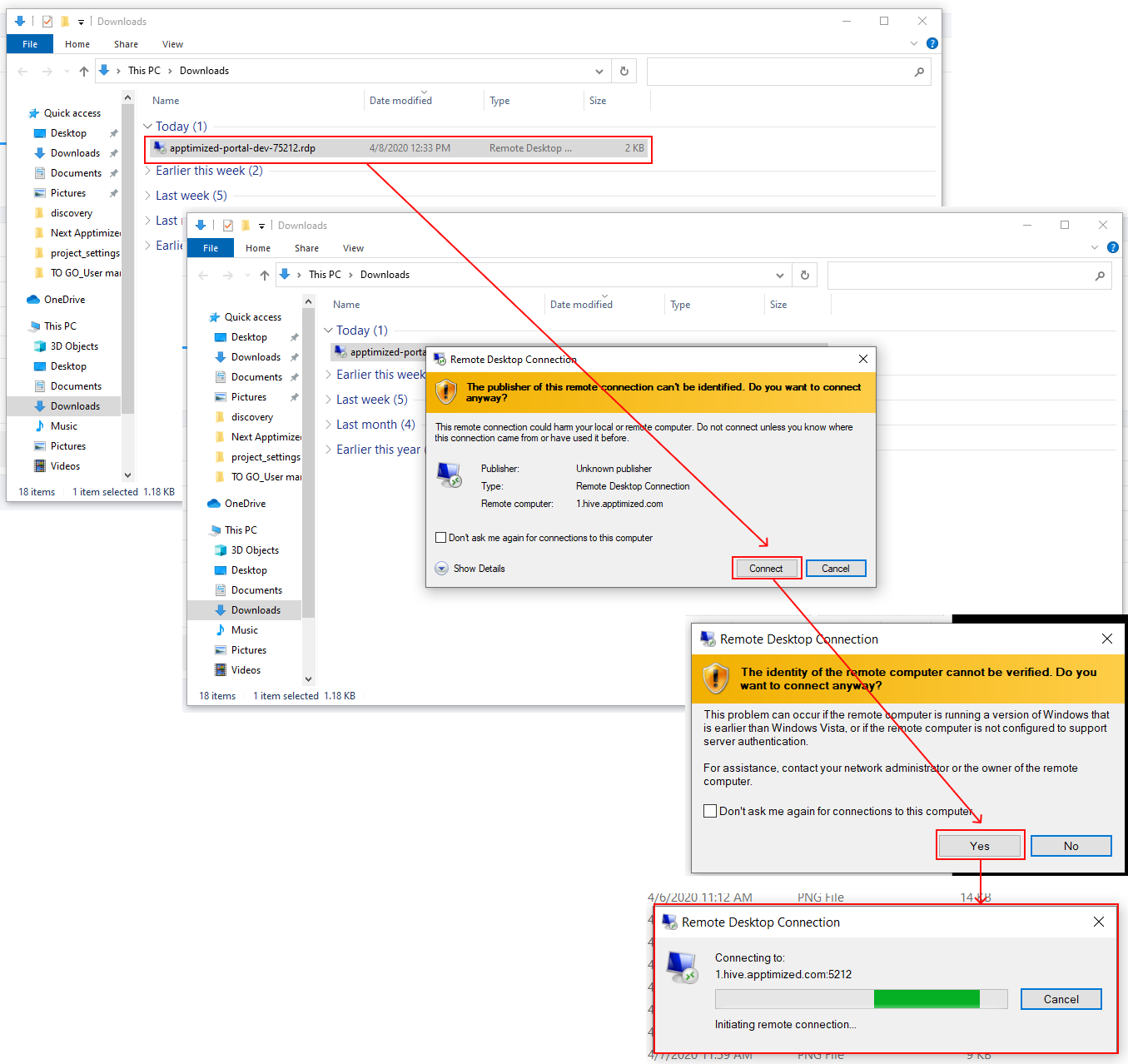
When the remote connection is set, copy the RDP password paste to the modal window. The remote desktop connection window appears when successful:

[![discovery_16_11.png](https://docs.apptimized.com/uploads/images/gallery/2021-06/scaled-1680-/hXxgRaHm2vEiUvI8-discovery_16_11.png)](https://docs.apptimized.com/uploads/images/gallery/2021-06/hXxgRaHm2vEiUvI8-discovery_16_11.png)
</td></tr><tr style="height: 377px;"><td style="width: 47px; height: 377px;">4

</td><td style="width: 124px; height: 377px;">VM Snapshots

</td><td style="width: 628px; height: 377px;">The setting enables to create a snapshot of the VM to save its current state or to revert to a state saved earlier.

This is applicable when the application has prerequisites that need to be present before a certain action (i.e., Discovery, Packaging, or Testing) can be started.

[![discovery_17_2-(2).png](https://docs.apptimized.com/uploads/images/gallery/2021-06/scaled-1680-/q1earvQUGQF2qJeK-discovery_17_2-(2).png)](https://docs.apptimized.com/uploads/images/gallery/2021-06/q1earvQUGQF2qJeK-discovery_17_2-(2).png)

The snapshot option is available under the **VM snapshot** button &gt; **Snapshot name** field &gt; **Take** button.

</td></tr><tr style="height: 318px;"><td style="width: 47px; height: 318px;">5

</td><td style="width: 124px; height: 318px;">Clipboard

</td><td style="width: 628px; height: 318px;">This setting enables a user to put text from the user’s system to the VM clipboard. Transferring clipboard content between the host machine and the VM is performed via "Cut &amp; Paste" in most user scenarios. If the user experiences any issues with "Cut &amp; Paste", the Clipboard button can be used to put the text to the VM's clipboard.

[![discovery_18_2-(1).png](https://docs.apptimized.com/uploads/images/gallery/2021-06/scaled-1680-/FirV4VtGIrouVpAf-discovery_18_2-(1).png)](https://docs.apptimized.com/uploads/images/gallery/2021-06/FirV4VtGIrouVpAf-discovery_18_2-(1).png)

</td></tr><tr style="height: 35px;"><td style="width: 47px; height: 35px;">6

</td><td style="width: 124px; height: 35px;">Ctrl + Alt + Del

</td><td style="width: 628px; height: 35px;">This setting enables to open security options menu at the VM.

</td></tr><tr style="height: 35px;"><td style="width: 47px; height: 35px;">7

</td><td style="width: 124px; height: 35px;">Fullscreen

</td><td style="width: 628px; height: 35px;">This setting enables to put a browser in a full-screen mode.

</td></tr><tr style="height: 377px;"><td style="width: 47px; height: 377px;">8

</td><td style="width: 124px; height: 377px;">Restart

</td><td style="width: 628px; height: 377px;">This setting enables a user to redo the discovery session on a restarted VM.

The following restart options available:

- OS (Operating system restart. Equal to Power &gt; Restart);
- VM (Equal to the Reset button on the real PC);
- Session (Restart current session. All unsaved progress will be lost).

[![discovery_19.png](https://docs.apptimized.com/uploads/images/gallery/2020-04/scaled-1680-/izI3ki86lz1WjB3S-discovery_19.png)](https://docs.apptimized.com/uploads/images/gallery/2020-04/izI3ki86lz1WjB3S-discovery_19.png)
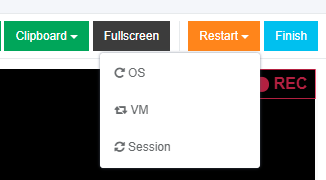
When the restart option is chosen, the confirmation model window appears.

</td></tr><tr style="height: 35px;"><td style="width: 47px; height: 35px;">9

</td><td style="width: 124px; height: 35px;">Finish

</td><td style="width: 628px; height: 35px;">This setting finishes the VM when the discovery session is completed.

</td></tr></tbody></table>

#### **Discovery – Self Service screenshots**

The option to edit the screenshots is available under the **Continue with Discovery – Self Service screenshots** button.

[![discovery_21.png](https://docs.apptimized.com/uploads/images/gallery/2020-04/scaled-1680-/yE3ulZAsp5WDbvtg-discovery_21.png)](https://docs.apptimized.com/uploads/images/gallery/2020-04/yE3ulZAsp5WDbvtg-discovery_21.png)

Apptimized shows the following screen when successful:

[![discovery_22.png](https://docs.apptimized.com/uploads/images/gallery/2020-04/scaled-1680-/W2AdBfiNNgQXqn00-discovery_22.png)](https://docs.apptimized.com/uploads/images/gallery/2020-04/W2AdBfiNNgQXqn00-discovery_22.png)

Screenshots can be excluded from discovery by clicking the **Delete** button.

[![discovery_23.png](https://docs.apptimized.com/uploads/images/gallery/2020-04/scaled-1680-/tPzb790OWq4lht7y-discovery_23.png)](https://docs.apptimized.com/uploads/images/gallery/2020-04/tPzb790OWq4lht7y-discovery_23.png)

Screenshots can be excluded from discovery in a multiple mode by unticking checkboxes in front of their ID and clicking the **Delete selected screenshots** button.

[![discovery_24.png](https://docs.apptimized.com/uploads/images/gallery/2020-04/scaled-1680-/EDYPHC4KSGqXdpT3-discovery_24.png)](https://docs.apptimized.com/uploads/images/gallery/2020-04/EDYPHC4KSGqXdpT3-discovery_24.png)

Apptimized shows the following modal window:

[![discovery_25.png](https://docs.apptimized.com/uploads/images/gallery/2020-04/scaled-1680-/GdJBDJcbruNyIEPf-discovery_25.png)](https://docs.apptimized.com/uploads/images/gallery/2020-04/GdJBDJcbruNyIEPf-discovery_25.png)

When clicking on the Confirm button, Apptimized shows the notification:

[![discovery_26.png](https://docs.apptimized.com/uploads/images/gallery/2020-04/scaled-1680-/zhIzrOrdqlU63Iyo-discovery_26.png)](https://docs.apptimized.com/uploads/images/gallery/2020-04/zhIzrOrdqlU63Iyo-discovery_26.png)

Screenshots sequence can be changed in discovery by clicking the **Up** or **Down** buttons.

[![discovery_27.png](https://docs.apptimized.com/uploads/images/gallery/2020-04/scaled-1680-/FaVLjr9dJtrWrVMT-discovery_27.png)](https://docs.apptimized.com/uploads/images/gallery/2020-04/FaVLjr9dJtrWrVMT-discovery_27.png)

[![discovery_28.png](https://docs.apptimized.com/uploads/images/gallery/2020-04/scaled-1680-/TTu68BadqVcV891E-discovery_28.png)](https://docs.apptimized.com/uploads/images/gallery/2020-04/TTu68BadqVcV891E-discovery_28.png)

Comments to the screenshots can be edited by clicking on the comment cell.

[![discovery_29.png](https://docs.apptimized.com/uploads/images/gallery/2020-04/scaled-1680-/YgGdEc3jxU0NaI7y-discovery_29.png)](https://docs.apptimized.com/uploads/images/gallery/2020-04/YgGdEc3jxU0NaI7y-discovery_29.png)

The **Additional comment (Optional)** field can stay blank.

[![discovery_30.png](https://docs.apptimized.com/uploads/images/gallery/2020-04/scaled-1680-/1NZl40AlSlC6b9Oh-discovery_30.png)](https://docs.apptimized.com/uploads/images/gallery/2020-04/1NZl40AlSlC6b9Oh-discovery_30.png)

If any problems accur, the option to contact support is available under the **Did you run into problems?** button.

[![discovery_33.png](https://docs.apptimized.com/uploads/images/gallery/2020-04/scaled-1680-/kIx3BKyRTuhSe2Nw-discovery_33.png)](https://docs.apptimized.com/uploads/images/gallery/2020-04/kIx3BKyRTuhSe2Nw-discovery_33.png)

Apptimized shows the following modal window:

[![discovery_34.png](https://docs.apptimized.com/uploads/images/gallery/2020-04/scaled-1680-/WEhFlFMlikZdK5Jy-discovery_34.png)](https://docs.apptimized.com/uploads/images/gallery/2020-04/WEhFlFMlikZdK5Jy-discovery_34.png)

When the **Contact support** option is chosen, the live chat with the support team appears:

[![discovery_35.png](https://docs.apptimized.com/uploads/images/gallery/2020-04/scaled-1680-/IHnCwzkAxA0OBA8l-discovery_35.png)](https://docs.apptimized.com/uploads/images/gallery/2020-04/IHnCwzkAxA0OBA8l-discovery_35.png)

When the **Log problem** option is chosen, the modal window appears:

[![discovery_36.png](https://docs.apptimized.com/uploads/images/gallery/2020-04/scaled-1680-/qgfl2j4JytUT9oPP-discovery_36.png)](https://docs.apptimized.com/uploads/images/gallery/2020-04/qgfl2j4JytUT9oPP-discovery_36.png)

The problem category can be chosen by ticking checkboxes in front of their names.

Screenshots editing mode finalizes when clicking the **Save changes** button.

Apptimized shows the following interface when successful:

[![discovery_31.png](https://docs.apptimized.com/uploads/images/gallery/2020-04/scaled-1680-/cgDNXYXsq334rTGC-discovery_31.png)](https://docs.apptimized.com/uploads/images/gallery/2020-04/cgDNXYXsq334rTGC-discovery_31.png)

The generated document is available in **PDF** and **HTML** formats. To download a document, click the **Download generated HTML** **document** or **Download generated PDF document** buttons.

A generated HTML document first page sample is available:

[![discovery_x_6.png](https://docs.apptimized.com/uploads/images/gallery/2021-09/scaled-1680-/xGKwHGv4C4IlPhvV-discovery_x_6-(1).png)](https://docs.apptimized.com/uploads/images/gallery/2021-09/xGKwHGv4C4IlPhvV-discovery_x_6-(1).png)

The option to edit a discovery document is available under the **Edit generated document** button. The document editing finalizes by clicking the **Save** button.

[![discovery_32.png](https://docs.apptimized.com/uploads/images/gallery/2020-04/scaled-1680-/ujlH74YeobULIMm0-discovery_32.png)](https://docs.apptimized.com/uploads/images/gallery/2020-04/ujlH74YeobULIMm0-discovery_32.png)

The option to return to the discovery self-service screen mode is available under the **Revert to Discovery – Self Service Self Service** button.

The option to finish the discovery process is available under the **Finish** button.

Apptimized shows the following screen:

[![discovery_37.png](https://docs.apptimized.com/uploads/images/gallery/2020-04/scaled-1680-/drqECOAfgahhVNZQ-discovery_37.png)](https://docs.apptimized.com/uploads/images/gallery/2020-04/drqECOAfgahhVNZQ-discovery_37.png)

### **Discovery — Factory Service process**

Discovery - Factory Service characteristics:

- Apptimized installs, configures, and tests an application for a user.
- Apptimized documents the configuration for a user.
- Apptimized contacts a user if any details are needed.

The Discovery - Factory Service option is available under the **Discovery - Factory Service** module in the **Transition screen**.

[![discovery_38.png](https://docs.apptimized.com/uploads/images/gallery/2020-04/scaled-1680-/1q3yoBgJtT4Cwwv6-discovery_38.png)](https://docs.apptimized.com/uploads/images/gallery/2020-04/1q3yoBgJtT4Cwwv6-discovery_38.png)

Apptimized shows the following screen when successful:

[![discovery_39_2.png](https://docs.apptimized.com/uploads/images/gallery/2021-08/scaled-1680-/3t1bYORhoQ9WFPwp-discovery_39_2.png)](https://docs.apptimized.com/uploads/images/gallery/2021-08/3t1bYORhoQ9WFPwp-discovery_39_2.png)

All required fields are marked with an asterisk <span style="color: #ff0000;">\*</span>.

The option to provide a comment is available under the **Reference** field.

The option to choose the discovery platform is available under the **Discovery platform** field.

[![discovery_40.png](https://docs.apptimized.com/uploads/images/gallery/2020-04/scaled-1680-/sxMZ7Z3c59VLKXtf-discovery_40.png)](https://docs.apptimized.com/uploads/images/gallery/2020-04/sxMZ7Z3c59VLKXtf-discovery_40.png)

Two priority options are available: **Normal** and **Urgent**. The default value is **Normal**.

<span class="TrackChangeTextInsertion TrackedChange SCXW184448488 BCX7"><span class="TextRun SCXW184448488 BCX7" data-contrast="auto" lang="EN-US" xml:lang="EN-US"><span class="NormalTextRun SCXW184448488 BCX7" data-wac-het="1">The option to submit </span></span></span><span class="TrackChangeTextInsertion TrackedChange SCXW184448488 BCX7"><span class="TextRun SCXW184448488 BCX7" data-contrast="auto" lang="EN-US" xml:lang="EN-US"><span class="NormalTextRun SCXW184448488 BCX7" data-wac-het="1">the discovery request is available </span></span></span><span class="TextRun SCXW184448488 BCX7" data-contrast="auto" lang="EN-US" xml:lang="EN-US"><span class="NormalTextRun SCXW184448488 BCX7" data-wac-het="1">the </span></span>**<span class="TrackedChange SCXW184448488 BCX7"><span class="TextRun SCXW184448488 BCX7" data-contrast="auto" lang="EN-US" xml:lang="EN-US"><span class="NormalTextRun SCXW184448488 BCX7" data-wac-het="1">Submit request</span></span></span>**<span class="TextRun SCXW184448488 BCX7" data-contrast="auto" lang="EN-US" xml:lang="EN-US"><span class="NormalTextRun SCXW184448488 BCX7" data-wac-het="1"> button.</span></span><span class="EOP SCXW184448488 BCX7" data-ccp-props="{"201341983":0,"335559739":160,"335559740":259}" data-wac-het="1"> </span>

Apptimized shows the following modal window:

[![Make Urgent Button.png](https://docs.apptimized.com/uploads/images/gallery/2026-02/scaled-1680-/make-urgent-button.png)](https://docs.apptimized.com/uploads/images/gallery/2026-02/make-urgent-button.png)

The option to change the Normal priority to Urgent before approving the request is available under the **Make urgent** button.

The option to create the request is available under the **OK** button.

Apptimized shows the following screen when successful:

[![discovery_42-(1).png](https://docs.apptimized.com/uploads/images/gallery/2021-06/scaled-1680-/v0RdJ4FpGxuMtI3q-discovery_42-(1).png)](https://docs.apptimized.com/uploads/images/gallery/2021-06/v0RdJ4FpGxuMtI3q-discovery_42-(1).png)

This is an initial screen, and all blocks except the **Status** block are empty.

This screen provides information on the Apptimized **Discovery – Factory Service** request (i.e., request progress and status). Additional information that might be needed during the discovery process will be exchanged here.

After the request is created, the current priority is displayed on the Factory Service page. Clicking the **Priority** field opens a modal window allowing the priority to be increased to **Urgent**.

[![Priority.png](https://docs.apptimized.com/uploads/images/gallery/2026-02/scaled-1680-/priority.png)](https://docs.apptimized.com/uploads/images/gallery/2026-02/priority.png)

Next, each Discovery – Factory Service block is shown in more detail.

##### **Status block**

The Status block shows discovery progress. The following request statuses appear depending on the **Discovery – Factory Service** progress:

Table 2. Discovery request statuses

<table border="1" id="bkmrk-request-status-descr" style="width: 800px;"><tbody><tr><td width="138">**Request status**

</td><td width="480">**Description**

</td></tr><tr><td width="138">Incoming check

</td><td width="480">The request has not been processed by the Apptimized team yet. The request is in the queue.

</td></tr><tr><td width="138">In progress

</td><td width="480">The request was processed by the Apptimized team. The request is in progress.

</td></tr><tr><td width="138">Action required

</td><td width="480">The Apptimized team asked the user a question. The user answer is needed.

</td></tr><tr><td width="138">Delivered

</td><td width="480">Discovery results are available to the user.

Discovery results can be provided in **PDF** and **HTML** formats.

</td></tr><tr><td width="138">Error analysis

</td><td width="480">The user rejected the Discovery results. Apptimized team fixes bugs in the Discovery document.

</td></tr><tr><td width="138">Approved

</td><td width="480">The user has confirmed the Discovery results.

</td></tr><tr><td width="138">Canceled

</td><td width="480">The user canceled the Discovery request at the processing stage.

</td></tr></tbody></table>

The option to cancel the request is available under the **Cancel Request** button.

[![discovery_51_1.png](https://docs.apptimized.com/uploads/images/gallery/2020-04/scaled-1680-/BxIq4p8YSSAFA02z-discovery_51_1.png)](https://docs.apptimized.com/uploads/images/gallery/2020-04/BxIq4p8YSSAFA02z-discovery_51_1.png)

[![discovery_52_1.png](https://docs.apptimized.com/uploads/images/gallery/2020-04/scaled-1680-/ruNR2x5xw6hCdJgG-discovery_52_1.png)](https://docs.apptimized.com/uploads/images/gallery/2020-04/ruNR2x5xw6hCdJgG-discovery_52_1.png)

Apptimized shows the following modal window to confirm the request cancellation:

[![discovery_46.png](https://docs.apptimized.com/uploads/images/gallery/2020-04/scaled-1680-/zolUB4xlNbAe1BNS-discovery_46.png)](https://docs.apptimized.com/uploads/images/gallery/2020-04/zolUB4xlNbAe1BNS-discovery_46.png)

Apptimized shows the following modal window when successful:

[![discovery_45-(1).png](https://docs.apptimized.com/uploads/images/gallery/2021-06/scaled-1680-/Zn8Wlz1YDlzBjRSS-discovery_45-(1).png)](https://docs.apptimized.com/uploads/images/gallery/2021-06/Zn8Wlz1YDlzBjRSS-discovery_45-(1).png)

A user can cancel the discovery request until the **Delivered** status is achieved, and the discovery deliverables are available.

[![discovery_53_2-(1).png](https://docs.apptimized.com/uploads/images/gallery/2021-06/scaled-1680-/kAJKbZciCWAfYQ7N-discovery_53_2-(1).png)](https://docs.apptimized.com/uploads/images/gallery/2021-06/kAJKbZciCWAfYQ7N-discovery_53_2-(1).png)

<span class="TextRun SCXW83040976 BCX8" data-contrast="auto" lang="EN-GB" xml:lang="EN-GB"><span class="NormalTextRun SCXW83040976 BCX8">If a user is not satisfied with the discovery results, they can be rejected under the </span></span><span class="TextRun SCXW83040976 BCX8" data-contrast="auto" lang="EN-GB" xml:lang="EN-GB"><span class="NormalTextRun SCXW83040976 BCX8">**Factory activity** </span></span><span class="TextRun SCXW83040976 BCX8" data-contrast="auto" lang="EN-GB" xml:lang="EN-GB"><span class="NormalTextRun SCXW83040976 BCX8">block.</span></span><span class="EOP SCXW83040976 BCX8" data-ccp-props="{"201341983":0,"335559739":160,"335559740":259}"> </span>

When a user is satisfied with the discovery results, they must be approved in the **Status** block. The option to approve the request is available under the **Approve Request** button. The **Approve Request** button becomes active when the **Delivered** status is achieved, and the discovery deliverables are available.

Apptimized shows the following modal window to confirm the request approval:

[![discovery_55.png](https://docs.apptimized.com/uploads/images/gallery/2020-04/scaled-1680-/Yec9BE3AqhbUPUcn-discovery_55.png)](https://docs.apptimized.com/uploads/images/gallery/2020-04/Yec9BE3AqhbUPUcn-discovery_55.png)

Apptimized shows the following screen window when successful:

[![discovery_56-(2).png](https://docs.apptimized.com/uploads/images/gallery/2021-06/scaled-1680-/1pRwshkSDX6SStBM-discovery_56-(2).png)](https://docs.apptimized.com/uploads/images/gallery/2021-06/1pRwshkSDX6SStBM-discovery_56-(2).png)

<p class="callout info">**Note.** When a user approves the request, the option can`t be canceled.</p>

##### **Deliverables block**

This block provides the discovery results to a user. Discovery results can be provided in PDF and HTML formats.

The option to download the discovery results is available under the **Download** button.

[![discovery_54-(1).png](https://docs.apptimized.com/uploads/images/gallery/2021-06/scaled-1680-/fCmMOzkPF7ePOqjo-discovery_54-(1).png)](https://docs.apptimized.com/uploads/images/gallery/2021-06/fCmMOzkPF7ePOqjo-discovery_54-(1).png)

<span class="TextRun SCXW16984173 BCX8" data-contrast="auto" lang="EN-GB" xml:lang="EN-GB"><span class="NormalTextRun SCXW16984173 BCX8">If a user is not satisfied with the discovery results, they can be rejected </span><span class="NormalTextRun SCXW16984173 BCX8">for</span><span class="NormalTextRun SCXW16984173 BCX8"> </span><span class="NormalTextRun SCXW16984173 BCX8">further processing by the </span><span class="NormalTextRun SpellingErrorV2 SCXW16984173 BCX8">Apptimized</span><span class="NormalTextRun SCXW16984173 BCX8"> team. The option to reject the discovery results is available under the </span></span>**<span class="TextRun SCXW16984173 BCX8" data-contrast="auto" lang="EN-GB" xml:lang="EN-GB"><span class="NormalTextRun SCXW16984173 BCX8">Factory request</span></span>**<span class="TextRun SCXW16984173 BCX8" data-contrast="auto" lang="EN-GB" xml:lang="EN-GB"><span class="NormalTextRun SCXW16984173 BCX8"> </span><span class="NormalTextRun SCXW16984173 BCX8">section under the </span></span>**<span class="TextRun SCXW16984173 BCX8" data-contrast="auto" lang="EN-GB" xml:lang="EN-GB"><span class="NormalTextRun SCXW16984173 BCX8">Factory activity </span></span>**<span class="TextRun SCXW16984173 BCX8" data-contrast="auto" lang="EN-GB" xml:lang="EN-GB"><span class="NormalTextRun SCXW16984173 BCX8">block</span><span class="NormalTextRun SCXW16984173 BCX8"> (see </span></span><span class="TextRun SCXW16984173 BCX8" data-contrast="auto" lang="EN-GB" xml:lang="EN-GB"><span class="NormalTextRun SCXW16984173 BCX8">[**Factory activity**](https://docs.apptimized.com/books/apptimized-platform-user-manual/page/discovery#bkmrk-comments-%26-attachmen) block</span></span><span class="TextRun SCXW16984173 BCX8" data-contrast="auto" lang="EN-GB" xml:lang="EN-GB"><span class="NormalTextRun SCXW16984173 BCX8">)</span><span class="NormalTextRun SCXW16984173 BCX8">.</span></span><span class="EOP SCXW16984173 BCX8" data-ccp-props="{"201341983":0,"335559739":160,"335559740":259}"> </span>

##### **Factory activity block**

<span class="TextRun SCXW228760546 BCX8" data-contrast="auto" lang="EN-GB" xml:lang="EN-GB"><span class="NormalTextRun SCXW228760546 BCX8">The option to contact the specialist from </span><span class="NormalTextRun SCXW228760546 BCX8">the </span><span class="NormalTextRun SCXW228760546 BCX8">team is available under the </span></span><span class="TextRun SCXW228760546 BCX8" data-contrast="auto" lang="EN-GB" xml:lang="EN-GB"><span class="NormalTextRun SCXW228760546 BCX8">**Factory activity** block &gt; **Factory request** </span></span><span class="TextRun SCXW228760546 BCX8" data-contrast="auto" lang="EN-GB" xml:lang="EN-GB"><span class="NormalTextRun SCXW228760546 BCX8">&gt; </span></span><span class="TextRun SCXW228760546 BCX8" data-contrast="auto" lang="EN-GB" xml:lang="EN-GB"><span class="NormalTextRun SCXW228760546 BCX8">**Write a message**... </span></span><span class="TextRun SCXW228760546 BCX8" data-contrast="auto" lang="EN-GB" xml:lang="EN-GB"><span class="NormalTextRun SCXW228760546 BCX8">field</span></span><span class="TextRun SCXW228760546 BCX8" data-contrast="auto" lang="EN-GB" xml:lang="EN-GB"><span class="NormalTextRun SCXW228760546 BCX8">.</span></span>

[![discovery_19-(1).png](https://docs.apptimized.com/uploads/images/gallery/2021-06/scaled-1680-/9uM3zWDYFN9427iC-discovery_19-(1).png)](https://docs.apptimized.com/uploads/images/gallery/2021-06/9uM3zWDYFN9427iC-discovery_19-(1).png)

<span class="TextRun SCXW217450636 BCX8" data-contrast="auto" lang="EN-GB" xml:lang="EN-GB"><span class="NormalTextRun SCXW217450636 BCX8">The option to add optional attachments to the comment</span><span class="NormalTextRun SCXW217450636 BCX8">,</span><span class="NormalTextRun SCXW217450636 BCX8"> such as screenshots or additional files (max 10 MB per file)</span><span class="NormalTextRun SCXW217450636 BCX8">,</span><span class="NormalTextRun SCXW217450636 BCX8"> is available under the </span></span><span class="TextRun SCXW217450636 BCX8" data-contrast="auto" lang="EN-GB" xml:lang="EN-GB">**<span class="NormalTextRun SCXW217450636 BCX8">Select </span>**<span class="NormalTextRun ContextualSpellingAndGrammarErrorV2 SCXW217450636 BCX8">**file**.</span></span>

[![discovery_20-(2).png](https://docs.apptimized.com/uploads/images/gallery/2021-06/scaled-1680-/YpioXUsNWIlUqMVd-discovery_20-(2).png)](https://docs.apptimized.com/uploads/images/gallery/2021-06/YpioXUsNWIlUqMVd-discovery_20-(2).png)

<span class="TextRun SCXW9305103 BCX8" data-contrast="auto" lang="EN-GB" xml:lang="EN-GB"><span class="NormalTextRun SCXW9305103 BCX8">The option to send </span><span class="NormalTextRun SCXW9305103 BCX8">a </span><span class="NormalTextRun SCXW9305103 BCX8">message is available under the </span></span><span class="TextRun SCXW9305103 BCX8" data-contrast="auto" lang="EN-GB" xml:lang="EN-GB"><span class="NormalTextRun SCXW9305103 BCX8">**Add** </span></span><span class="TextRun SCXW9305103 BCX8" data-contrast="auto" lang="EN-GB" xml:lang="EN-GB"><span class="NormalTextRun SCXW9305103 BCX8">button.</span></span><span class="EOP SCXW9305103 BCX8" data-ccp-props="{"201341983":0,"335559739":160,"335559740":259}"> </span>

[![discovery_21-(1).png](https://docs.apptimized.com/uploads/images/gallery/2021-06/scaled-1680-/PLn2ZE9n3MlRx3J3-discovery_21-(1).png)](https://docs.apptimized.com/uploads/images/gallery/2021-06/PLn2ZE9n3MlRx3J3-discovery_21-(1).png)

<span class="TextRun SCXW44391992 BCX8" data-contrast="none" lang="EN-GB" xml:lang="EN-GB"><span class="NormalTextRun SCXW44391992 BCX8">The option to provide additional comments or attachments to the Apptimized team is available under the </span></span><span class="TextRun SCXW44391992 BCX8" data-contrast="none" lang="EN-GB" xml:lang="EN-GB"><span class="NormalTextRun SCXW44391992 BCX8">**Factory activity** block</span></span><span class="TextRun SCXW44391992 BCX8" data-contrast="none" lang="EN-GB" xml:lang="EN-GB"><span class="NormalTextRun SCXW44391992 BCX8"> after the Factory request was solved.</span></span>

<span class="EOP SCXW44391992 BCX8" data-ccp-props="{"201341983":0,"335559739":160,"335559740":259}"><span class="TextRun SCXW203545808 BCX8" data-contrast="auto" lang="EN-GB" xml:lang="EN-GB"><span class="NormalTextRun SCXW203545808 BCX8">The option to ask additional questions to the Apptimized team is available under the </span></span><span class="TextRun SCXW203545808 BCX8" data-contrast="auto" lang="EN-GB" xml:lang="EN-GB"><span class="NormalTextRun SCXW203545808 BCX8">**Report a problem** </span></span><span class="TextRun SCXW203545808 BCX8" data-contrast="auto" lang="EN-GB" xml:lang="EN-GB"><span class="NormalTextRun ContextualSpellingAndGrammarErrorV2 SCXW203545808 BCX8">button.</span></span></span>

[![discovery_22-(1).png](https://docs.apptimized.com/uploads/images/gallery/2021-06/scaled-1680-/dCyeofcN0C8DqNmh-discovery_22-(1).png)](https://docs.apptimized.com/uploads/images/gallery/2021-06/dCyeofcN0C8DqNmh-discovery_22-(1).png)

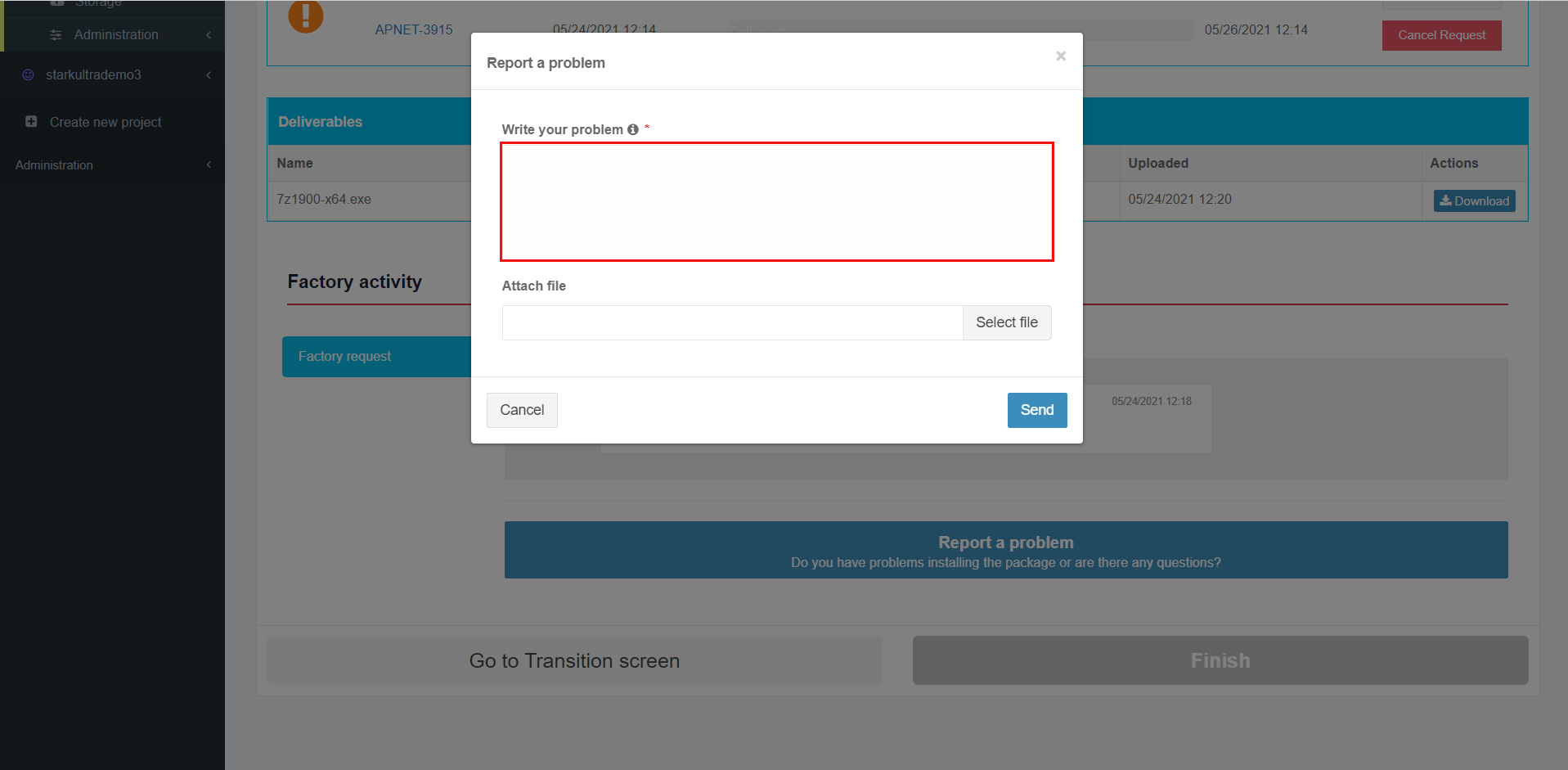
<span class="TextRun SCXW94421903 BCX8" data-contrast="auto" lang="EN-GB" xml:lang="EN-GB"><span class="NormalTextRun SCXW94421903 BCX8">Apptimized provides the following modal window when successful:</span></span>

[![packaging_23-(2).png](https://docs.apptimized.com/uploads/images/gallery/2021-06/scaled-1680-/N2n2ngaEjbmuGYvS-packaging_23-(2).png)](https://docs.apptimized.com/uploads/images/gallery/2021-06/N2n2ngaEjbmuGYvS-packaging_23-(2).png)

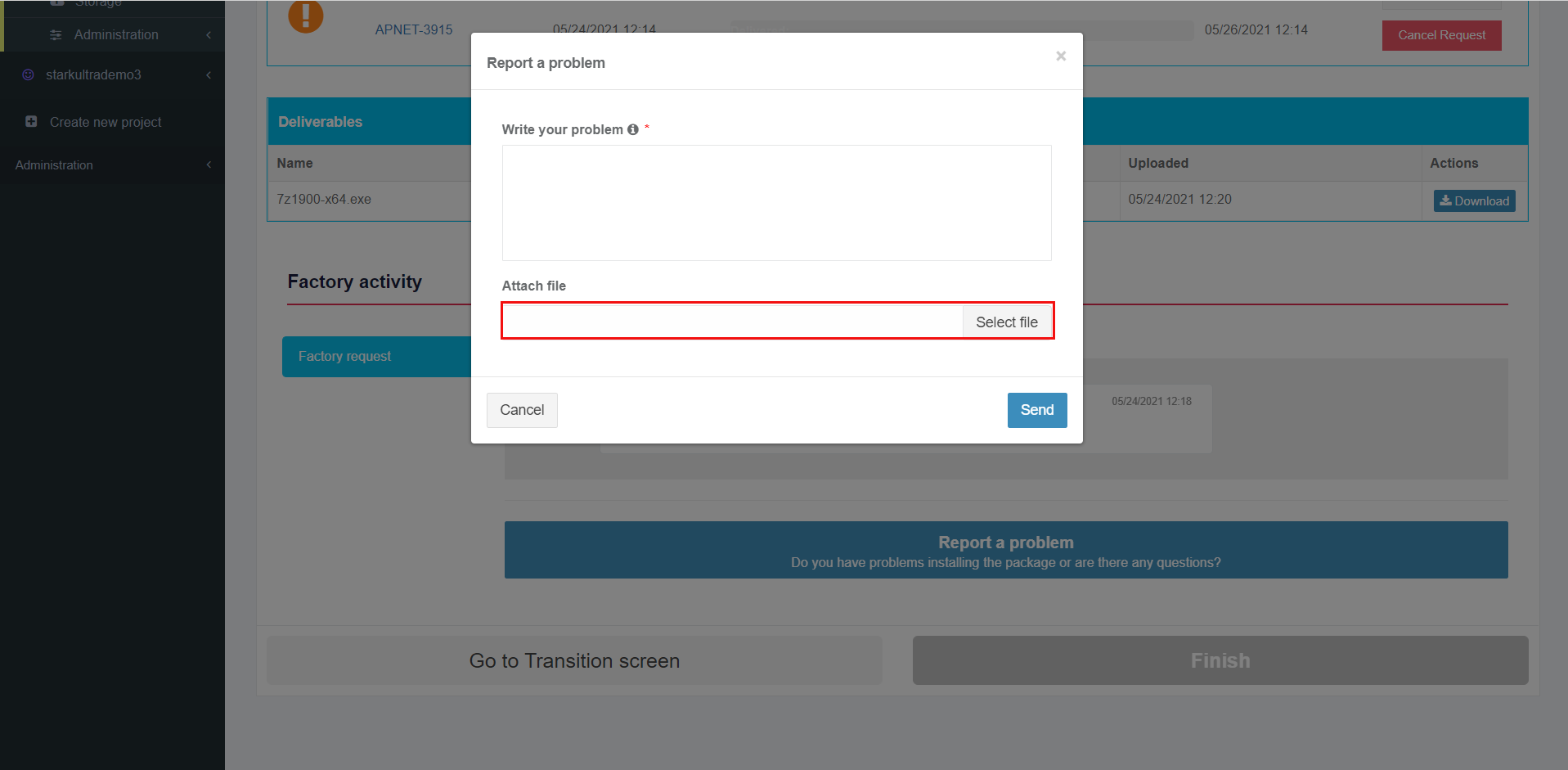
<span class="TextRun SCXW106624138 BCX8" data-contrast="auto" lang="EN-GB" xml:lang="EN-GB"><span class="NormalTextRun SCXW106624138 BCX8">The option to write a text message is available under </span><span class="NormalTextRun SCXW106624138 BCX8">the </span></span><span class="TextRun SCXW106624138 BCX8" data-contrast="auto" lang="EN-GB" xml:lang="EN-GB"><span class="NormalTextRun SCXW106624138 BCX8">**Write your problem** </span></span><span class="TextRun SCXW106624138 BCX8" data-contrast="auto" lang="EN-GB" xml:lang="EN-GB"><span class="NormalTextRun ContextualSpellingAndGrammarErrorV2 SCXW106624138 BCX8">field.</span></span>

<span class="TextRun SCXW106624138 BCX8" data-contrast="auto" lang="EN-GB" xml:lang="EN-GB"><span class="NormalTextRun ContextualSpellingAndGrammarErrorV2 SCXW106624138 BCX8">[![packaging_24.png](https://docs.apptimized.com/uploads/images/gallery/2021-06/scaled-1680-/6xoAlvb3jarfH8su-packaging_24.png)](https://docs.apptimized.com/uploads/images/gallery/2021-06/6xoAlvb3jarfH8su-packaging_24.png)</span></span>

<p class="callout info"><span class="TextRun SCXW106624138 BCX8" data-contrast="auto" lang="EN-GB" xml:lang="EN-GB"><span class="NormalTextRun ContextualSpellingAndGrammarErrorV2 SCXW106624138 BCX8">**Note.** This field is mandatory.</span></span></p>

<span class="TextRun SCXW106624138 BCX8" data-contrast="auto" lang="EN-GB" xml:lang="EN-GB"><span class="NormalTextRun ContextualSpellingAndGrammarErrorV2 SCXW106624138 BCX8"><span class="TextRun SCXW211184477 BCX8" data-contrast="auto" lang="EN-GB" xml:lang="EN-GB"><span class="NormalTextRun SCXW211184477 BCX8">The option to attach </span><span class="NormalTextRun SCXW211184477 BCX8">a </span><span class="NormalTextRun SCXW211184477 BCX8">file is available under the </span></span><span class="TextRun SCXW211184477 BCX8" data-contrast="auto" lang="EN-GB" xml:lang="EN-GB"><span class="NormalTextRun SCXW211184477 BCX8">**Select file** </span></span><span class="TextRun SCXW211184477 BCX8" data-contrast="auto" lang="EN-GB" xml:lang="EN-GB"><span class="NormalTextRun ContextualSpellingAndGrammarErrorV2 SCXW211184477 BCX8">field.</span></span></span></span>

<span class="TextRun SCXW106624138 BCX8" data-contrast="auto" lang="EN-GB" xml:lang="EN-GB"><span class="NormalTextRun ContextualSpellingAndGrammarErrorV2 SCXW106624138 BCX8">[![packaging_25.png](https://docs.apptimized.com/uploads/images/gallery/2021-06/scaled-1680-/BohpvVdHQAv8vQD9-packaging_25.png)](https://docs.apptimized.com/uploads/images/gallery/2021-06/BohpvVdHQAv8vQD9-packaging_25.png)</span></span>

<span class="TextRun SCXW106624138 BCX8" data-contrast="auto" lang="EN-GB" xml:lang="EN-GB"><span class="NormalTextRun ContextualSpellingAndGrammarErrorV2 SCXW106624138 BCX8"><span class="TextRun SCXW77351729 BCX8" data-contrast="auto" lang="EN-GB" xml:lang="EN-GB"><span class="NormalTextRun SCXW77351729 BCX8">The option to change the attached file is available under the </span></span><span class="TextRun SCXW77351729 BCX8" data-contrast="auto" lang="EN-GB" xml:lang="EN-GB"><span class="NormalTextRun SCXW77351729 BCX8">**Change** </span></span><span class="TextRun SCXW77351729 BCX8" data-contrast="auto" lang="EN-GB" xml:lang="EN-GB"><span class="NormalTextRun SCXW77351729 BCX8">button.</span></span><span class="EOP SCXW77351729 BCX8" data-ccp-props="{"201341983":0,"335559739":160,"335559740":259}"> </span></span></span>

<span class="TextRun SCXW106624138 BCX8" data-contrast="auto" lang="EN-GB" xml:lang="EN-GB"><span class="NormalTextRun ContextualSpellingAndGrammarErrorV2 SCXW106624138 BCX8">[![packaging_26_3-(1).png](https://docs.apptimized.com/uploads/images/gallery/2021-06/scaled-1680-/O39QjMB2hotX9p2z-packaging_26_3-(1).png)](https://docs.apptimized.com/uploads/images/gallery/2021-06/O39QjMB2hotX9p2z-packaging_26_3-(1).png)</span></span>

<span class="TextRun SCXW106624138 BCX8" data-contrast="auto" lang="EN-GB" xml:lang="EN-GB"><span class="NormalTextRun ContextualSpellingAndGrammarErrorV2 SCXW106624138 BCX8"><span class="TextRun SCXW61857218 BCX8" data-contrast="auto" lang="EN-GB" xml:lang="EN-GB"><span class="NormalTextRun SCXW61857218 BCX8">The option to remove the attached file is available under the </span></span><span class="TextRun SCXW61857218 BCX8" data-contrast="auto" lang="EN-GB" xml:lang="EN-GB"><span class="NormalTextRun SCXW61857218 BCX8">**Remove** </span></span><span class="TextRun SCXW61857218 BCX8" data-contrast="auto" lang="EN-GB" xml:lang="EN-GB"><span class="NormalTextRun SCXW61857218 BCX8">button.</span></span></span></span>

<span class="TextRun SCXW106624138 BCX8" data-contrast="auto" lang="EN-GB" xml:lang="EN-GB"><span class="NormalTextRun ContextualSpellingAndGrammarErrorV2 SCXW106624138 BCX8"><span class="TextRun SCXW61857218 BCX8" data-contrast="auto" lang="EN-GB" xml:lang="EN-GB"><span class="NormalTextRun SCXW61857218 BCX8">[![packaging-27-(1).png](https://docs.apptimized.com/uploads/images/gallery/2021-06/scaled-1680-/ITBYIKfheqDvVfxR-packaging-27-(1).png)](https://docs.apptimized.com/uploads/images/gallery/2021-06/ITBYIKfheqDvVfxR-packaging-27-(1).png)</span></span></span></span>

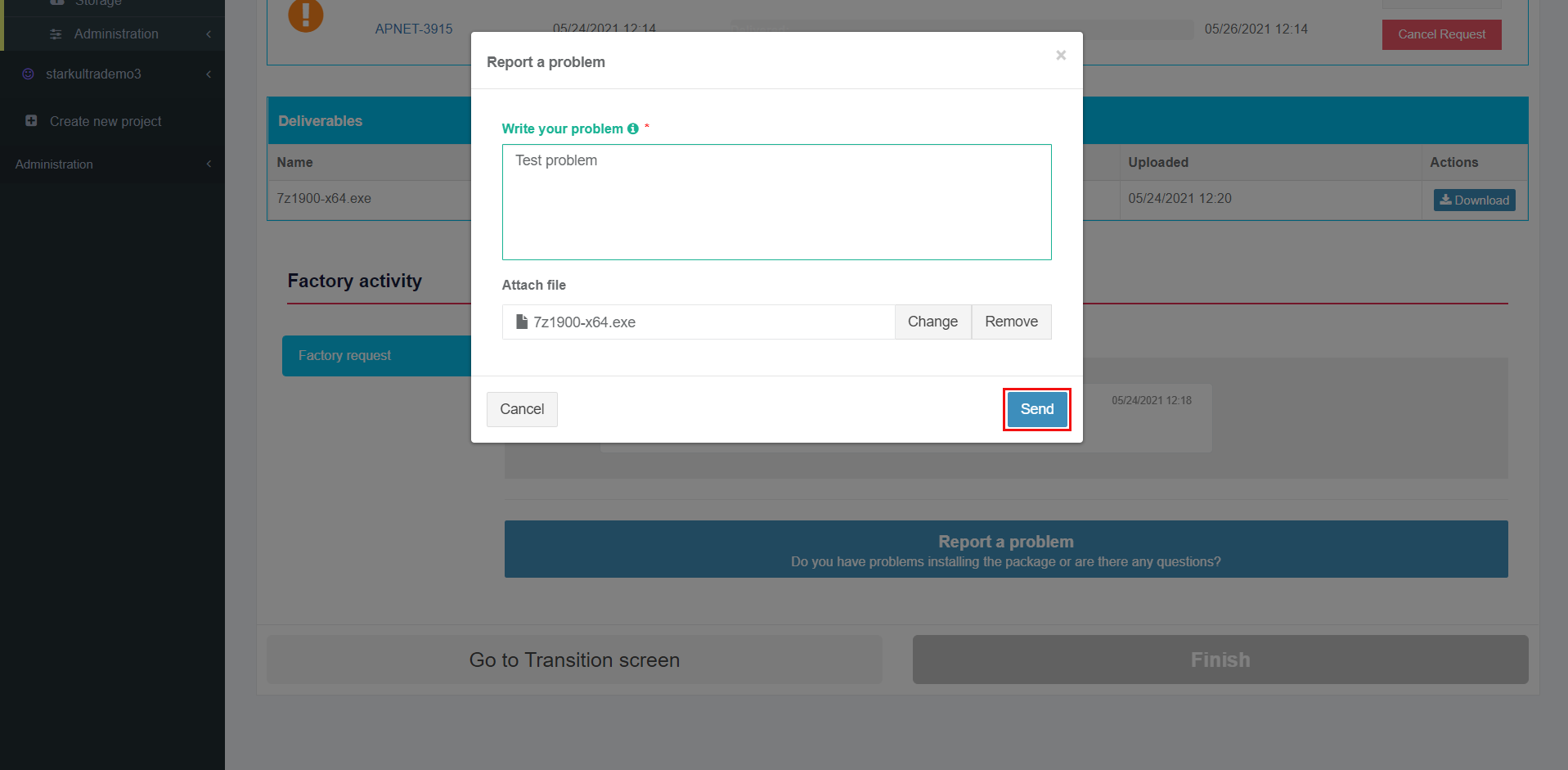
<span class="TextRun SCXW106624138 BCX8" data-contrast="auto" lang="EN-GB" xml:lang="EN-GB"><span class="NormalTextRun ContextualSpellingAndGrammarErrorV2 SCXW106624138 BCX8"><span class="TextRun SCXW61857218 BCX8" data-contrast="auto" lang="EN-GB" xml:lang="EN-GB"><span class="NormalTextRun SCXW61857218 BCX8"><span class="TextRun SCXW201467371 BCX8" data-contrast="auto" lang="EN-GB" xml:lang="EN-GB"><span class="NormalTextRun SCXW201467371 BCX8">The option to send </span><span class="NormalTextRun SCXW201467371 BCX8">a </span><span class="NormalTextRun SCXW201467371 BCX8">message is available under </span></span><span class="TextRun SCXW201467371 BCX8" data-contrast="auto" lang="EN-GB" xml:lang="EN-GB"><span class="NormalTextRun SCXW201467371 BCX8">**Send** </span></span><span class="TextRun SCXW201467371 BCX8" data-contrast="auto" lang="EN-GB" xml:lang="EN-GB"><span class="NormalTextRun SCXW201467371 BCX8">field. </span></span><span class="TextRun SCXW201467371 BCX8" data-contrast="auto" lang="EN-GB" xml:lang="EN-GB"><span class="NormalTextRun SCXW201467371 BCX8">**Cancel** – </span></span><span class="TextRun SCXW201467371 BCX8" data-contrast="auto" lang="EN-GB" xml:lang="EN-GB"><span class="NormalTextRun SCXW201467371 BCX8">reverts to </span></span><span class="TextRun SCXW201467371 BCX8" data-contrast="auto" lang="EN-GB" xml:lang="EN-GB"><span class="NormalTextRun SCXW201467371 BCX8">general Factory process </span></span><span class="TextRun SCXW201467371 BCX8" data-contrast="auto" lang="EN-GB" xml:lang="EN-GB"><span class="NormalTextRun SCXW201467371 BCX8">workflow.</span></span></span></span></span></span>

<span class="TextRun SCXW106624138 BCX8" data-contrast="auto" lang="EN-GB" xml:lang="EN-GB"><span class="NormalTextRun ContextualSpellingAndGrammarErrorV2 SCXW106624138 BCX8"><span class="TextRun SCXW61857218 BCX8" data-contrast="auto" lang="EN-GB" xml:lang="EN-GB"><span class="NormalTextRun SCXW61857218 BCX8"><span class="TextRun SCXW201467371 BCX8" data-contrast="auto" lang="EN-GB" xml:lang="EN-GB"><span class="NormalTextRun SCXW201467371 BCX8">[![packaging_28.png](https://docs.apptimized.com/uploads/images/gallery/2021-06/scaled-1680-/9UTowLyYgK7MB2ZW-packaging_28.png)](https://docs.apptimized.com/uploads/images/gallery/2021-06/9UTowLyYgK7MB2ZW-packaging_28.png)</span></span></span></span></span></span>

<span class="TextRun SCXW106624138 BCX8" data-contrast="auto" lang="EN-GB" xml:lang="EN-GB"><span class="NormalTextRun ContextualSpellingAndGrammarErrorV2 SCXW106624138 BCX8"><span class="TextRun SCXW61857218 BCX8" data-contrast="auto" lang="EN-GB" xml:lang="EN-GB"><span class="NormalTextRun SCXW61857218 BCX8"><span class="TextRun SCXW213087499 BCX8" data-contrast="auto" lang="EN-GB" xml:lang="EN-GB"><span class="NormalTextRun SCXW213087499 BCX8">Apptimized shows the message history interface when successful:</span></span></span></span></span></span>

<span class="TextRun SCXW106624138 BCX8" data-contrast="auto" lang="EN-GB" xml:lang="EN-GB"><span class="NormalTextRun ContextualSpellingAndGrammarErrorV2 SCXW106624138 BCX8"><span class="TextRun SCXW61857218 BCX8" data-contrast="auto" lang="EN-GB" xml:lang="EN-GB"><span class="NormalTextRun SCXW61857218 BCX8"><span class="TextRun SCXW213087499 BCX8" data-contrast="auto" lang="EN-GB" xml:lang="EN-GB"><span class="NormalTextRun SCXW213087499 BCX8">[![discovery_54-(1).png](https://docs.apptimized.com/uploads/images/gallery/2021-06/scaled-1680-/fCmMOzkPF7ePOqjo-discovery_54-(1).png)](https://docs.apptimized.com/uploads/images/gallery/2021-06/fCmMOzkPF7ePOqjo-discovery_54-(1).png)</span></span></span></span></span></span>

<p class="callout info"><span class="TextRun SCXW106624138 BCX8" data-contrast="auto" lang="EN-GB" xml:lang="EN-GB"><span class="NormalTextRun ContextualSpellingAndGrammarErrorV2 SCXW106624138 BCX8"><span class="TextRun SCXW61857218 BCX8" data-contrast="auto" lang="EN-GB" xml:lang="EN-GB"><span class="NormalTextRun SCXW61857218 BCX8"><span class="TextRun SCXW213087499 BCX8" data-contrast="auto" lang="EN-GB" xml:lang="EN-GB"><span class="NormalTextRun SCXW213087499 BCX8">**Note.** <span class="NormalTextRun SCXW212872003 BCX8">The a</span><span class="NormalTextRun SCXW212872003 BCX8">ttached </span><span class="NormalTextRun SCXW212872003 BCX8">files appear above the message history interface.</span></span></span></span></span></span></span></p>

[![discovery_30-(1).png](https://docs.apptimized.com/uploads/images/gallery/2021-06/scaled-1680-/PpQYlcpOFyHOAo6Z-discovery_30-(1).png)](https://docs.apptimized.com/uploads/images/gallery/2021-06/PpQYlcpOFyHOAo6Z-discovery_30-(1).png)

<span class="TextRun SCXW88740037 BCX8" data-contrast="none" lang="EN-GB" xml:lang="EN-GB"><span class="NormalTextRun SCXW88740037 BCX8">If Apptimized needs some additional information, a user will receive notifications and a warning icon in the dashboard:</span></span><span class="EOP SCXW88740037 BCX8" data-ccp-props="{"201341983":0,"335559739":160,"335559740":259}"> </span>

[![discovery_40-(2).png](https://docs.apptimized.com/uploads/images/gallery/2021-06/scaled-1680-/YrFbKwxmH57iw66m-discovery_40-(2).png)](https://docs.apptimized.com/uploads/images/gallery/2021-06/YrFbKwxmH57iw66m-discovery_40-(2).png)

[![discovery_34-(1).png](https://docs.apptimized.com/uploads/images/gallery/2021-06/scaled-1680-/LKFlzJYbCoL0pwpL-discovery_34-(1).png)](https://docs.apptimized.com/uploads/images/gallery/2021-06/LKFlzJYbCoL0pwpL-discovery_34-(1).png)

<span class="TextRun SCXW254872944 BCX8" data-contrast="auto" lang="EN-GB" xml:lang="EN-GB"><span class="NormalTextRun SCXW254872944 BCX8">If there is </span><span class="NormalTextRun SCXW254872944 BCX8">feedback from the user </span><span class="NormalTextRun SCXW254872944 BCX8">regarding</span><span class="NormalTextRun SCXW254872944 BCX8"> </span><span class="NormalTextRun SCXW254872944 BCX8">the Factory Request, the following notification and status in the dashboard appear:</span></span><span class="EOP SCXW254872944 BCX8" data-ccp-props="{"201341983":0,"335559739":160,"335559740":259}"> </span>

<span class="EOP SCXW254872944 BCX8" data-ccp-props="{"201341983":0,"335559739":160,"335559740":259}">[![packaging_36-(1).png](https://docs.apptimized.com/uploads/images/gallery/2021-06/scaled-1680-/wsajrhpC8RCdeXuQ-packaging_36-(1).png)](https://docs.apptimized.com/uploads/images/gallery/2021-06/wsajrhpC8RCdeXuQ-packaging_36-(1).png)</span>

<span class="EOP SCXW254872944 BCX8" data-ccp-props="{"201341983":0,"335559739":160,"335559740":259}">[![discovery_36-(1).png](https://docs.apptimized.com/uploads/images/gallery/2021-06/scaled-1680-/gAY4IknVjTajo4CA-discovery_36-(1).png)](https://docs.apptimized.com/uploads/images/gallery/2021-06/gAY4IknVjTajo4CA-discovery_36-(1).png)</span>

<span class="EOP SCXW254872944 BCX8" data-ccp-props="{"201341983":0,"335559739":160,"335559740":259}"><span class="TextRun SCXW234675944 BCX8" data-contrast="auto" lang="EN-GB" xml:lang="EN-GB"><span class="NormalTextRun SCXW234675944 BCX8">Apptimized provides the following </span><span class="NormalTextRun SCXW234675944 BCX8">notification and </span><span class="NormalTextRun SCXW234675944 BCX8">status</span><span class="NormalTextRun SCXW234675944 BCX8">es</span><span class="NormalTextRun SCXW234675944 BCX8"> in workflow and dashboard</span><span class="NormalTextRun SCXW234675944 BCX8"> after the request was solved:</span></span><span class="EOP SCXW234675944 BCX8" data-ccp-props="{"201341983":0,"335559739":160,"335559740":259}"> </span></span>

[![packaging_36-(1).png](https://docs.apptimized.com/uploads/images/gallery/2021-06/scaled-1680-/wsajrhpC8RCdeXuQ-packaging_36-(1).png)](https://docs.apptimized.com/uploads/images/gallery/2021-06/wsajrhpC8RCdeXuQ-packaging_36-(1).png)

[![discovery_33-(2).png](https://docs.apptimized.com/uploads/images/gallery/2021-06/scaled-1680-/qWlHKpSJMcdp5swM-discovery_33-(2).png)](https://docs.apptimized.com/uploads/images/gallery/2021-06/qWlHKpSJMcdp5swM-discovery_33-(2).png)

[![discovery_37-(2).png](https://docs.apptimized.com/uploads/images/gallery/2021-06/scaled-1680-/GZ5eFNv0AiDqwREG-discovery_37-(2).png)](https://docs.apptimized.com/uploads/images/gallery/2021-06/GZ5eFNv0AiDqwREG-discovery_37-(2).png)

##### **Finish Discovery - Factory Service**

The Finish button becomes active when a request is approved by a user.

[![discovery_62-(4).png](https://docs.apptimized.com/uploads/images/gallery/2021-06/scaled-1680-/xPAWwfKD1DwjQCyP-discovery_62-(4).png)](https://docs.apptimized.com/uploads/images/gallery/2021-06/xPAWwfKD1DwjQCyP-discovery_62-(4).png)

The option to create a new request is available under the **Create new request** button. Apptimized shows the following modal window to confirm the request approval:

[![discovery_49.png](https://docs.apptimized.com/uploads/images/gallery/2020-04/scaled-1680-/SySuYgeb9XrmoHNT-discovery_49.png)](https://docs.apptimized.com/uploads/images/gallery/2020-04/SySuYgeb9XrmoHNT-discovery_49.png)
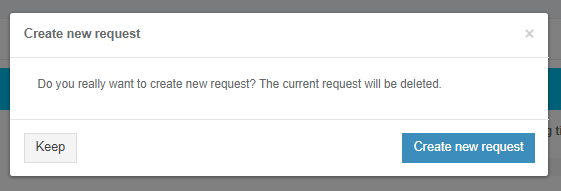
Apptimized shows the following screen when successful:

[![discovery_61.png](https://docs.apptimized.com/uploads/images/gallery/2020-04/scaled-1680-/YOeDdCjqeZUenEiA-discovery_61.png)](https://docs.apptimized.com/uploads/images/gallery/2020-04/YOeDdCjqeZUenEiA-discovery_61.png)
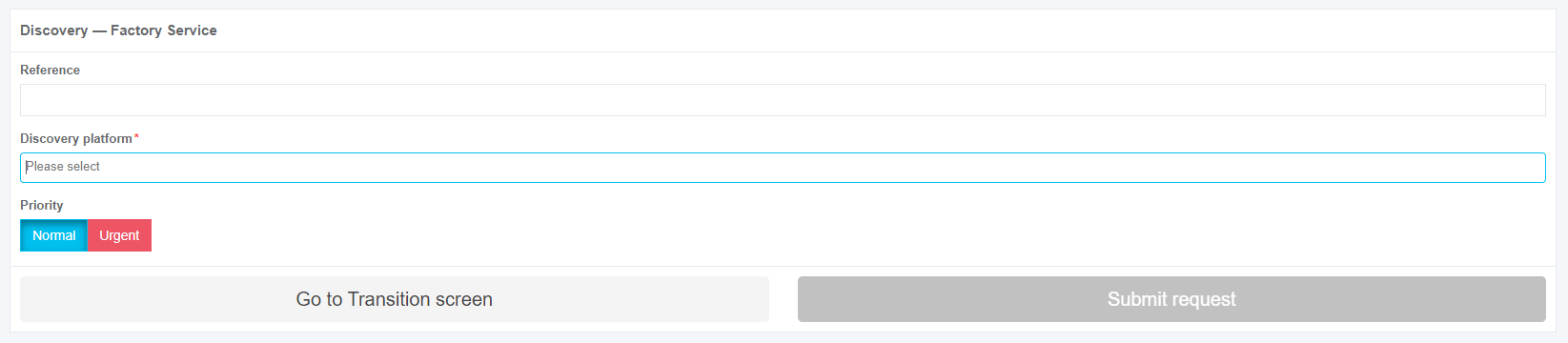
The option to finish Discovery - Factory Service process is available under the **Finish** button.

[![discovery_59-(1).png](https://docs.apptimized.com/uploads/images/gallery/2021-06/scaled-1680-/6qlXsYryghMyrXDB-discovery_59-(1).png)](https://docs.apptimized.com/uploads/images/gallery/2021-06/6qlXsYryghMyrXDB-discovery_59-(1).png)

Apptimized shows the following screen when successful:

[![discovery_60_2.png](https://docs.apptimized.com/uploads/images/gallery/2021-08/scaled-1680-/MNP04Qq1Iber55Bs-discovery_60_2.png)](https://docs.apptimized.com/uploads/images/gallery/2021-08/MNP04Qq1Iber55Bs-discovery_60_2.png)