# Push to SCCM as Package

Deployment starts from the project portfolio.

[![sccm_27.png](https://docs.apptimized.com/uploads/images/gallery/2020-03/scaled-1680-/M7gjsM6O9hLl3hSp-sccm_27.png)](https://docs.apptimized.com/uploads/images/gallery/2020-03/M7gjsM6O9hLl3hSp-sccm_27.png)

<p class="callout info">The application should have a package file produced during the Packaging step (Factory or Self-Service). If the required file is missing, Apptimized shows the notification.  
  
[![sccm_15.png](https://docs.apptimized.com/uploads/images/gallery/2020-03/scaled-1680-/5lwmLAFlfpRUVX4K-sccm_15.png)](https://docs.apptimized.com/uploads/images/gallery/2020-03/5lwmLAFlfpRUVX4K-sccm_15.png)</p>

After locating the application in the list, the deployment process can be triggered by clicking the extended menu in the **Actions** column and selecting **Push to SCCM as Package**.

[![sccm_21_01-(1).png](https://docs.apptimized.com/uploads/images/gallery/2021-11/scaled-1680-/jww7o9Ppy1i16fW9-sccm_21_01-(1).png)](https://docs.apptimized.com/uploads/images/gallery/2021-11/jww7o9Ppy1i16fW9-sccm_21_01-(1).png)

Apptimized shows the following screen when successful:

[![sccm_31_01.png](https://docs.apptimized.com/uploads/images/gallery/2021-12/scaled-1680-/qIWzgEbwivBsPKpL-sccm_31_01.png)](https://docs.apptimized.com/uploads/images/gallery/2021-12/qIWzgEbwivBsPKpL-sccm_31_01.png)
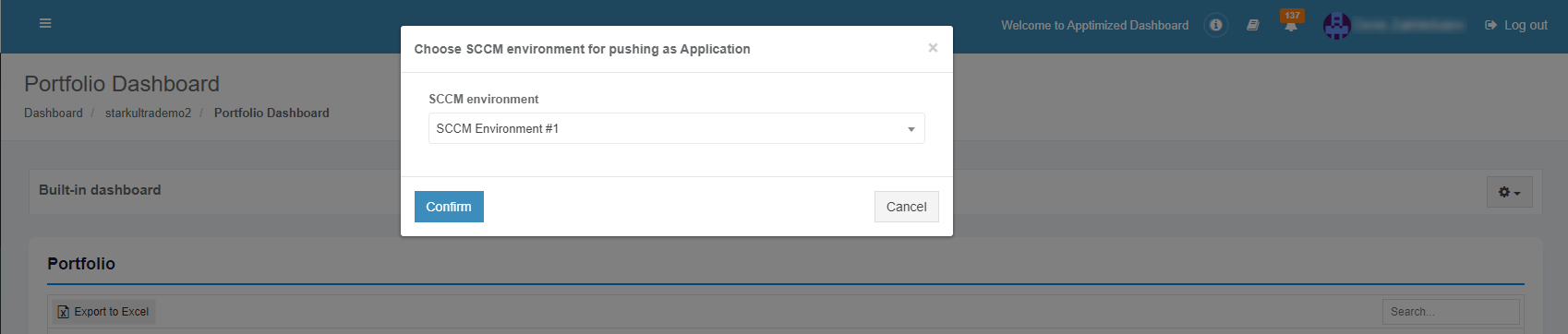
The option to continue the deploying process is available after selecting the **SCCM environment** and clicking the **Confirm** button.

Apptimized shows the following screen when successful:

[![sccm_22_03.png](https://docs.apptimized.com/uploads/images/gallery/2022-04/scaled-1680-/9QZubXwtfYZqtULK-sccm_22_03.png)](https://docs.apptimized.com/uploads/images/gallery/2022-04/9QZubXwtfYZqtULK-sccm_22_03.png)
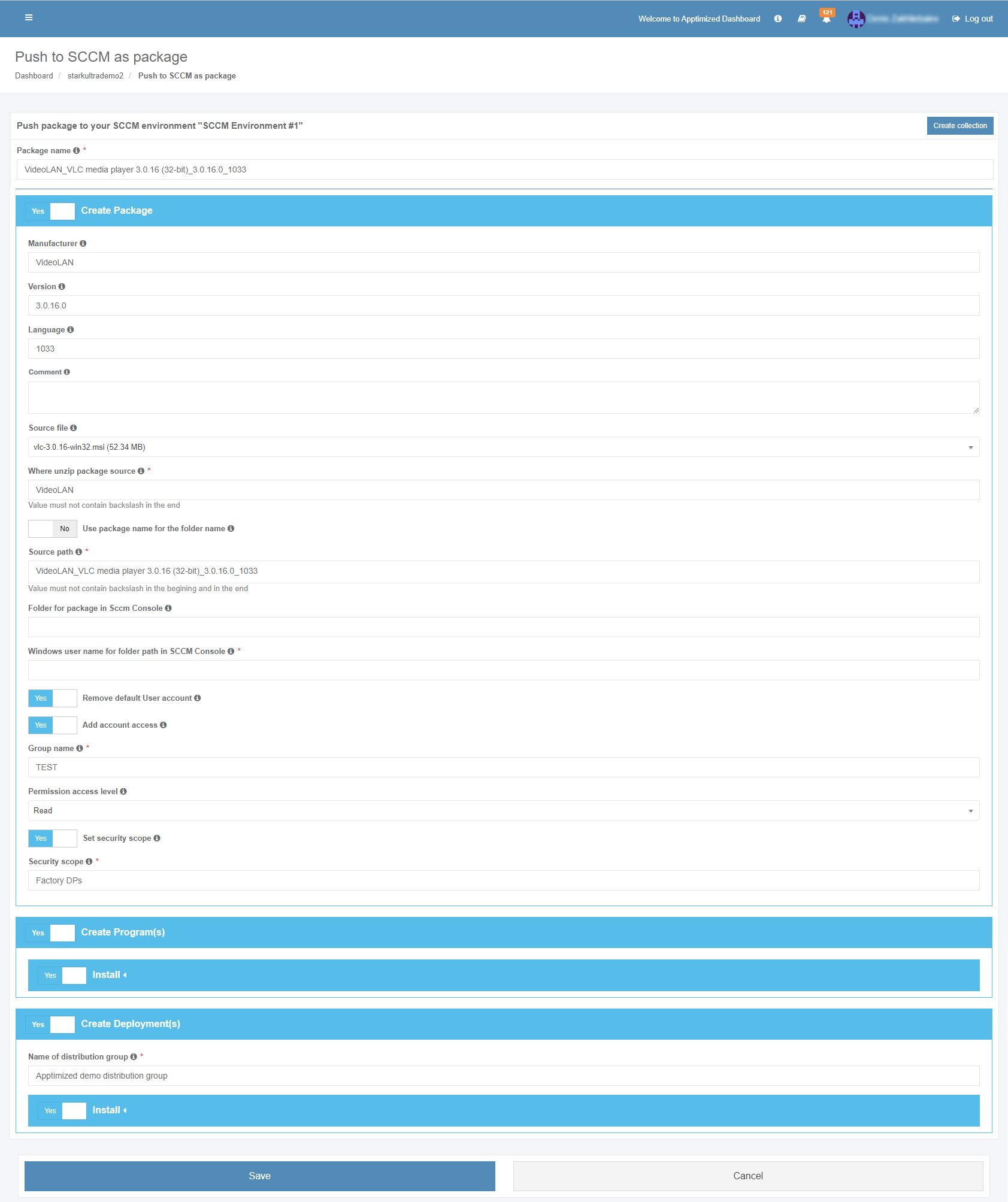
**The package name** option is the only option that requires manual verification and confirmation. The package inherits default SCCM project settings. . Brief field descriptions are available by hovering the info icon ([![info.png](https://docs.apptimized.com/uploads/images/gallery/2020-07/scaled-1680-/rn4N9zcLXMfUeVtu-info.png)](https://docs.apptimized.com/uploads/images/gallery/2020-07/rn4N9zcLXMfUeVtu-info.png))

<p class="callout info">**<span class="TextRun SCXW158035226 BCX8" data-contrast="none" lang="RU-RU" xml:lang="RU-RU"><span class="NormalTextRun SCXW158035226 BCX8">Note</span></span>**<span class="TextRun SCXW158035226 BCX8" data-contrast="none" lang="RU-RU" xml:lang="RU-RU"><span class="NormalTextRun SCXW158035226 BCX8">**.** Max </span><span class="NormalTextRun SpellingErrorV2 SCXW158035226 BCX8 SpellingErrorHighlight">length</span><span class="NormalTextRun SCXW158035226 BCX8"> </span><span class="NormalTextRun SpellingErrorV2 SCXW158035226 BCX8">for</span><span class="NormalTextRun SCXW158035226 BCX8"> a </span><span class="NormalTextRun SpellingErrorV2 SCXW158035226 BCX8">package</span><span class="NormalTextRun SCXW158035226 BCX8"> </span><span class="NormalTextRun SpellingErrorV2 SCXW158035226 BCX8">name</span><span class="NormalTextRun SCXW158035226 BCX8"> </span><span class="NormalTextRun SpellingErrorV2 SCXW158035226 BCX8">is</span><span class="NormalTextRun SCXW158035226 BCX8"> 50 </span><span class="NormalTextRun SpellingErrorV2 SCXW158035226 BCX8">symbols</span><span class="NormalTextRun SCXW158035226 BCX8">.</span></span><span class="EOP SCXW158035226 BCX8" data-ccp-props="{"201341983":0,"335559739":160,"335559740":259}"> </span></p>

<span class="TextRun SCXW58455599 BCX8" data-contrast="none" lang="RU-RU" xml:lang="RU-RU"><span class="NormalTextRun SpellingErrorV2 SCXW58455599 BCX8">The package is</span><span class="NormalTextRun SCXW58455599 BCX8"> </span><span class="NormalTextRun SpellingErrorV2 SCXW58455599 BCX8">scheduled</span><span class="NormalTextRun SCXW58455599 BCX8"> </span><span class="NormalTextRun SpellingErrorV2 SCXW58455599 BCX8">for</span><span class="NormalTextRun SCXW58455599 BCX8"> </span><span class="NormalTextRun SpellingErrorV2 SCXW58455599 BCX8">deployment</span><span class="NormalTextRun SCXW58455599 BCX8"> </span><span class="NormalTextRun SpellingErrorV2 SCXW58455599 BCX8">by</span><span class="NormalTextRun SCXW58455599 BCX8"> </span><span class="NormalTextRun SpellingErrorV2 SCXW58455599 BCX8">clicking</span><span class="NormalTextRun SCXW58455599 BCX8"> </span><span class="NormalTextRun SpellingErrorV2 SCXW58455599 BCX8">on</span><span class="NormalTextRun SCXW58455599 BCX8"> </span><span class="NormalTextRun SpellingErrorV2 SCXW58455599 BCX8">the</span><span class="NormalTextRun SCXW58455599 BCX8"> </span></span><span class="TextRun SCXW58455599 BCX8" data-contrast="none" lang="RU-RU" xml:lang="RU-RU"><span class="NormalTextRun SCXW58455599 BCX8">**Save** </span></span><span class="TextRun SCXW58455599 BCX8" data-contrast="none" lang="RU-RU" xml:lang="RU-RU"><span class="NormalTextRun SpellingErrorV2 SCXW58455599 BCX8">button</span><span class="NormalTextRun SCXW58455599 BCX8">. </span><span class="NormalTextRun SpellingErrorV2 SCXW58455599 BCX8">Apptimized</span><span class="NormalTextRun SCXW58455599 BCX8"> </span><span class="NormalTextRun SpellingErrorV2 SCXW58455599 BCX8">shows</span><span class="NormalTextRun SCXW58455599 BCX8"> </span><span class="NormalTextRun SpellingErrorV2 SCXW58455599 BCX8">the</span><span class="NormalTextRun SCXW58455599 BCX8"> </span><span class="NormalTextRun SpellingErrorV2 SCXW58455599 BCX8">following</span><span class="NormalTextRun SCXW58455599 BCX8"> </span><span class="NormalTextRun SpellingErrorV2 SCXW58455599 BCX8">notification</span><span class="NormalTextRun SCXW58455599 BCX8"> </span><span class="NormalTextRun SpellingErrorV2 SCXW58455599 BCX8">when</span><span class="NormalTextRun SCXW58455599 BCX8"> </span><span class="NormalTextRun SpellingErrorV2 SpellingErrorHighlight SCXW58455599 BCX8">successful</span><span class="NormalTextRun SCXW58455599 BCX8">:</span></span><span class="EOP SCXW58455599 BCX8" data-ccp-props="{"201341983":0,"335559739":160,"335559740":259}"> </span>

<span class="EOP SCXW58455599 BCX8" data-ccp-props="{"201341983":0,"335559739":160,"335559740":259}">[![sccm_26_01-(1).png](https://docs.apptimized.com/uploads/images/gallery/2021-11/scaled-1680-/PZ7Gcvp685CwvKa1-sccm_26_01-(1).png)](https://docs.apptimized.com/uploads/images/gallery/2021-11/PZ7Gcvp685CwvKa1-sccm_26_01-(1).png)</span>

It takes a few minutes for SCCM objects to appear in the SCCM Admin Console.

Details of the deployment process components are described in the sections below.

##### Create the package in SCCM

The creation of applications can be enabled by **Create Application** switch and editing appropriate settings if required. Brief field descriptions are available by hovering the info icon ([![info.png](https://docs.apptimized.com/uploads/images/gallery/2020-03/scaled-1680-/wmeTsIn3XGJj4EpS-info.png)](https://docs.apptimized.com/uploads/images/gallery/2020-03/wmeTsIn3XGJj4EpS-info.png)) located near every field.

[![sccm_23_03.png](https://docs.apptimized.com/uploads/images/gallery/2022-04/scaled-1680-/FENT5vxfRRTNQr3B-sccm_23_03.png)](https://docs.apptimized.com/uploads/images/gallery/2022-04/FENT5vxfRRTNQr3B-sccm_23_03.png)
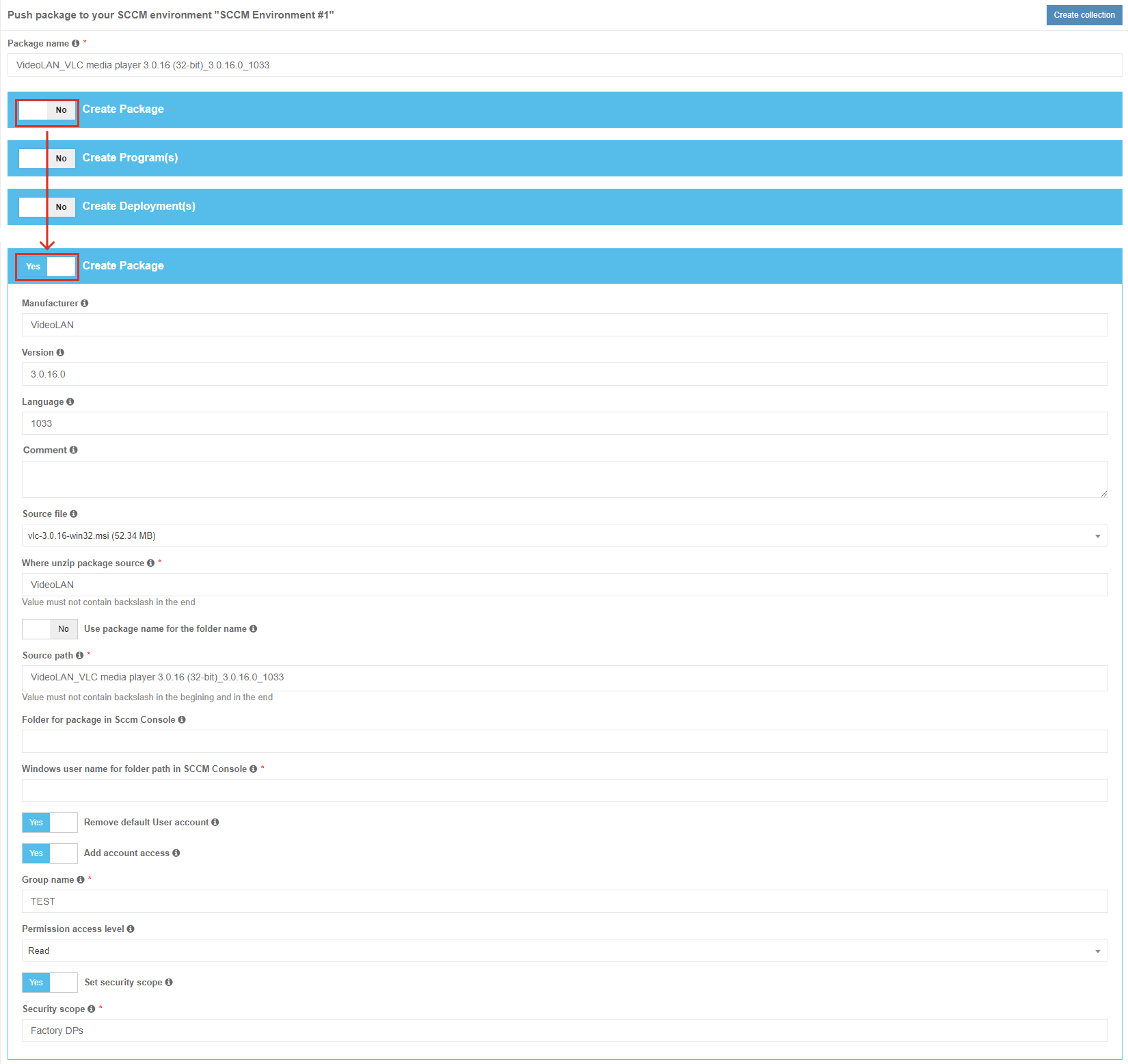
<table border="1" id="bkmrk-settings%C2%A0-details%C2%A0-m" style="border-collapse: collapse; width: 100%; height: 1066px;"><tbody><tr aria-rowindex="1" style="height: 35px;"><td data-celllook="0" style="width: 35.1851%; height: 35px;">**Settings**

</td><td data-celllook="0" style="width: 64.6914%; height: 35px;">**Details**

</td></tr><tr aria-rowindex="2" style="height: 35px;"><td data-celllook="0" style="width: 35.1851%; height: 35px;"><span data-contrast="none">Manufacturer</span><span data-ccp-props="{"201341983":0,"335559740":259}"> </span>

</td><td data-celllook="0" style="width: 64.6914%; height: 35px;"><span data-contrast="none">This setting equals the vendor field of application in the [project portfolio](https://docs.apptimized.com/link/246#bkmrk-table-1.-information).</span><span data-ccp-props="{"201341983":0,"335559740":259}"> </span>

</td></tr><tr aria-rowindex="3" style="height: 35px;"><td data-celllook="0" style="width: 35.1851%; height: 35px;"><span data-contrast="none">Version</span><span data-ccp-props="{"201341983":0,"335559740":259}"> </span>

</td><td data-celllook="0" style="width: 64.6914%; height: 35px;"><span data-contrast="none">This setting equals the version field of the application in the [project portfolio](https://docs.apptimized.com/link/246#bkmrk-table-1.-information).</span><span data-ccp-props="{"201341983":0,"335559740":259}"> </span>

</td></tr><tr aria-rowindex="4" style="height: 35px;"><td data-celllook="0" style="width: 35.1851%; height: 35px;"><span data-contrast="none">Language</span><span data-ccp-props="{"201341983":0,"335559740":259}"> </span>

</td><td data-celllook="0" style="width: 64.6914%; height: 35px;"><span data-contrast="none">This setting equals the language field of application in the [project portfolio](https://docs.apptimized.com/link/246#bkmrk-table-1.-information).</span><span data-ccp-props="{"201341983":0,"335559740":259}"> </span>

</td></tr><tr aria-rowindex="5" style="height: 35px;"><td data-celllook="0" style="width: 35.1851%; height: 35px;">Сomment

</td><td data-celllook="0" style="width: 64.6914%; height: 35px;"><span data-contrast="none">This setting enables setting the optional description for the package.</span><span data-ccp-props="{"201341983":0,"335559740":259}"> </span>

</td></tr><tr aria-rowindex="6" style="height: 57px;"><td data-celllook="0" style="width: 35.1851%; height: 57px;"><span data-contrast="none">Source file</span><span data-ccp-props="{"201341983":0,"335559740":259}"> </span>

</td><td data-celllook="0" style="width: 64.6914%; height: 57px;"><span data-contrast="none">This setting enables the selection of the package that will be deployed under SCCM.</span><span data-ccp-props="{"201341983":0,"335559740":259}"> </span>

</td></tr><tr aria-rowindex="7" style="height: 57px;"><td data-celllook="0" style="width: 35.1851%; height: 57px;"><span data-contrast="none">Where unzip package source</span><span data-ccp-props="{"201341983":0,"335559740":259}"> </span>

</td><td data-celllook="0" style="width: 64.6914%; height: 57px;"><span data-contrast="none">This setting corresponds to **Where unzip package source setting** under **Project Settings** &gt; **Integration** &gt; **SCCM** &gt; **Package template**. (see [Table 4](https://docs.apptimized.com/link/6#bkmrk-table%C2%A04.%C2%A0package%C2%A0tem))</span>

</td></tr><tr aria-rowindex="8" style="height: 80px;"><td data-celllook="0" style="width: 35.1851%; height: 80px;"><span data-contrast="none">Use package name for the folder name</span><span data-ccp-props="{"201341983":0,"335559740":259}"> </span>

</td><td data-celllook="0" style="width: 64.6914%; height: 80px;"><span data-contrast="none">This setting corresponds to **Use package name for the folder name** setting under **Project Settings** &gt; **Integration** &gt; **SCCM** &gt; **Package template**. (see [Table 4](https://docs.apptimized.com/link/6#bkmrk-table%C2%A04.%C2%A0package%C2%A0tem))</span>

</td></tr><tr aria-rowindex="9" style="height: 57px;"><td data-celllook="0" style="width: 35.1851%; height: 57px;"><span data-contrast="none">Source path</span><span data-ccp-props="{"201341983":0,"335559740":259}"> </span>

</td><td data-celllook="0" style="width: 64.6914%; height: 57px;"><span data-contrast="none">This setting corresponds to **Source path** setting under **Project Settings** &gt; **Integration** &gt; **SCCM** &gt; **Package template**. (see [Table 4](https://docs.apptimized.com/link/6#bkmrk-table%C2%A04.%C2%A0package%C2%A0tem))</span>

</td></tr><tr aria-rowindex="10" style="height: 80px;"><td data-celllook="0" style="width: 35.1851%; height: 80px;"><span data-contrast="none">Folder for package in Sccm Console</span><span data-ccp-props="{"201341983":0,"335559740":259}"> </span>

</td><td data-celllook="0" style="width: 64.6914%; height: 80px;"><span data-contrast="none">This setting corresponds to **Folder for package in Sccm Console** setting under **Project Settings** &gt; **Integration** &gt; **SCCM** &gt; **Package template**. (see [Table 4](https://docs.apptimized.com/link/6#bkmrk-table%C2%A04.%C2%A0package%C2%A0tem))</span>

<span data-ccp-props="{"201341983":0,"335559740":259}"> </span>

</td></tr><tr aria-rowindex="11" style="height: 80px;"><td data-celllook="0" style="width: 35.1851%; height: 80px;"><span data-contrast="none">Windows user name for folder path in SCCM Console</span><span data-ccp-props="{"201341983":0,"335559740":259}"> </span>

</td><td data-celllook="0" style="width: 64.6914%; height: 80px;"><span data-contrast="none">This setting indicates the user name of user under Windows OS for folder path in SCCM Console.</span>

<span data-ccp-props="{"201341983":0,"335559740":259}"> </span>

</td></tr><tr aria-rowindex="12" style="height: 80px;"><td data-celllook="0" style="width: 35.1851%; height: 80px;"><span data-contrast="none">Remove default User account</span><span data-ccp-props="{"201341983":0,"335559740":259}"> </span>

</td><td data-celllook="0" style="width: 64.6914%; height: 80px;"><span data-contrast="none">This setting corresponds to **Remove default User account** setting under **Project Settings** &gt; **Integration** &gt; **SCCM** &gt; **Package template**.</span><span data-ccp-props="{"201341983":0,"335559740":259}"> (see [Table 4](https://docs.apptimized.com/link/6#bkmrk-table%C2%A04.%C2%A0package%C2%A0tem))</span>

<span data-ccp-props="{"201341983":0,"335559740":259}"> </span>

</td></tr><tr aria-rowindex="13" style="height: 80px;"><td data-celllook="0" style="width: 35.1851%; height: 80px;"><span data-contrast="none">Add account access</span><span data-ccp-props="{"201341983":0,"335559740":259}"> </span>

</td><td data-celllook="0" style="width: 64.6914%; height: 80px;"><span data-contrast="none">This setting corresponds to **Add account access** setting under **Project Settings** &gt; **Integration** &gt; **SCCM** &gt; **Package template**. (see [Table 4](https://docs.apptimized.com/link/6#bkmrk-table%C2%A04.%C2%A0package%C2%A0tem))</span>

<span data-ccp-props="{"201341983":0,"335559740":259}"> </span>

</td></tr><tr aria-rowindex="14" style="height: 80px;"><td data-celllook="0" style="width: 35.1851%; height: 80px;"><span data-contrast="none">Group name</span><span data-ccp-props="{"201341983":0,"335559740":259}"> </span>

</td><td data-celllook="0" style="width: 64.6914%; height: 80px;"><span data-contrast="none">This setting corresponds to **Group name** setting under **Project Settings** &gt; **Integration** &gt; **SCCM** &gt; **Package template**. (see [Table 4](https://docs.apptimized.com/link/6#bkmrk-table%C2%A04.%C2%A0package%C2%A0tem))</span>

<span data-ccp-props="{"201341983":0,"335559740":259}"> </span>

</td></tr><tr aria-rowindex="15" style="height: 80px;"><td data-celllook="0" style="width: 35.1851%; height: 80px;"><span data-contrast="none">Permission access level</span><span data-ccp-props="{"201341983":0,"335559740":259}"> </span>

</td><td data-celllook="0" style="width: 64.6914%; height: 80px;"><span data-contrast="none">This setting corresponds to **Permission access level** setting under **Project Settings** &gt; **Integration** &gt; **SCCM** &gt; **Package template**. (see [Table 4](https://docs.apptimized.com/link/6#bkmrk-table%C2%A04.%C2%A0package%C2%A0tem))</span>

<span data-ccp-props="{"201341983":0,"335559740":259}"> </span>

</td></tr><tr aria-rowindex="16" style="height: 80px;"><td data-celllook="0" style="width: 35.1851%; height: 80px;"><span data-contrast="none">Set security scope</span><span data-ccp-props="{"201341983":0,"335559740":259}"> </span>

</td><td data-celllook="0" style="width: 64.6914%; height: 80px;"><span data-contrast="none">This setting corresponds to **Set security scope** setting under **Project Settings** &gt; **Integration** &gt; **SCCM** &gt; **Package template**. (see [Table 4](https://docs.apptimized.com/link/6#bkmrk-table%C2%A04.%C2%A0package%C2%A0tem))</span>

<span data-ccp-props="{"201341983":0,"335559740":259}"> </span>

</td></tr><tr aria-rowindex="17" style="height: 80px;"><td data-celllook="0" style="width: 35.1851%; height: 80px;"><span data-contrast="none">Security scope</span><span data-ccp-props="{"201341983":0,"335559740":259}"> </span>

</td><td data-celllook="0" style="width: 64.6914%; height: 80px;"><span data-contrast="none">This setting corresponds to **Security scope** setting under **Project Settings** &gt; **Integration** &gt; **SCCM** &gt; **Package template**. (see [Table 4](https://docs.apptimized.com/link/6#bkmrk-table%C2%A04.%C2%A0package%C2%A0tem))</span>

<span data-ccp-props="{"201341983":0,"335559740":259}"> </span>

</td></tr></tbody></table>

##### Create Program(s) in SCCM 

<span data-contrast="none">The creation of applications can be enabled by </span>**<span data-contrast="none">Create Program(s)</span>**<span data-contrast="none"> switch &gt; enabling switches of all created programs under the Project settings (link) and editing appropriate settings if required. Brief field descriptions are available by hovering the info icon (</span><span data-contrast="none">) located near every field.</span><span data-ccp-props="{"201341983":0,"335559739":160,"335559740":259}"> </span>

[![sccm_24_04.png](https://docs.apptimized.com/uploads/images/gallery/2022-04/scaled-1680-/37vPdrBt4SbwmTTn-sccm_24_04.png)](https://docs.apptimized.com/uploads/images/gallery/2022-04/37vPdrBt4SbwmTTn-sccm_24_04.png)

<span data-ccp-props="{"201341983":0,"335559739":160,"335559740":259}">The settings description is available under **Project Settings** &gt; **Integration** &gt; **SCCM** &gt; **Package template** &gt; **Create program** button (see [Table 5](https://docs.apptimized.com/link/6#bkmrk-table-5.-program-tem)).</span>

##### Create Deployment(s) in SCCM

<span data-contrast="none">The creation of applications can be enabled by </span>**<span data-contrast="none">Create Program(s)</span>**<span data-contrast="none"> switch &gt; setting the distribution group name &gt; enabling switches of all created deployments under the Project settings (link) and editing appropriate settings if required. Brief field descriptions are available by hovering the info icon (</span><span data-contrast="none">) located near every field.</span><span data-ccp-props="{"201341983":0,"335559739":160,"335559740":259}"> </span>

[![sccm_25_03.png](https://docs.apptimized.com/uploads/images/gallery/2021-12/scaled-1680-/I3MMmDdvgIB5qMxy-sccm_25_03.png)](https://docs.apptimized.com/uploads/images/gallery/2021-12/I3MMmDdvgIB5qMxy-sccm_25_03.png)

<span data-ccp-props="{"201341983":0,"335559739":160,"335559740":259}">The settings description is available under **Project Settings** &gt; **Integration** &gt; **SCCM** &gt; **Package template** &gt; **Create deployment** button (see [Table 6](https://docs.apptimized.com/link/6#bkmrk-table-6.-package-dep)).</span>