# Apptimized AdminCenter User Manual

# Single Sign-On

#### <span data-contrast="auto">About Single Sign-On</span>

<span data-contrast="auto">Apptimized </span><span data-contrast="auto">**Single Sign-On (SSO)** </span><span data-contrast="auto">is a</span><span data-contrast="auto">n authentication</span><span data-contrast="auto"> </span><span data-contrast="auto">technology that enables an Apptimized user to secure log in with single credentials to any of Apptimized solutions or services</span><span data-contrast="auto"> he has a subscription</span><span data-contrast="auto">.</span><span data-ccp-props="{"201341983":0,"335559739":160,"335559740":259}"> </span>

<span data-contrast="auto">Before starting </span><span data-contrast="auto">the</span><span data-contrast="auto"> Apptimized SSO application</span><span data-contrast="auto">,</span><span data-contrast="auto"> i</span><span data-contrast="auto">t is recommended to</span><span data-contrast="auto"> </span><span data-contrast="auto">check </span><span data-contrast="auto">the</span><span data-contrast="auto"> </span><span data-contrast="auto">list of </span>[<span data-contrast="none">prerequisites and firewall </span><span data-contrast="none">rules</span>](https://docs.apptimized.com/books/manual/page/prerequisites-and-firewall-rules)<span data-contrast="auto">.</span><span data-ccp-props="{"201341983":0,"335559739":160,"335559740":259}"> </span>

<span data-contrast="auto">The Apptimized SSO application is available under the </span>[https://auth.apptimized.com/](https://auth.apptimized.com/)

#### User sign-on experience 

The following scheme shows a user login experience (both for the existing and new Apptimized user):

[![SSO_user-experience_v3.png](https://docs.apptimized.com/uploads/images/gallery/2020-11/scaled-1680-/H0JfShIxnb3lnCVJ-SSO_user-experience_v3.png)](https://docs.apptimized.com/uploads/images/gallery/2020-11/H0JfShIxnb3lnCVJ-SSO_user-experience_v3.png)

No need to reconfigure accounts for the existing Apptimized users. Therefore, existing credentials will continue to work.

In the case a password is not consistent with the [organization's security policy settings](https://docs.apptimized.com/books/apptimized-admincenter-admin-manual/page/organization-management#bkmrk-security-settings) or is expired, a [password update](#bkmrk-password-change-requ) is required.

##### Register to Apptimized Passport

<span class="TextRun SCXW141569445 BCX8" data-contrast="auto" lang="EN-GB" xml:lang="EN-GB"><span class="NormalTextRun SCXW141569445 BCX8">The registration screen is shown by </span><span class="NormalTextRun SpellingErrorV2 SCXW141569445 BCX8">Apptimized</span><span class="NormalTextRun SCXW141569445 BCX8"> after user clicks on an invitation link </span><span class="NormalTextRun SCXW141569445 BCX8">in</span><span class="NormalTextRun SCXW141569445 BCX8"> </span><span class="NormalTextRun SCXW141569445 BCX8">email</span><span class="NormalTextRun SCXW141569445 BCX8"> (see **[Invite via email](https://docs.apptimized.com/link/244#bkmrk-if-the-person-does-n)**)</span><span class="NormalTextRun SCXW141569445 BCX8">.</span></span>

<span class="EOP SCXW141569445 BCX8" data-ccp-props="{"201341983":0,"335559739":160,"335559740":259}">[![sso_reg_1.png](https://docs.apptimized.com/uploads/images/gallery/2021-09/scaled-1680-/3j2RGCCwTRHphKJQ-sso_reg_1.png)](https://docs.apptimized.com/uploads/images/gallery/2021-09/3j2RGCCwTRHphKJQ-sso_reg_1.png)</span>

<table border="1" id="bkmrk-setting-description-" style="border-collapse: collapse; width: 100%; height: 277px;"><tbody><tr style="height: 29px;"><td style="width: 25.1852%; height: 29px;">Setting</td><td style="width: 74.8148%; height: 29px;">Description</td></tr><tr style="height: 45px;"><td style="width: 25.1852%; height: 45px;">Email</td><td style="width: 74.8148%; height: 45px;">This field indicates user's email being used during the registration process.

This field can't be changed.

</td></tr><tr style="height: 29px;"><td style="width: 25.1852%; height: 29px;">Password</td><td style="width: 74.8148%; height: 29px;">This field indicates user's password that will be used during the log in process.

Password requirements:

- At least 1 special symbol;
- At least 1 lowercase leter;
- At least 1 uppercase letter;
- At least 1 digit;
- Length must be a least 8 symbols.

This field is **required**.

</td></tr><tr style="height: 29px;"><td style="width: 25.1852%; height: 29px;">Confirm password</td><td style="width: 74.8148%; height: 29px;">This field duplicates the **Password** field and must be filled in identically.

This field is **required**.

</td></tr><tr style="height: 29px;"><td style="width: 25.1852%; height: 29px;">Time zone</td><td style="width: 74.8148%; height: 29px;">This field indicates the user's Time zone. The default value is: **(GMT) Casablanca**.

This field is **required**.

</td></tr><tr style="height: 29px;"><td style="width: 25.1852%; height: 29px;">First Name</td><td style="width: 74.8148%; height: 29px;">This field indicates the user's First name (i.e., John).

This field is **required**.

</td></tr><tr style="height: 29px;"><td style="width: 25.1852%; height: 29px;">Last Name</td><td style="width: 74.8148%; height: 29px;">This field indicates the user's Last name (i.e., Doe).

This field is **required**.

</td></tr><tr style="height: 29px;"><td style="width: 25.1852%; height: 29px;">Occupation</td><td style="width: 74.8148%; height: 29px;">This field indicates the user's occupation (i.e., CTO).

This is an **optional** field.

</td></tr><tr style="height: 29px;"><td style="width: 25.1852%; height: 29px;">Department</td><td style="width: 74.8148%; height: 29px;">This field indicates the user's department (i.e., IT Security).

This is an **optional** field.

</td></tr></tbody></table>

<span class="TextRun SCXW52825488 BCX8" data-contrast="auto" lang="EN-GB" xml:lang="EN-GB"><span class="NormalTextRun SCXW52825488 BCX8">The option to </span><span class="NormalTextRun SCXW52825488 BCX8">Register becomes available after filling in required fields and marking </span></span><span class="TextRun SCXW52825488 BCX8" data-contrast="auto" lang="EN-GB" xml:lang="EN-GB"><span class="NormalTextRun SCXW52825488 BCX8">**I consent to you processing my personal data as detailed in your Privacy Notice** </span></span><span class="TextRun SCXW52825488 BCX8" data-contrast="auto" lang="EN-GB" xml:lang="EN-GB"><span class="NormalTextRun SCXW52825488 BCX8">checkbox.</span></span><span class="EOP SCXW52825488 BCX8" data-ccp-props="{"201341983":0,"335559739":160,"335559740":259}"> </span>

The Privacy Notice is available by clicking the checkbox.

[![sso_reg_2-(1).png](https://docs.apptimized.com/uploads/images/gallery/2021-09/scaled-1680-/DqisLfXqsZ9isMsx-sso_reg_2-(1).png)](https://docs.apptimized.com/uploads/images/gallery/2021-09/DqisLfXqsZ9isMsx-sso_reg_2-(1).png)

Apptimized shows the following screen when successful registration.

[![sso_reg_3_2.png](https://docs.apptimized.com/uploads/images/gallery/2022-10/scaled-1680-/MtPktx6GWq66MbkH-sso_reg_3_2.png)](https://docs.apptimized.com/uploads/images/gallery/2022-10/MtPktx6GWq66MbkH-sso_reg_3_2.png)

After registration, the user must contact the organization administrator to assign subscriptions.

#### <span data-ccp-props="{"201341983":0,"335559739":160,"335559740":259}">Log in to Apptimized Passport</span>

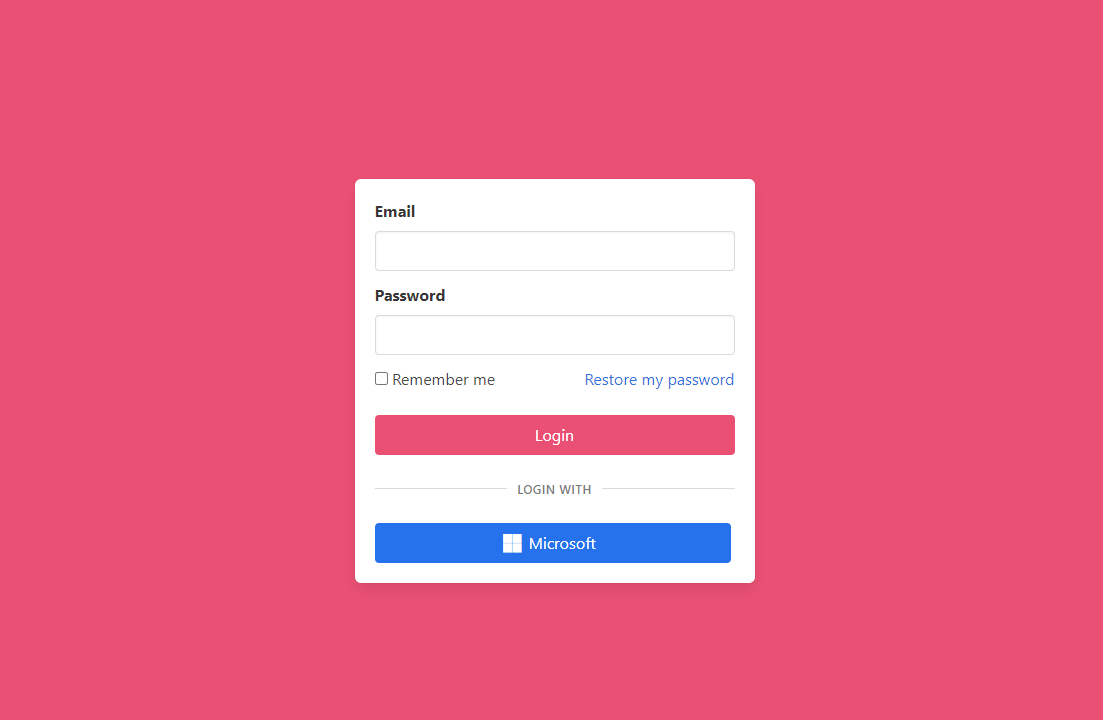
<span data-ccp-props="{"201341983":0,"335559739":160,"335559740":259}"> The following screenshot shows the login screen to Apptimized Passport:</span>

<span data-ccp-props="{"201341983":0,"335559739":160,"335559740":259}">[![sso_01_3.png](https://docs.apptimized.com/uploads/images/gallery/2022-10/scaled-1680-/n3tRc57hzscFFHCM-sso_01_3.png)](https://docs.apptimized.com/uploads/images/gallery/2022-10/n3tRc57hzscFFHCM-sso_01_3.png)</span>

The login to the Apptimized Passport is available under the following scenarios:

- **Email** field &gt; **Password** field &gt; **Login** button;
- **Use Microsoft** button;
- **Use LinkedIn** button.

[![sso_02_new_2.png](https://docs.apptimized.com/uploads/images/gallery/2022-10/scaled-1680-/nIsIzighCrZMwDCA-sso_02_new_2.png)](https://docs.apptimized.com/uploads/images/gallery/2022-10/nIsIzighCrZMwDCA-sso_02_new_2.png)

Apptimized produces a secured cookie with an encrypted session ID to automatically login on the next visit. The automatic login option is available under the **Remember my login** checkbox.

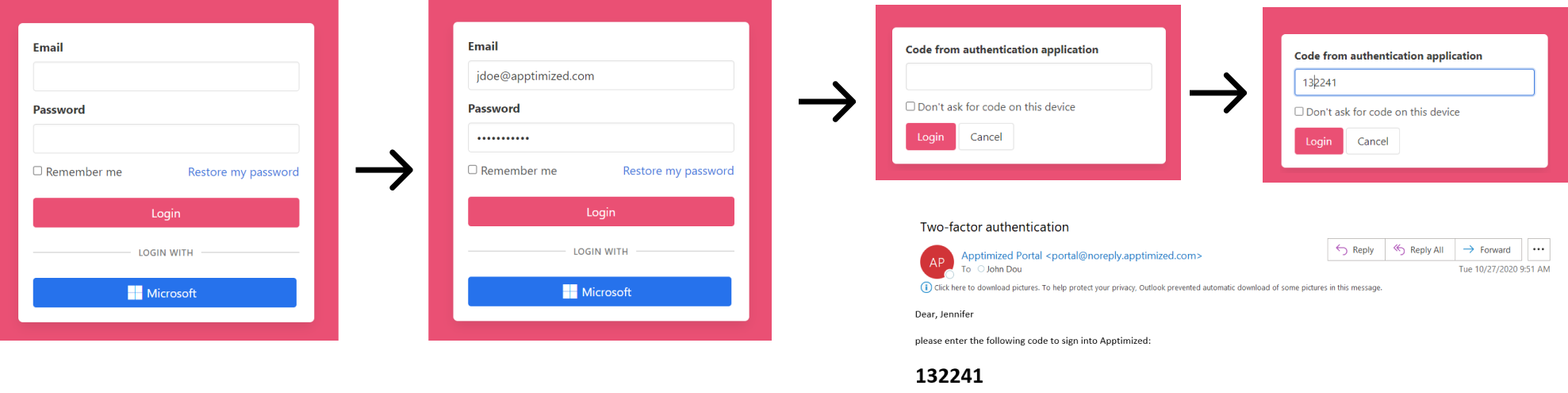
<p class="callout info"><span data-ccp-props="{"201341983":0,"335559739":160,"335559740":259}">**Note.** In instances of two-factor authentication is enabled <span class="TextRun  BCX0 SCXW255868204" data-contrast="auto" lang="EN-US" xml:lang="EN-US"><span class="NormalTextRun  BCX0 SCXW255868204">for the account</span></span>, the log in procedure will be as follows:  
[![sso_19_new_2.png](https://docs.apptimized.com/uploads/images/gallery/2022-10/scaled-1680-/xiPtXhGWda8C2BnB-sso_19_new_2.png)](https://docs.apptimized.com/uploads/images/gallery/2022-10/xiPtXhGWda8C2BnB-sso_19_new_2.png)  
</span></p>

<span data-ccp-props="{"201341983":0,"335559739":160,"335559740":259}"><span class="EOP SCXW161986024 BCX0" data-ccp-props="{"201341983":0,"335559739":160,"335559740":259}"><span class="TextRun SCXW243100854 BCX0" data-contrast="auto" lang="EN-US" xml:lang="EN-US"><span class="NormalTextRun SCXW243100854 BCX0"><span class="TextRun SCXW161986024 BCX0" data-contrast="auto" lang="EN-US" xml:lang="EN-US"><span class="NormalTextRun SpellingErrorV2  SCXW161986024 BCX0 DefaultHighlightTransition">Apptimized</span><span class="NormalTextRun SCXW161986024 BCX0"> shows the following screen</span></span><span class="TextRun SCXW161986024 BCX0" data-contrast="auto" lang="EN-US" xml:lang="EN-US"><span class="NormalTextRun SCXW161986024 BCX0"> w</span></span><span class="TextRun SCXW161986024 BCX0" data-contrast="auto" lang="EN-US" xml:lang="EN-US"><span class="NormalTextRun SCXW161986024 BCX0">hen successful</span></span><span class="TextRun SCXW161986024 BCX0" data-contrast="auto" lang="EN-US" xml:lang="EN-US"><span class="NormalTextRun SCXW161986024 BCX0">:</span></span> </span></span></span></span>

<span data-ccp-props="{"201341983":0,"335559739":160,"335559740":259}"><span class="EOP SCXW161986024 BCX0" data-ccp-props="{"201341983":0,"335559739":160,"335559740":259}"><span class="TextRun SCXW243100854 BCX0" data-contrast="auto" lang="EN-US" xml:lang="EN-US"><span class="NormalTextRun SCXW243100854 BCX0">[![sso_attach-buttons_3-(1).png](https://docs.apptimized.com/uploads/images/gallery/2022-11/scaled-1680-/AvxbaH8v8CbOJDpe-sso_attach-buttons_3-(1).png)](https://docs.apptimized.com/uploads/images/gallery/2022-11/AvxbaH8v8CbOJDpe-sso_attach-buttons_3-(1).png)</span></span></span></span>

<span data-ccp-props="{"201341983":0,"335559739":160,"335559740":259}"><span class="EOP SCXW161986024 BCX0" data-ccp-props="{"201341983":0,"335559739":160,"335559740":259}"><span class="TextRun SCXW243100854 BCX0" data-contrast="auto" lang="EN-US" xml:lang="EN-US"><span class="NormalTextRun SCXW243100854 BCX0">**Ten** attempts to provide credentials available by default. The number of attempts can be changed by an Organization administrator. The account locks when attempts are deplete. Assistance on this issue is available under the Apptimized support team email (<support@apptimized.com>) or via [https://www.apptimized.com/contact-us/](https://www.apptimized.com/contact-us/) .</span></span></span></span>

<span data-ccp-props="{"201341983":0,"335559739":160,"335559740":259}"><span class="EOP SCXW161986024 BCX0" data-ccp-props="{"201341983":0,"335559739":160,"335559740":259}"><span class="TextRun SCXW243100854 BCX0" data-contrast="auto" lang="EN-US" xml:lang="EN-US"><span class="NormalTextRun SCXW243100854 BCX0">When a user </span></span><span class="TrackChangeTextInsertion TrackedChange SCXW243100854 BCX0"><span class="TextRun SCXW243100854 BCX0" data-contrast="auto" lang="EN-US" xml:lang="EN-US"><span class="NormalTextRun SCXW243100854 BCX0">is </span></span></span><span class="TextRun SCXW243100854 BCX0" data-contrast="auto" lang="EN-US" xml:lang="EN-US"><span class="NormalTextRun SCXW243100854 BCX0">logged into </span></span><span class="TextRun SCXW243100854 BCX0" data-contrast="auto" lang="EN-US" xml:lang="EN-US"><span class="NormalTextRun SCXW243100854 BCX0">the </span></span><span class="TextRun SCXW243100854 BCX0" data-contrast="auto" lang="EN-US" xml:lang="EN-US"><span class="NormalTextRun SpellingErrorV2 SCXW243100854 BCX0">Apptimized</span><span class="NormalTextRun SCXW243100854 BCX0"> SSO application</span></span><span class="TextRun SCXW243100854 BCX0" data-contrast="auto" lang="EN-US" xml:lang="EN-US"><span class="NormalTextRun SCXW243100854 BCX0">,</span></span> <span class="TextRun SCXW243100854 BCX0" data-contrast="auto" lang="EN-US" xml:lang="EN-US"><span class="NormalTextRun SCXW243100854 BCX0">organization settings can be performed in the **[Organization Management](https://docs.apptimized.com/books/apptimized-admincenter-admin-manual/page/organization-management)** application.</span></span></span></span>

##### Restore a password

The option to recover a password is available under the **Restore my password** link:

[![sso_restore_2-(1).png](https://docs.apptimized.com/uploads/images/gallery/2022-11/scaled-1680-/BxiJYevtqUMpegtz-sso_restore_2-(1).png)](https://docs.apptimized.com/uploads/images/gallery/2022-11/BxiJYevtqUMpegtz-sso_restore_2-(1).png)

#### Profile tab 

<span data-contrast="auto">This tab enables a user:</span><span data-ccp-props="{"201341983":0,"335559739":160,"335559740":259}"> </span>

- <span data-contrast="auto">To make changes to the user’s profile data</span><span data-contrast="auto"> </span><span data-contrast="auto">(i.e., first name, last name, occupation, department, avatar)</span><span data-contrast="auto">.</span><span data-ccp-props="{"134233279":true,"201341983":0,"335559739":160,"335559740":259}"> </span>
- <span data-contrast="auto">To </span><span data-contrast="auto">export personal data.</span><span data-ccp-props="{"134233279":true,"201341983":0,"335559739":160,"335559740":259}"> </span>
- <span data-contrast="auto">To delete an account.</span><span data-ccp-props="{"134233279":true,"201341983":0,"335559739":160,"335559740":259}"> </span>

##### Account avatar 

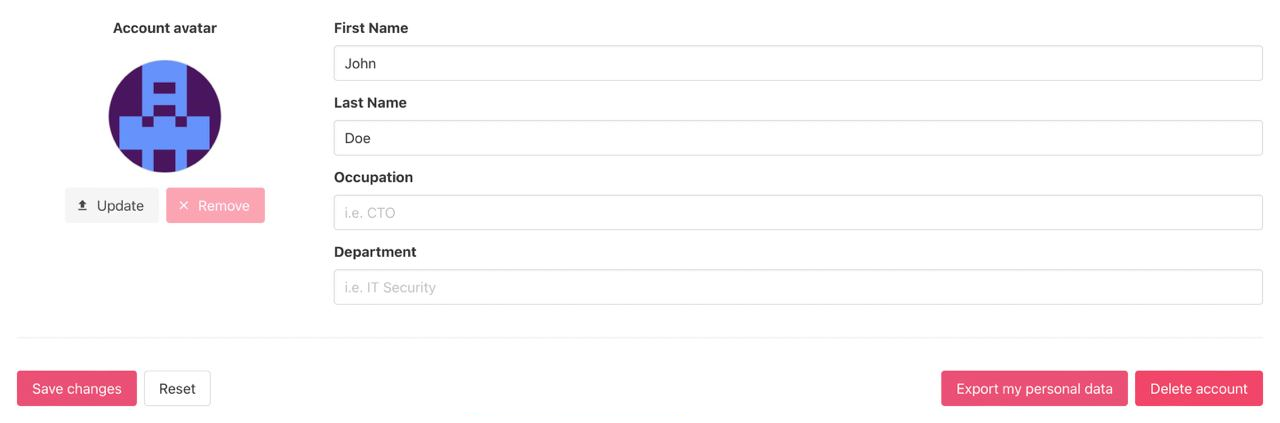
<span data-contrast="auto">By default, the system assigns a user a random image.</span><span data-ccp-props="{"201341983":0,"335559739":160,"335559740":259}"> </span>

<span data-contrast="auto">The option to change the avatar is available under the </span>**<span data-contrast="auto">Update</span>**<span data-contrast="auto"> button:</span><span data-ccp-props="{"201341983":0,"335559739":160,"335559740":259}"> </span>

[![sso_08_2-(2).png](https://docs.apptimized.com/uploads/images/gallery/2022-11/scaled-1680-/59wYgPY2A1aNoxhH-sso_08_2-(2).png)](https://docs.apptimized.com/uploads/images/gallery/2022-11/59wYgPY2A1aNoxhH-sso_08_2-(2).png)

<p class="callout info"><span data-contrast="auto">**Note.** The file upload must be </span><span data-contrast="auto">less than 5 Mb and</span><span data-contrast="auto"> PNG</span><span data-contrast="auto"> / </span><span data-contrast="auto">JPEG only.</span><span data-ccp-props="{"201341983":0,"335559739":160,"335559740":259}"> </span></p>

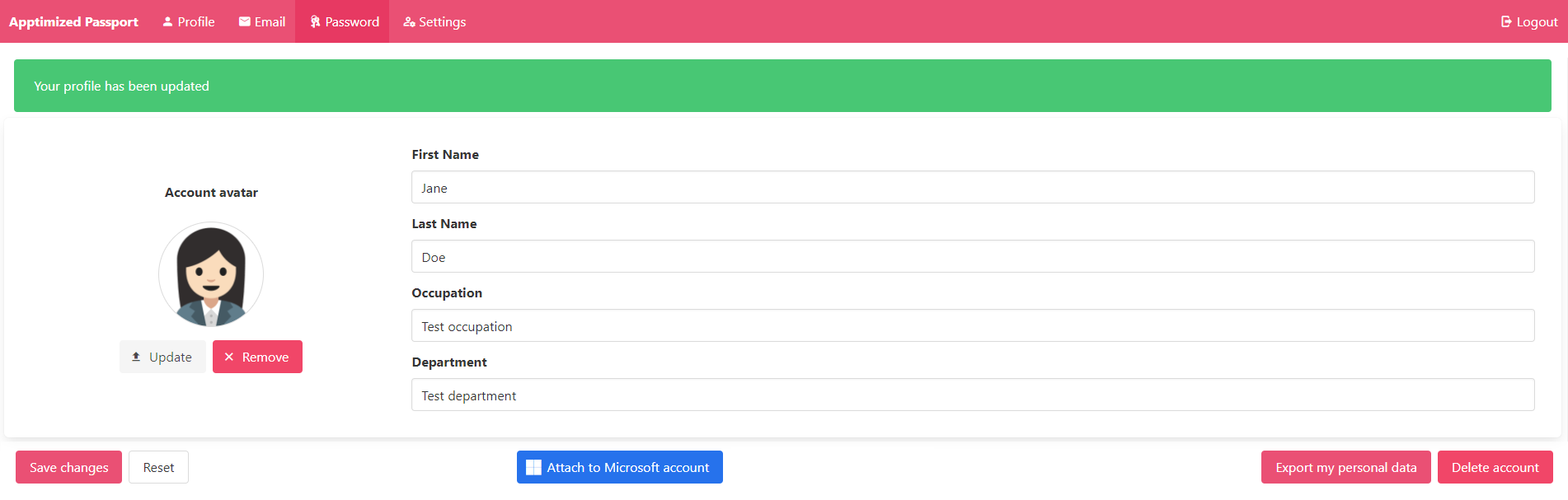
<span data-contrast="auto">Apptimized shows the following screen when successful:</span><span data-ccp-props="{"201341983":0,"335559739":160,"335559740":259}"> </span>

[![sso_03_avatar_2.png](https://docs.apptimized.com/uploads/images/gallery/2022-11/scaled-1680-/JFuMJT5kl2zWqNdA-sso_03_avatar_2.png)](https://docs.apptimized.com/uploads/images/gallery/2022-11/JFuMJT5kl2zWqNdA-sso_03_avatar_2.png)

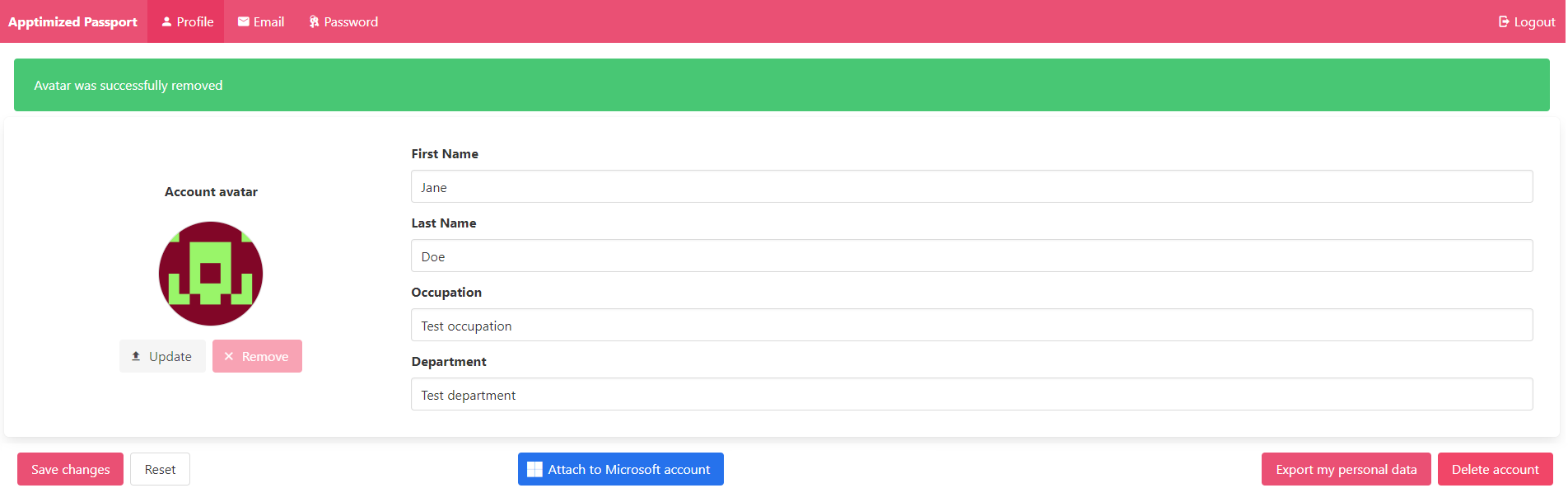
<span data-ccp-props="{"201341983":0,"335559739":160,"335559740":259}"><span class="TextRun SCXW126711612 BCX0" data-contrast="auto" lang="EN-US" xml:lang="EN-US"><span class="NormalTextRun SCXW126711612 BCX0">The option to r</span></span><span class="TextRun SCXW126711612 BCX0" data-contrast="auto" lang="EN-US" xml:lang="EN-US"><span class="NormalTextRun SCXW126711612 BCX0">emove </span></span><span class="TrackChangeTextInsertion TrackedChange SCXW126711612 BCX0"><span class="TextRun SCXW126711612 BCX0" data-contrast="auto" lang="EN-US" xml:lang="EN-US"><span class="NormalTextRun SCXW126711612 BCX0">the </span></span></span><span class="TextRun SCXW126711612 BCX0" data-contrast="auto" lang="EN-US" xml:lang="EN-US"><span class="NormalTextRun SCXW126711612 BCX0">avatar</span></span><span class="TextRun SCXW126711612 BCX0" data-contrast="auto" lang="EN-US" xml:lang="EN-US"><span class="NormalTextRun SCXW126711612 BCX0"> is available under the </span></span>**<span class="TextRun SCXW126711612 BCX0" data-contrast="auto" lang="EN-US" xml:lang="EN-US"><span class="NormalTextRun SCXW126711612 BCX0">Remove</span></span>**<span class="TextRun SCXW126711612 BCX0" data-contrast="auto" lang="EN-US" xml:lang="EN-US"><span class="NormalTextRun SCXW126711612 BCX0"> button.</span></span><span class="TextRun SCXW126711612 BCX0" data-contrast="auto" lang="EN-US" xml:lang="EN-US"><span class="NormalTextRun SCXW126711612 BCX0"> </span><span class="NormalTextRun SpellingErrorV2 SCXW126711612 BCX0">Apptimized</span><span class="NormalTextRun SCXW126711612 BCX0"> shows the following screen when successful:</span></span><span class="EOP SCXW126711612 BCX0" data-ccp-props="{"201341983":0,"335559739":160,"335559740":259}"> </span></span>

<span data-ccp-props="{"201341983":0,"335559739":160,"335559740":259}"><span class="EOP SCXW126711612 BCX0" data-ccp-props="{"201341983":0,"335559739":160,"335559740":259}">[![sso_10_2.png](https://docs.apptimized.com/uploads/images/gallery/2022-11/scaled-1680-/xZjx4CkNr5oL7gky-sso_10_2.png)](https://docs.apptimized.com/uploads/images/gallery/2022-11/xZjx4CkNr5oL7gky-sso_10_2.png)</span></span>

##### Profile data 

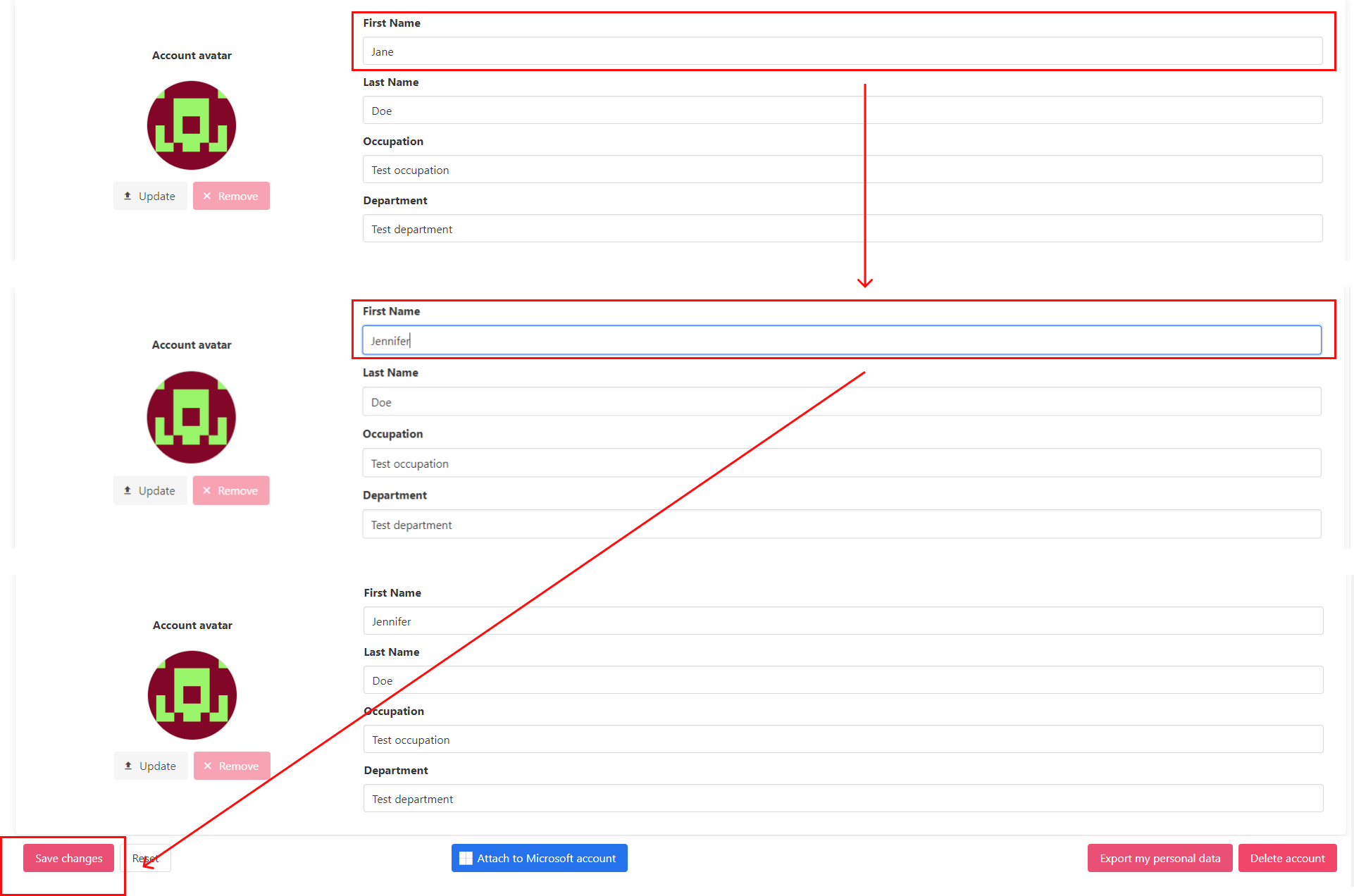
<span data-contrast="auto">To make changes to the profile data (i.e., first name, last name, occupation, department)</span><span data-contrast="auto">,</span><span data-contrast="auto"> a user </span><span data-contrast="auto">enters the valid data into the relevant field.</span><span data-ccp-props="{"201341983":0,"335559739":160,"335559740":259}"> </span>

[![sso_11_2.png](https://docs.apptimized.com/uploads/images/gallery/2022-11/scaled-1680-/gtiAnEEEVACHmzuX-sso_11_2.png)](https://docs.apptimized.com/uploads/images/gallery/2022-11/gtiAnEEEVACHmzuX-sso_11_2.png)

<span data-contrast="auto">The option to revert the changes before they were applied is available under the </span>**<span data-contrast="auto">Reset</span>**<span data-contrast="auto"> button.</span><span data-ccp-props="{"201341983":0,"335559739":160,"335559740":259}"> </span>

<span data-contrast="auto">The changes in the profile data apply when clicking the </span>**<span data-contrast="auto">Save changes</span>**<span data-contrast="auto"> button. </span><span data-ccp-props="{"201341983":0,"335559739":160,"335559740":259}"> </span>

<span data-contrast="auto">Apptimized shows the following screen when successful:</span><span data-ccp-props="{"201341983":0,"335559739":160,"335559740":259}"> </span>

[![sso_12_2-(3).png](https://docs.apptimized.com/uploads/images/gallery/2022-11/scaled-1680-/OQ48rfQevk76ZD8H-sso_12_2-(3).png)](https://docs.apptimized.com/uploads/images/gallery/2022-11/OQ48rfQevk76ZD8H-sso_12_2-(3).png)

##### Export profile data 

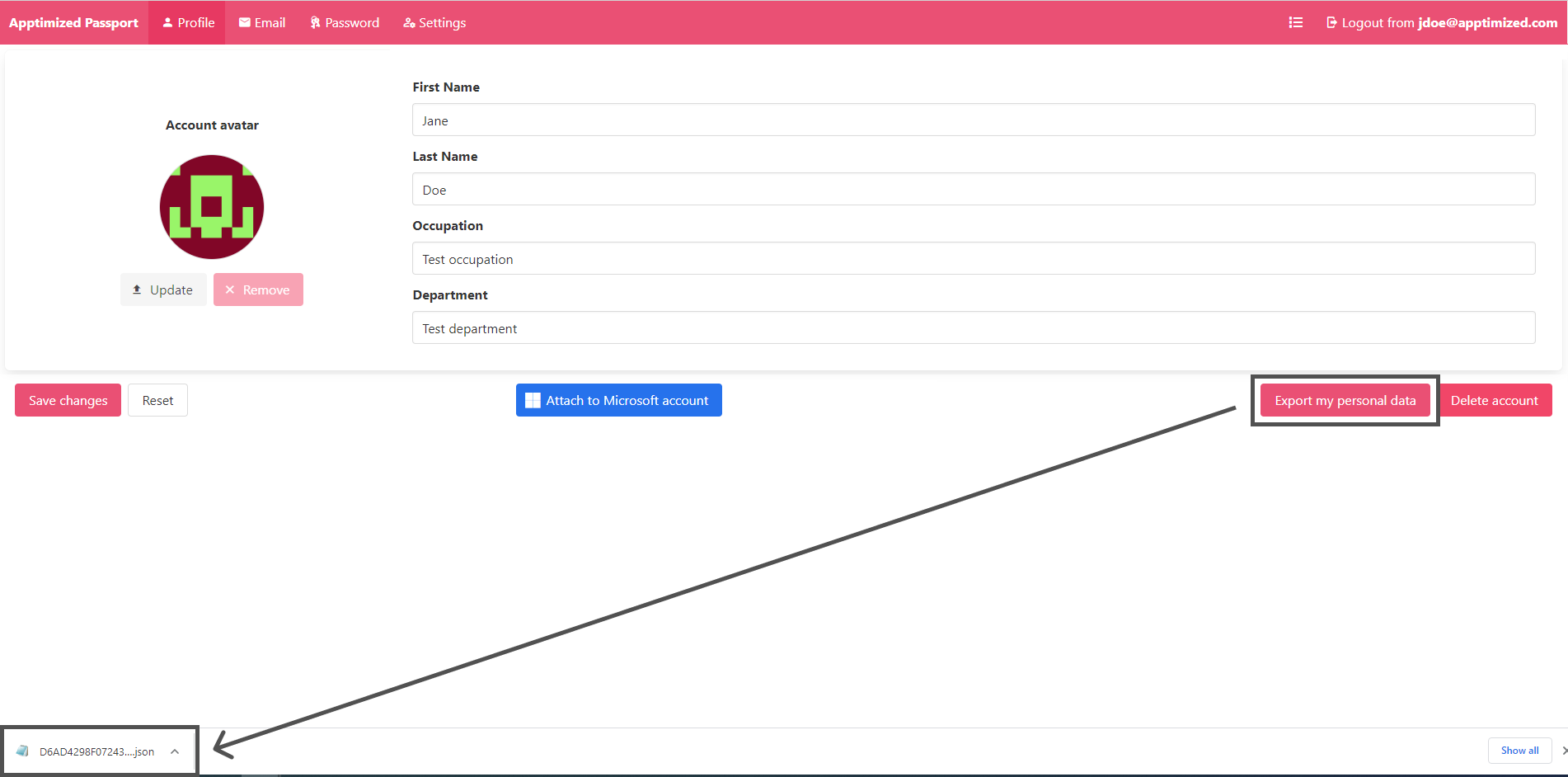
<span data-contrast="auto">P</span><span data-contrast="auto">rofile</span><span data-contrast="auto"> data can be downloaded as a</span><span data-contrast="auto"> </span>[<span data-contrast="none">JSON</span>](https://www.json.org/json-en.html)<span data-contrast="auto"> file by clicking the </span>**<span data-contrast="auto">Export my </span><span data-contrast="auto">personal </span><span data-contrast="auto">data</span>**<span data-contrast="auto"> </span><span data-contrast="auto">button.</span><span data-ccp-props="{"201341983":0,"335559739":160,"335559740":259}"> </span>

[![sso_09_3.png](https://docs.apptimized.com/uploads/images/gallery/2022-11/scaled-1680-/LByILh6MW683i4Sm-sso_09_3.png)](https://docs.apptimized.com/uploads/images/gallery/2022-11/LByILh6MW683i4Sm-sso_09_3.png)

##### Attach Microsoft account

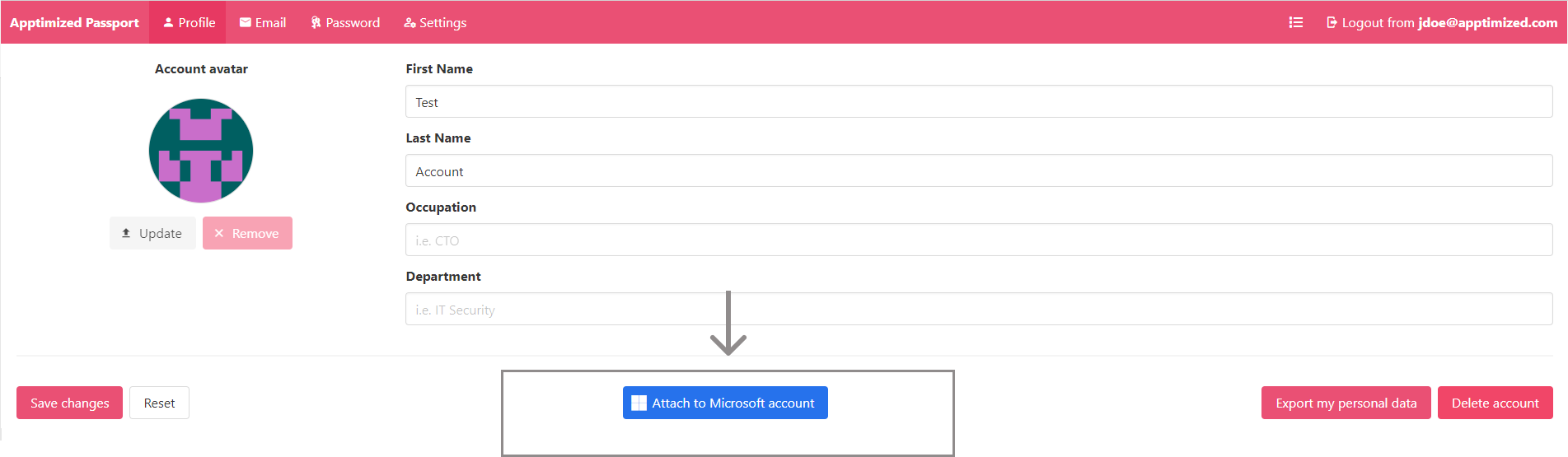
The option to connect user's Microsoft account to Apptimized account is available under the **Attach to Microsoft account** button:

[![sso_social-med_3.png](https://docs.apptimized.com/uploads/images/gallery/2022-11/scaled-1680-/UjlXZj50ySOgPpKn-sso_social-med_3.png)](https://docs.apptimized.com/uploads/images/gallery/2022-11/UjlXZj50ySOgPpKn-sso_social-med_3.png)

Apptimized shows the following screen when successful:

[![sso_21_5.png](https://docs.apptimized.com/uploads/images/gallery/2022-11/scaled-1680-/FGGnbbZvmD7tvjwD-sso_21_5.png)](https://docs.apptimized.com/uploads/images/gallery/2022-11/FGGnbbZvmD7tvjwD-sso_21_5.png)

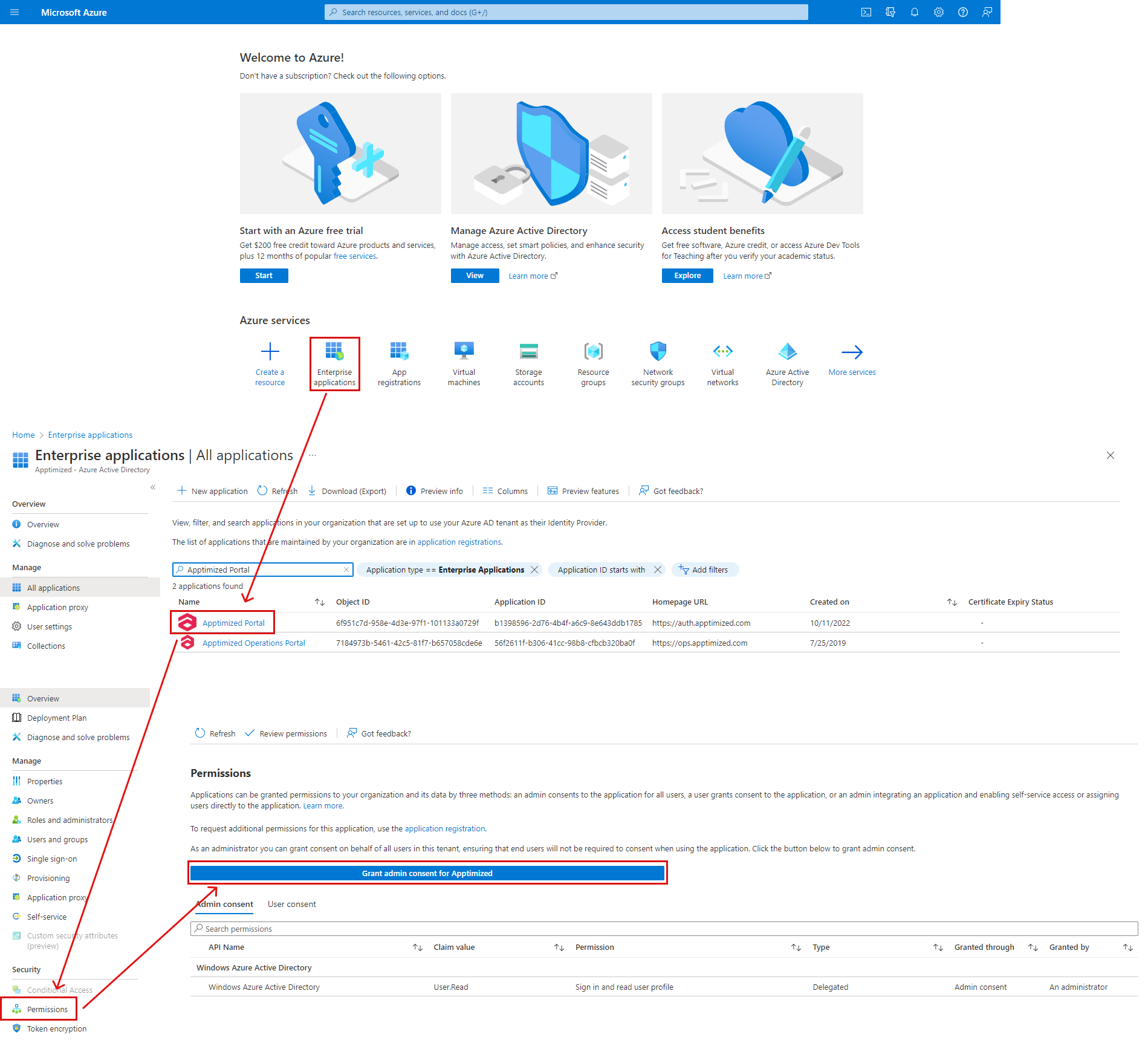
<p class="callout info">Note. <span class="TextRun SCXW158864263 BCX0" data-contrast="auto" lang="EN-US" xml:lang="EN-US"><span class="NormalTextRun SCXW158864263 BCX0">To proceed</span></span><span class="TrackChangeTextInsertion TrackedChange SCXW158864263 BCX0"><span class="TextRun SCXW158864263 BCX0" data-contrast="auto" lang="EN-US" xml:lang="EN-US"><span class="NormalTextRun SCXW158864263 BCX0"> with</span></span></span><span class="TextRun SCXW158864263 BCX0" data-contrast="auto" lang="EN-US" xml:lang="EN-US"><span class="NormalTextRun SCXW158864263 BCX0"> the connection to Microsoft</span></span><span class="TrackChangeTextInsertion TrackedChange SCXW158864263 BCX0"><span class="TextRun SCXW158864263 BCX0" data-contrast="auto" lang="EN-US" xml:lang="EN-US"><span class="NormalTextRun SCXW158864263 BCX0">,</span></span></span><span class="TextRun SCXW158864263 BCX0" data-contrast="auto" lang="EN-US" xml:lang="EN-US"><span class="NormalTextRun SCXW158864263 BCX0"> logging in Microsoft account and Granting **Sign in and read user profile permission is**</span><span class="FindHit SCXW158864263 BCX0"> </span><span class="FindHit SCXW158864263 BCX0">requir</span><span class="NormalTextRun SCXW158864263 BCX0">e</span><span class="NormalTextRun SCXW158864263 BCX0">d.  
The option to grant permission is available under **[Microsoft Azure Portal](https://portal.azure.com/#home)** &gt; Enterprise applications &gt; Apptimized Portal &gt; Permissions &gt; **Grant admin consent for Apptimized** button.  
[![sso_16_1.png](https://docs.apptimized.com/uploads/images/gallery/2022-11/scaled-1680-/343cRlwqT7BWAQ8A-sso_16_1.png)](https://docs.apptimized.com/uploads/images/gallery/2022-11/343cRlwqT7BWAQ8A-sso_16_1.png)  
</span></span></p>

The next time a user signs in to the Apptimized, those credentials will apply.

The option to detach the account when needed is available by contacting the Apptimized team through the support chat or via delivery managers.

##### Delete an account 

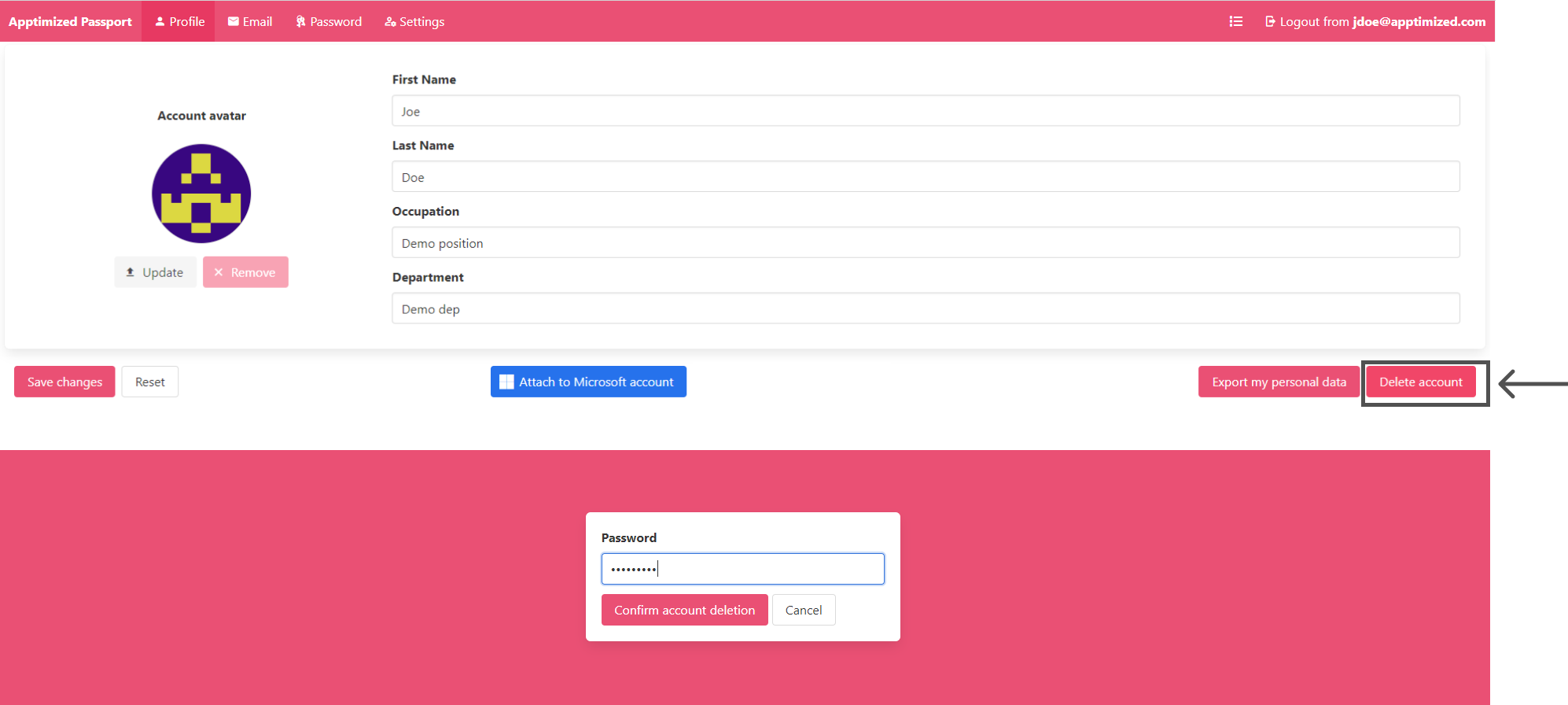
<span data-contrast="auto">The option to delete an account is available under the </span>**<span data-contrast="auto">Delete account</span>**<span data-contrast="auto"> button </span><span data-contrast="auto">&gt; Enter </span><span data-contrast="auto">the valid password</span><span data-contrast="auto"> &gt; </span>**<span data-contrast="auto">Confirm account deletion</span>**<span data-contrast="auto"> button</span><span data-contrast="auto">.</span><span data-ccp-props="{"201341983":0,"335559739":160,"335559740":259}"> </span>

[![sso_15_3.png](https://docs.apptimized.com/uploads/images/gallery/2022-11/scaled-1680-/xlRmUeNetqiKrfIB-sso_15_3.png)](https://docs.apptimized.com/uploads/images/gallery/2022-11/xlRmUeNetqiKrfIB-sso_15_3.png)

<span data-ccp-props="{"201341983":0,"335559739":160,"335559740":259}"><span class="TextRun SCXW204749152 BCX0" data-contrast="auto" lang="EN-US" xml:lang="EN-US"><span class="NormalTextRun SpellingErrorV2 SCXW204749152 BCX0 DefaultHighlightTransition">Apptimized</span><span class="NormalTextRun SCXW204749152 BCX0"> shows the following screen when successful:</span></span><span class="EOP SCXW204749152 BCX0" data-ccp-props="{"201341983":0,"335559739":160,"335559740":259}"> </span></span>

[![sso_15_4_2.png](https://docs.apptimized.com/uploads/images/gallery/2022-11/scaled-1680-/264YS4ytPTCNMmEH-sso_15_4_2.png)](https://docs.apptimized.com/uploads/images/gallery/2022-11/264YS4ytPTCNMmEH-sso_15_4_2.png)

#### Email tab 

<span data-contrast="auto">This tab enables a user to </span><span data-contrast="auto">change the email address </span><span data-contrast="auto">in the profile</span><span data-contrast="auto">.</span><span data-ccp-props="{"201341983":0,"335559739":160,"335559740":259}"> </span>

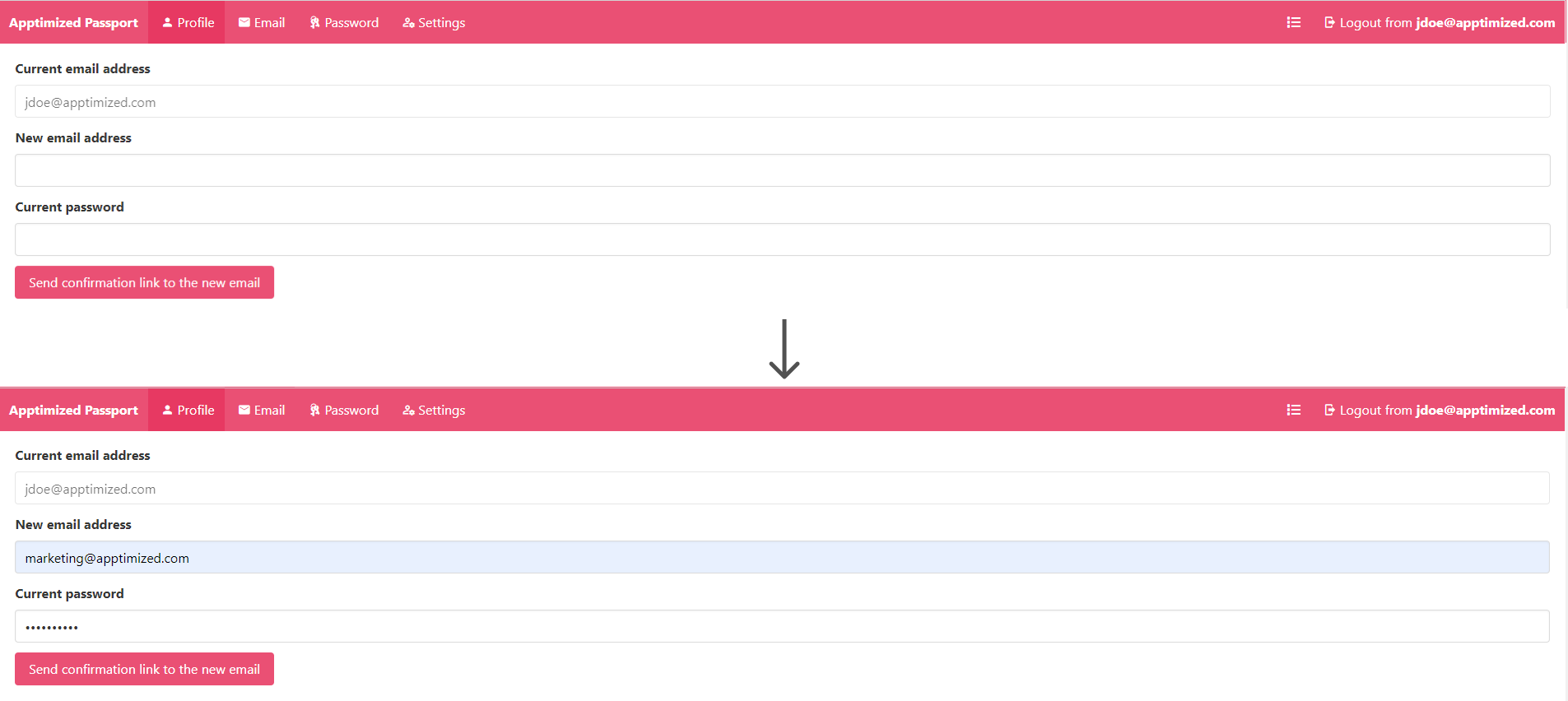
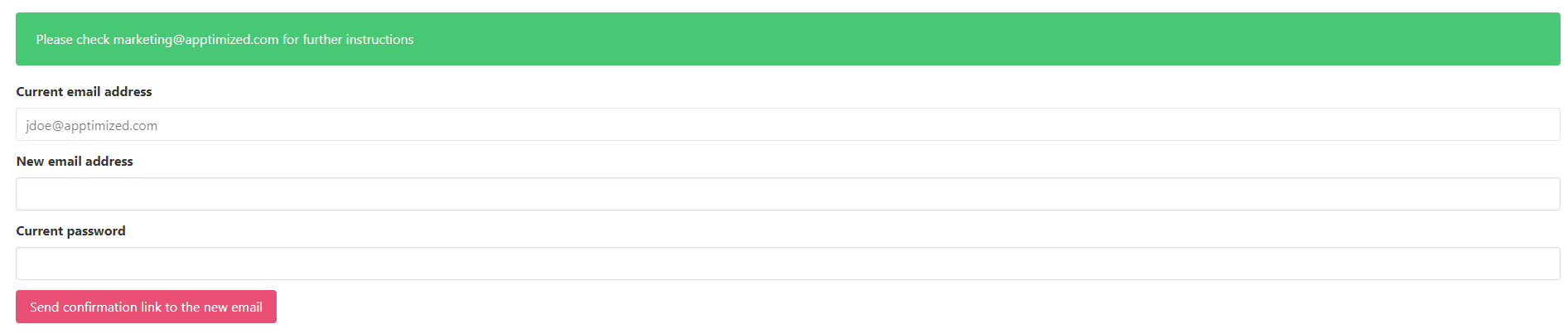
<span data-contrast="auto">To change the email address a</span><span data-contrast="auto"> user needs to perform the following </span><span data-contrast="auto">actions</span><span data-contrast="auto">: </span><span data-contrast="auto">Click the </span>**<span data-contrast="auto">Email</span>**<span data-contrast="auto"> tab</span><span data-contrast="auto"> &gt; </span><span data-contrast="auto">Select the </span>**<span data-contrast="auto">New email address</span>**<span data-contrast="auto"> field </span><span data-contrast="auto">&gt; Enter </span><span data-contrast="auto">new email</span><span data-contrast="auto"> &gt; </span><span data-contrast="auto">Select the </span>**<span data-contrast="auto">Current password</span>**<span data-contrast="auto"> field</span><span data-contrast="auto"> &gt; Enter </span><span data-contrast="auto">the valid password</span><span data-contrast="auto"> &gt; </span>**<span data-contrast="auto">Send confirmation link to the new email</span>**<span data-contrast="auto"> button</span><span data-contrast="auto">.</span><span data-ccp-props="{"201341983":0,"335559739":160,"335559740":259}"> </span>

[![sso_04_2.png](https://docs.apptimized.com/uploads/images/gallery/2021-07/scaled-1680-/1W0bTgMOkvqRVLIn-sso_04_2.png)](https://docs.apptimized.com/uploads/images/gallery/2021-07/1W0bTgMOkvqRVLIn-sso_04_2.png)

<span data-ccp-props="{"201341983":0,"335559739":160,"335559740":259}"><span class="TextRun SCXW34984278 BCX0" data-contrast="auto" lang="EN-US" xml:lang="EN-US"><span class="NormalTextRun SpellingErrorV2 SCXW34984278 BCX0">Apptimized</span><span class="NormalTextRun SCXW34984278 BCX0"> shows the following screen when successful:</span></span><span class="EOP SCXW34984278 BCX0" data-ccp-props="{"201341983":0,"335559739":160,"335559740":259}"> </span></span>

[![sso_04_3.PNG](https://docs.apptimized.com/uploads/images/gallery/2020-11/scaled-1680-/PkrIkHqhBGMKuXBj-sso_04_3.PNG)](https://docs.apptimized.com/uploads/images/gallery/2020-11/PkrIkHqhBGMKuXBj-sso_04_3.PNG)

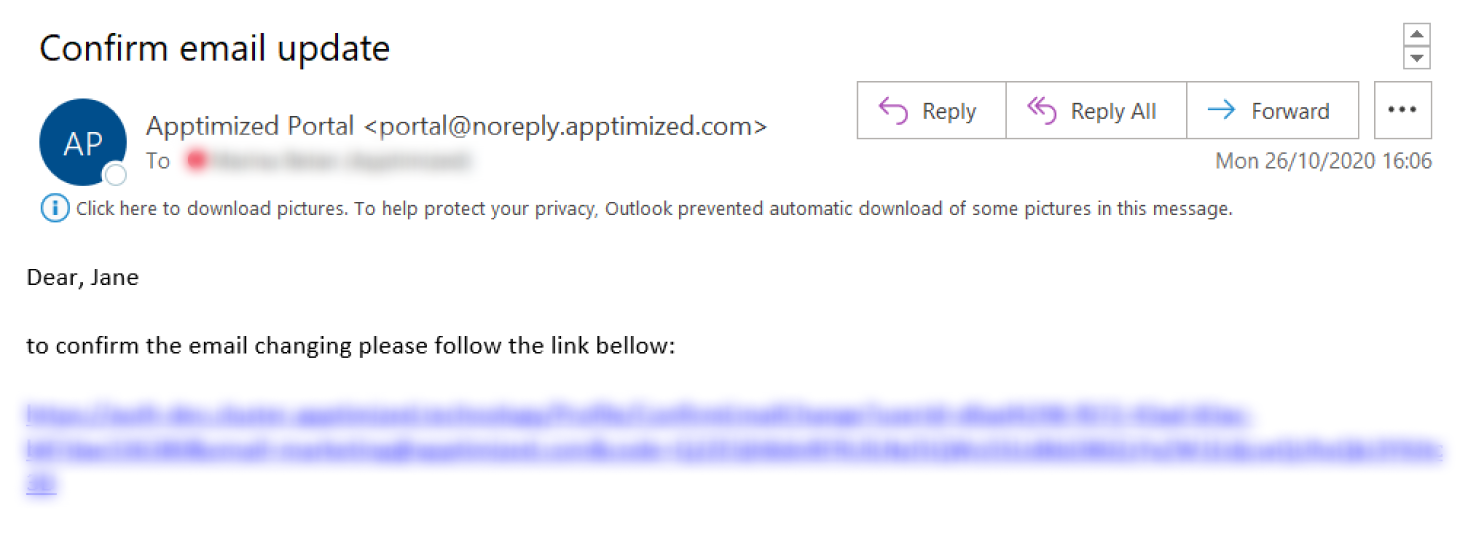
<span data-ccp-props="{"201341983":0,"335559739":160,"335559740":259}"><span class="EOP SCXW34984278 BCX0" data-ccp-props="{"201341983":0,"335559739":160,"335559740":259}"><span class="TextRun SCXW212121469 BCX0" data-contrast="auto" lang="EN-US" xml:lang="EN-US"><span class="NormalTextRun SCXW212121469 BCX0">The following screenshot shows the notification email when </span></span><span class="TextRun SCXW212121469 BCX0" data-contrast="auto" lang="EN-US" xml:lang="EN-US"><span class="NormalTextRun SCXW212121469 BCX0">a user makes an email change request:</span></span><span class="EOP SCXW212121469 BCX0" data-ccp-props="{"201341983":0,"335559739":160,"335559740":259}"> </span></span></span>

[![sso_email-change.png](https://docs.apptimized.com/uploads/images/gallery/2020-11/scaled-1680-/02usBRk6PM1El9uB-sso_email-change.png)](https://docs.apptimized.com/uploads/images/gallery/2020-11/02usBRk6PM1El9uB-sso_email-change.png)

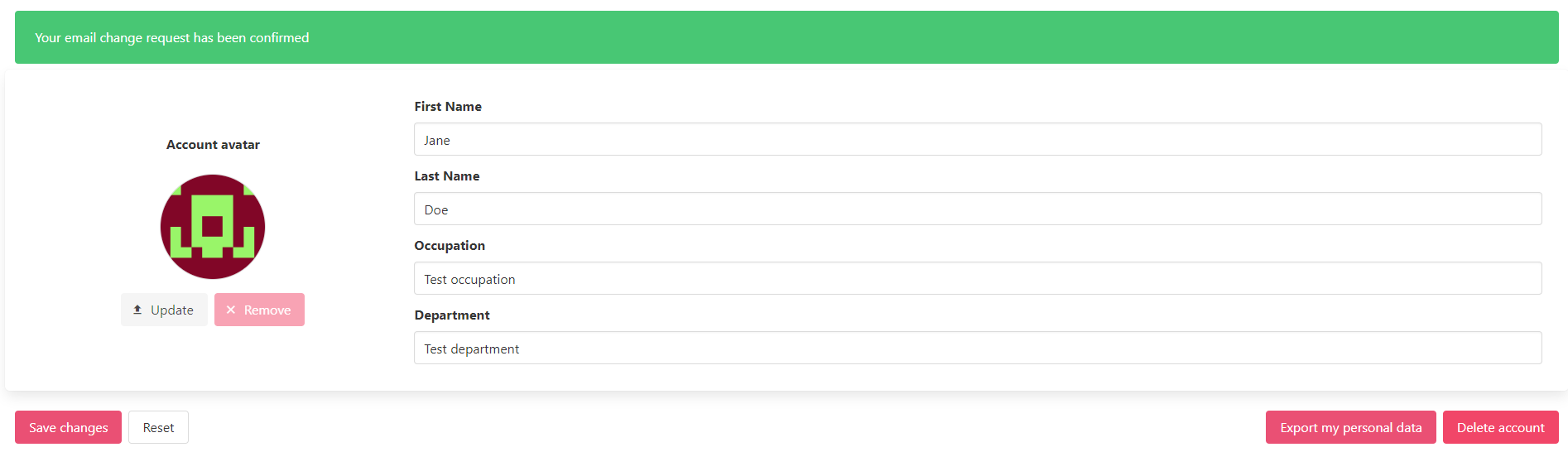
<span data-ccp-props="{"201341983":0,"335559739":160,"335559740":259}"><span class="EOP SCXW34984278 BCX0" data-ccp-props="{"201341983":0,"335559739":160,"335559740":259}"><span class="EOP SCXW212121469 BCX0" data-ccp-props="{"201341983":0,"335559739":160,"335559740":259}"><span class="TextRun SCXW44483803 BCX0" data-contrast="auto" lang="EN-US" xml:lang="EN-US"><span class="NormalTextRun SCXW44483803 BCX0">When a user clicks a link from the conf</span></span><span class="TextRun SCXW44483803 BCX0" data-contrast="auto" lang="EN-US" xml:lang="EN-US"><span class="NormalTextRun SCXW44483803 BCX0">i</span></span><span class="TextRun SCXW44483803 BCX0" data-contrast="auto" lang="EN-US" xml:lang="EN-US"><span class="NormalTextRun SCXW44483803 BCX0">rmation email </span><span class="NormalTextRun SpellingErrorV2 SpellingErrorHighlight SCXW44483803 BCX0">Apptimized</span><span class="NormalTextRun SCXW44483803 BCX0"> shows the following screen:</span></span><span class="EOP SCXW44483803 BCX0" data-ccp-props="{"201341983":0,"335559739":160,"335559740":259}"> </span></span></span></span>

[![sso_04_4.PNG](https://docs.apptimized.com/uploads/images/gallery/2020-11/scaled-1680-/V17T2OHP9qmQUelM-sso_04_4.PNG)](https://docs.apptimized.com/uploads/images/gallery/2020-11/V17T2OHP9qmQUelM-sso_04_4.PNG)

#### Password tab 

<span data-contrast="auto">This tab allows a user:</span><span data-ccp-props="{"201341983":0,"335559739":160,"335559740":259}"> </span>

- <span data-contrast="auto">To change the password.</span><span data-ccp-props="{"134233279":true,"201341983":0,"335559739":160,"335559740":259}"> </span>
- <span data-contrast="auto">To enable two-factor authentication</span><span data-contrast="auto">.</span><span data-ccp-props="{"134233279":true,"201341983":0,"335559739":160,"335559740":259}"> </span>

##### Password change request 

<span data-contrast="auto">The option to change password is available under the </span>**<span data-contrast="auto">Password</span>**<span data-contrast="auto"> tab &gt;</span><span data-contrast="auto"> </span>**<span data-contrast="auto">Current password</span>**<span data-contrast="auto"> field</span><span data-contrast="auto"> &gt; Enter </span><span data-contrast="auto">the current password</span><span data-contrast="auto"> &gt; Select the </span>**<span data-contrast="auto">New password</span>**<span data-contrast="auto"> field &gt; Enter </span><span data-contrast="auto">new</span><span data-contrast="auto"> valid password &gt;</span><span data-contrast="auto"> </span><span data-contrast="auto">Select the </span>**<span data-contrast="auto">New password (repeat) </span>**<span data-contrast="auto">field &gt; </span><span data-contrast="auto">Repeat</span><span data-contrast="auto"> </span><span data-contrast="auto">new</span><span data-contrast="auto"> valid password &gt; </span>**<span data-contrast="auto">Save changes</span>**<span data-contrast="auto"> button.</span><span data-ccp-props="{"201341983":0,"335559739":160,"335559740":259}"> </span>

[![sso_05_2-(1).png](https://docs.apptimized.com/uploads/images/gallery/2021-07/scaled-1680-/FSp0BAtc7uLX5RuL-sso_05_2-(1).png)](https://docs.apptimized.com/uploads/images/gallery/2021-07/FSp0BAtc7uLX5RuL-sso_05_2-(1).png)

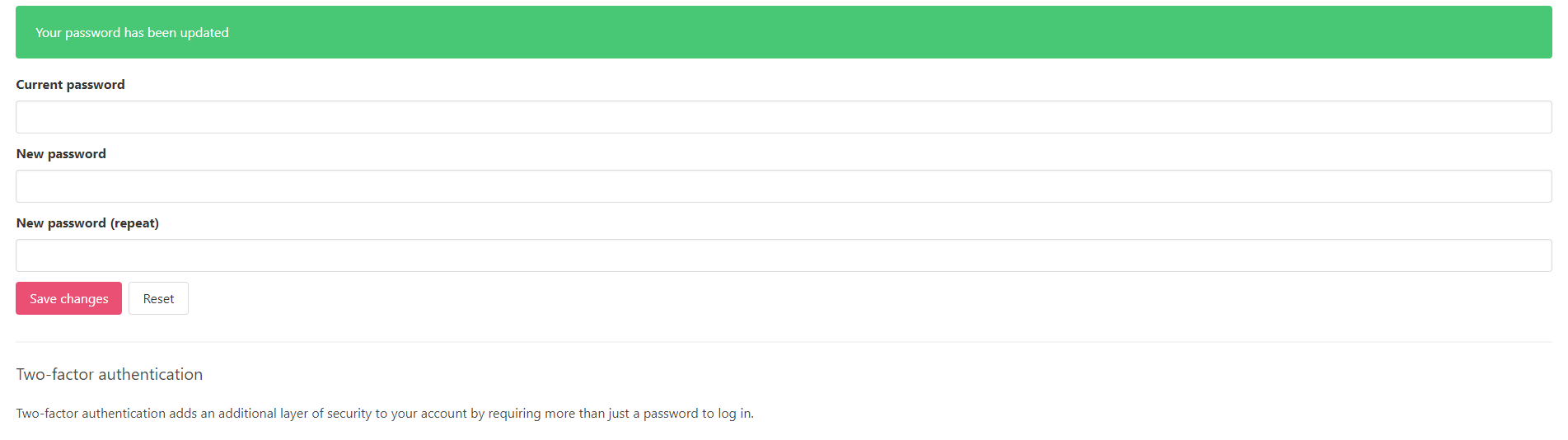
<span data-ccp-props="{"201341983":0,"335559739":160,"335559740":259}"><span class="EOP SCXW34984278 BCX0" data-ccp-props="{"201341983":0,"335559739":160,"335559740":259}"><span class="EOP SCXW212121469 BCX0" data-ccp-props="{"201341983":0,"335559739":160,"335559740":259}"><span class="EOP SCXW44483803 BCX0" data-ccp-props="{"201341983":0,"335559739":160,"335559740":259}"><span class="TextRun SCXW265873180 BCX0" data-contrast="auto" lang="EN-US" xml:lang="EN-US"><span class="NormalTextRun SpellingErrorV2  SCXW265873180 BCX0 DefaultHighlightTransition">Apptimized</span><span class="NormalTextRun SCXW265873180 BCX0"> shows the following screen when successful:</span></span><span class="EOP SCXW265873180 BCX0" data-ccp-props="{"201341983":0,"335559739":160,"335559740":259}"> </span></span></span></span></span>

[![sso_05_3.PNG](https://docs.apptimized.com/uploads/images/gallery/2020-11/scaled-1680-/6ELRDVDclbCnqFGN-sso_05_3.PNG)](https://docs.apptimized.com/uploads/images/gallery/2020-11/6ELRDVDclbCnqFGN-sso_05_3.PNG)

##### Two-factor authentication 

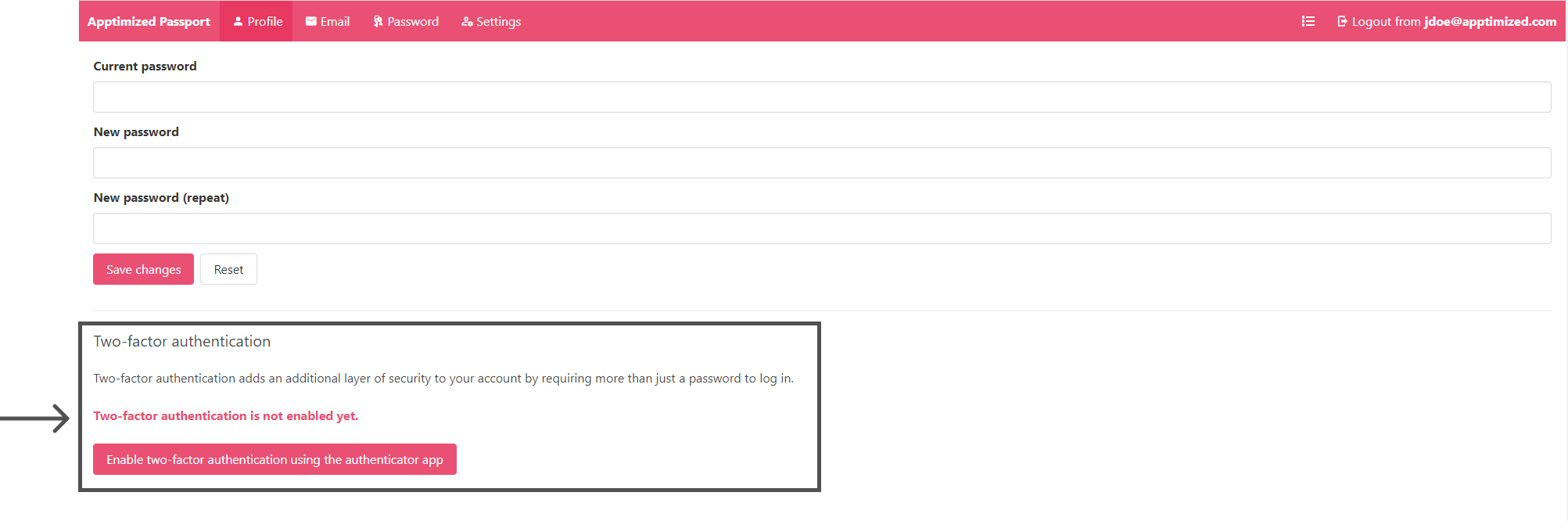
<span data-contrast="auto">The two-factor authentication is disabled by default.</span><span data-contrast="auto"> </span><span data-ccp-props="{"201341983":0,"335559739":160,"335559740":259}"> </span>

[![sso_14_2.png](https://docs.apptimized.com/uploads/images/gallery/2021-07/scaled-1680-/S65pb6CksGUxxEJZ-sso_14_2.png)](https://docs.apptimized.com/uploads/images/gallery/2021-07/S65pb6CksGUxxEJZ-sso_14_2.png)

<span data-ccp-props="{"201341983":0,"335559739":160,"335559740":259}"><span class="TextRun SCXW17630131 BCX0" data-contrast="auto" lang="EN-US" xml:lang="EN-US"><span class="NormalTextRun SCXW17630131 BCX0">The option to enable </span></span><span class="TextRun SCXW17630131 BCX0" data-contrast="auto" lang="EN-US" xml:lang="EN-US"><span class="NormalTextRun SCXW17630131 BCX0">two-factor authentication</span></span><span class="TextRun SCXW17630131 BCX0" data-contrast="auto" lang="EN-US" xml:lang="EN-US"><span class="NormalTextRun SCXW17630131 BCX0"> is available under the </span></span>**<span class="TextRun SCXW17630131 BCX0" data-contrast="auto" lang="EN-US" xml:lang="EN-US"><span class="NormalTextRun SCXW17630131 BCX0">Enable two-factor authentication using the authentication app</span></span>**<span class="TextRun SCXW17630131 BCX0" data-contrast="auto" lang="EN-US" xml:lang="EN-US"><span class="NormalTextRun SCXW17630131 BCX0"> </span></span><span class="TextRun SCXW17630131 BCX0" data-contrast="auto" lang="EN-US" xml:lang="EN-US"><span class="NormalTextRun SCXW17630131 BCX0">button.</span></span><span class="EOP SCXW17630131 BCX0" data-ccp-props="{"201341983":0,"335559739":160,"335559740":259}"> </span></span>

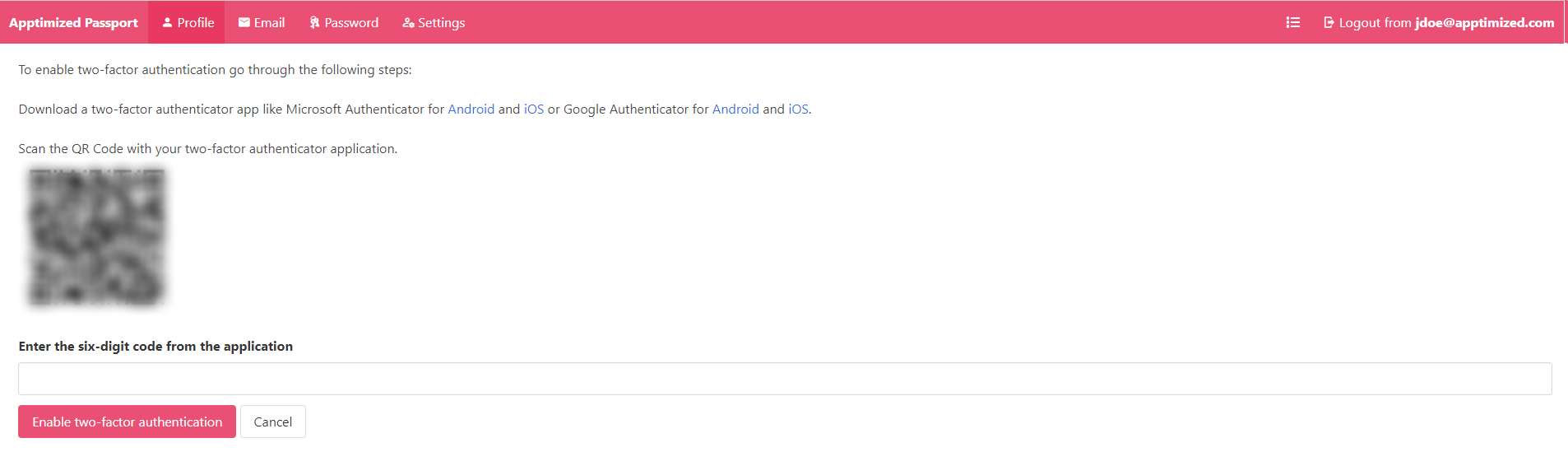
<span data-ccp-props="{"201341983":0,"335559739":160,"335559740":259}"><span class="TextRun SCXW236101434 BCX0" data-contrast="auto" lang="EN-US" xml:lang="EN-US"><span class="NormalTextRun SpellingErrorV2  SCXW236101434 BCX0 DefaultHighlightTransition">Apptimized</span><span class="NormalTextRun SCXW236101434 BCX0"> shows the following screen when successful:</span></span><span class="EOP SCXW236101434 BCX0" data-ccp-props="{"201341983":0,"335559739":160,"335559740":259}"> </span></span>

[![sso_13_2.png](https://docs.apptimized.com/uploads/images/gallery/2021-07/scaled-1680-/vkmLDdAOHQ6nL0uO-sso_13_2.png)](https://docs.apptimized.com/uploads/images/gallery/2021-07/vkmLDdAOHQ6nL0uO-sso_13_2.png)

<span data-contrast="auto">To proceed</span><span data-contrast="auto"> with</span><span data-contrast="auto"> the </span><span data-contrast="auto">two-factor authentication</span><span data-contrast="auto"> set up</span><span data-contrast="auto">,</span><span data-contrast="auto"> uploading one of the following applications is required:</span><span data-ccp-props="{"201341983":0,"335559739":160,"335559740":259}"> </span>

- [<span data-contrast="none">Microsoft Authenticator</span>](https://www.microsoft.com/en-us/account/authenticator?cmp=h66ftb_42hbak)<span data-ccp-props="{"134233279":true,"201341983":0,"335559739":160,"335559740":259}"> </span>
- [<span data-contrast="none">Google</span><span data-contrast="none"> Authenticator</span>](https://support.google.com/accounts/answer/1066447?co=GENIE.Platform%3DAndroid&hl=en)<span data-ccp-props="{"134233279":true,"201341983":0,"335559739":160,"335559740":259}"> </span>

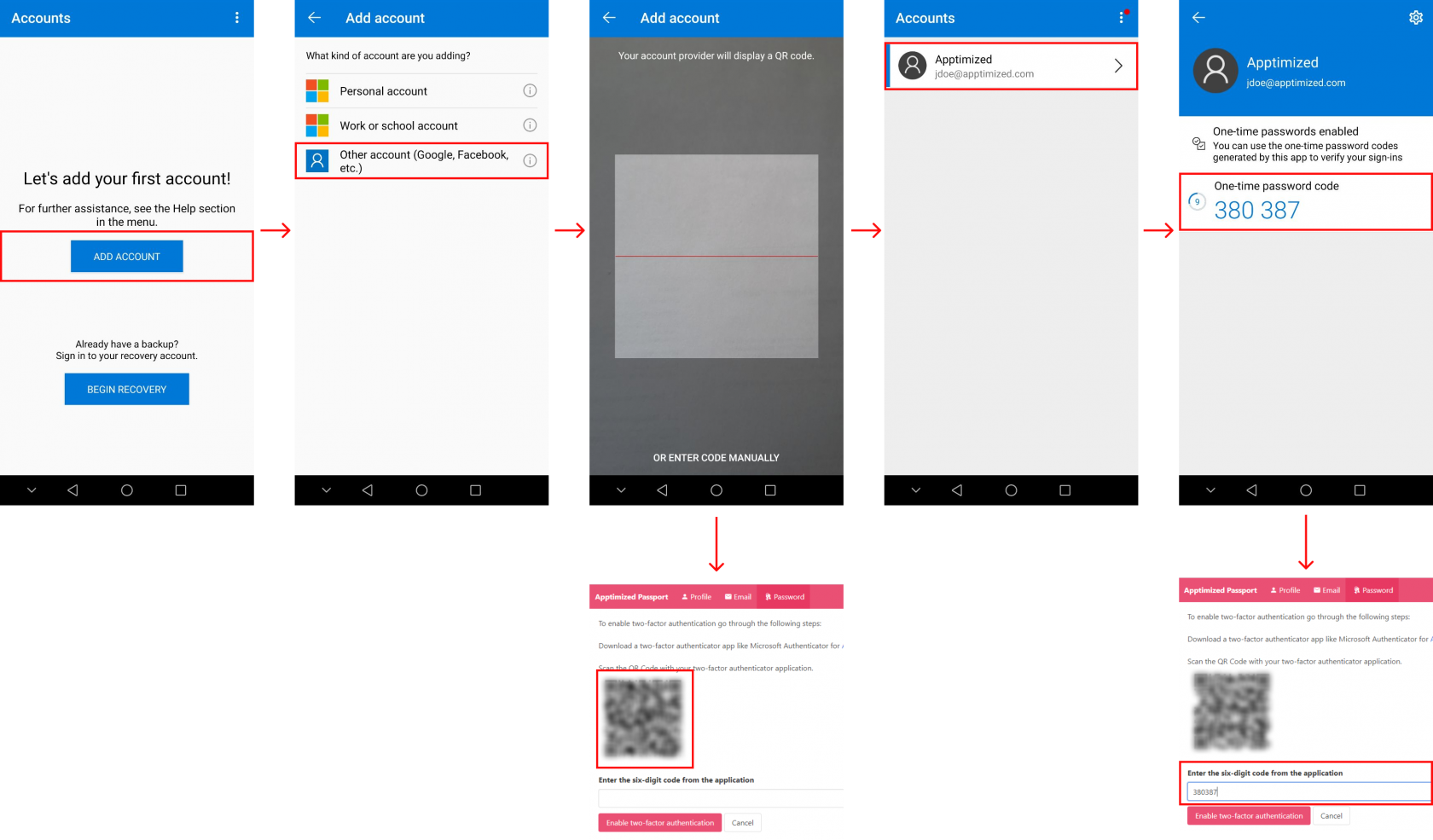
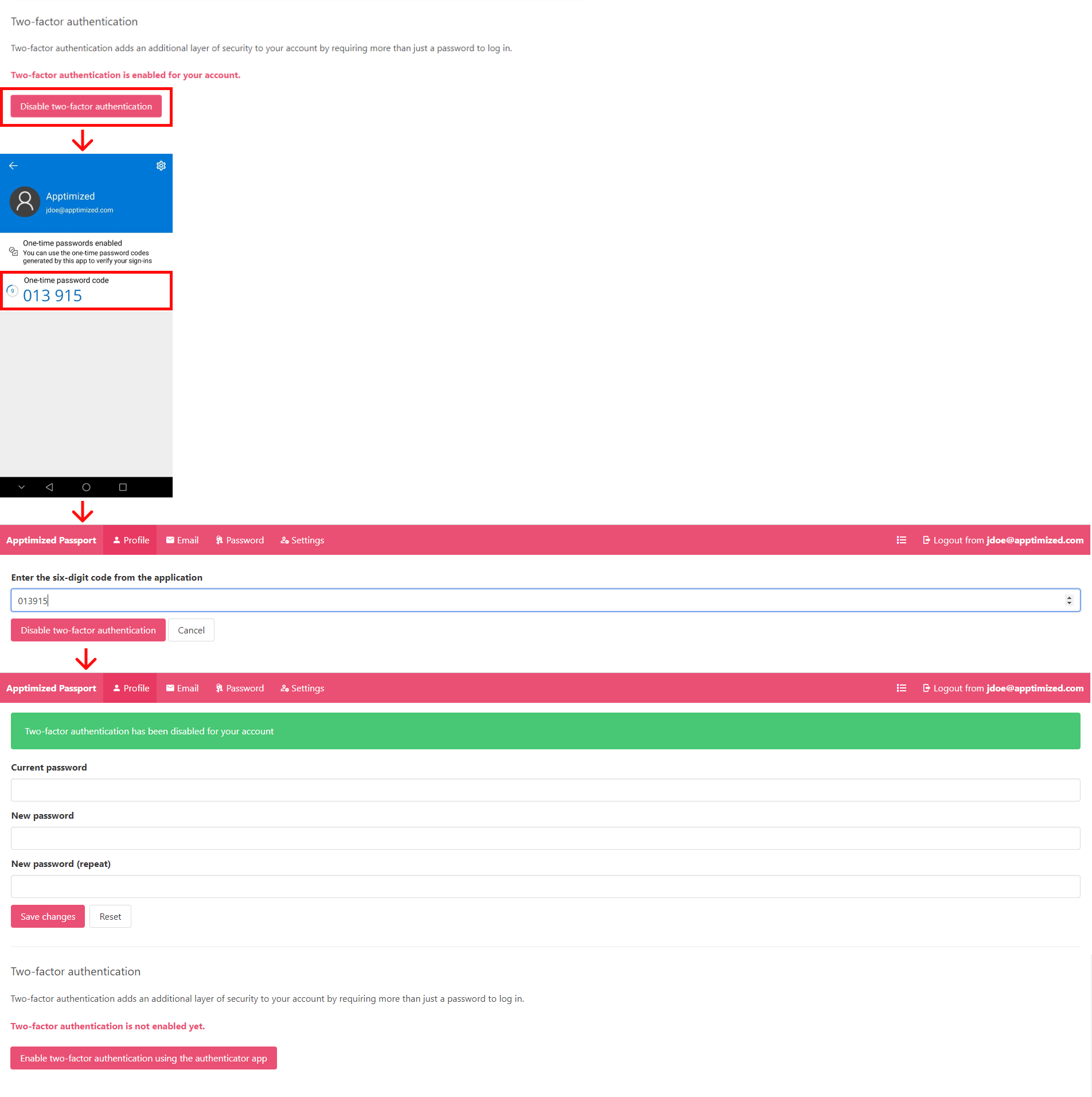
<span data-contrast="auto">The example </span><span data-contrast="auto">below </span><span data-contrast="auto">shows the procedure to enable two-factor authentication via Microsoft Authenticator for Android</span><span data-contrast="auto"> (t</span><span data-contrast="auto">he installation of the application to the </span><span data-contrast="auto">mobile phone or a tablet</span><span data-contrast="auto"> is required</span><span data-contrast="auto">): </span><span data-contrast="auto">Open Microsoft Authenticator </span><span data-contrast="auto">&gt;</span><span data-contrast="auto"> </span>**<span data-contrast="auto">Add account</span>**<span data-contrast="auto"> button </span><span data-contrast="auto">&gt;</span><span data-contrast="auto"> </span>**<span data-contrast="auto">Other account (Google, Facebook, etc.)</span>**<span data-contrast="auto"> option </span><span data-contrast="auto">&gt;</span><span data-contrast="auto"> Scan a QR code </span><span data-contrast="auto">in Apptimized SSO </span><span data-contrast="auto">&gt;</span><span data-contrast="auto"> Select an account from the list </span><span data-contrast="auto">&gt;</span><span data-contrast="auto"> </span><span data-contrast="auto">Enter a one-time password </span><span data-contrast="auto">in Apptimized SSO </span><span data-contrast="auto">&gt;</span><span data-contrast="auto"> </span>**<span data-contrast="auto">Enable two-factor</span>**<span data-contrast="auto"> </span>**<span data-contrast="auto">authentication</span><span data-contrast="auto"> </span>**<span data-contrast="auto">button</span>**<span data-contrast="auto"> </span>**<span data-contrast="auto">in Apptimized SSO:</span><span data-ccp-props="{"201341983":0,"335559739":160,"335559740":259}"> </span>

[![sso_maut.png](https://docs.apptimized.com/uploads/images/gallery/2020-11/scaled-1680-/WDgcuXtFgHwAPx4E-sso_maut.png)](https://docs.apptimized.com/uploads/images/gallery/2020-11/WDgcuXtFgHwAPx4E-sso_maut.png)

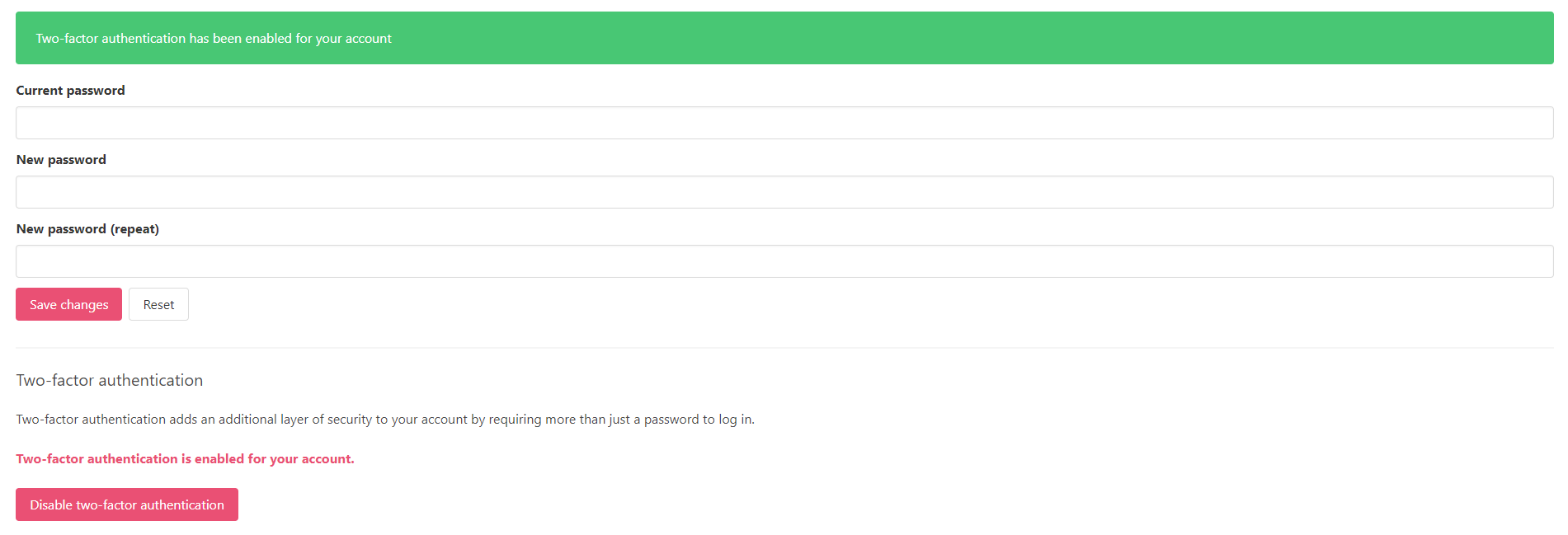
<span data-ccp-props="{"201341983":0,"335559739":160,"335559740":259}"><span class="TextRun SCXW62493595 BCX0" data-contrast="auto" lang="EN-US" xml:lang="EN-US"><span class="NormalTextRun SpellingErrorV2 SCXW62493595 BCX0 DefaultHighlightTransition">Apptimized</span><span class="NormalTextRun SCXW62493595 BCX0"> shows the following screen when successful:</span></span><span class="EOP SCXW62493595 BCX0" data-ccp-props="{"201341983":0,"335559739":160,"335559740":259}"> </span></span>

[![sso_16_2.png](https://docs.apptimized.com/uploads/images/gallery/2020-11/scaled-1680-/QrYiXwXhOXACvt6l-sso_16_2.png)](https://docs.apptimized.com/uploads/images/gallery/2020-11/QrYiXwXhOXACvt6l-sso_16_2.png)

<span data-ccp-props="{"201341983":0,"335559739":160,"335559740":259}"><span class="TextRun SCXW227525091 BCX0" data-contrast="auto" lang="EN-US" xml:lang="EN-US"><span class="NormalTextRun SCXW227525091 BCX0">The option to</span></span><span class="TextRun SCXW227525091 BCX0" data-contrast="auto" lang="EN-US" xml:lang="EN-US"><span class="NormalTextRun SCXW227525091 BCX0"> deactivate</span></span><span class="TextRun SCXW227525091 BCX0" data-contrast="auto" lang="EN-US" xml:lang="EN-US"><span class="NormalTextRun SCXW227525091 BCX0"> </span></span><span class="TextRun SCXW227525091 BCX0" data-contrast="auto" lang="EN-US" xml:lang="EN-US"><span class="NormalTextRun SCXW227525091 BCX0">the </span></span><span class="TextRun SCXW227525091 BCX0" data-contrast="auto" lang="EN-US" xml:lang="EN-US"><span class="NormalTextRun SCXW227525091 BCX0">two-factor authentication</span></span><span class="TextRun SCXW227525091 BCX0" data-contrast="auto" lang="EN-US" xml:lang="EN-US"><span class="NormalTextRun SCXW227525091 BCX0"> is available under the </span></span>**<span class="TextRun SCXW227525091 BCX0" data-contrast="auto" lang="EN-US" xml:lang="EN-US"><span class="NormalTextRun SCXW227525091 BCX0">Disable</span></span><span class="TextRun SCXW227525091 BCX0" data-contrast="auto" lang="EN-US" xml:lang="EN-US"><span class="NormalTextRun SCXW227525091 BCX0"> </span></span><span class="TextRun SCXW227525091 BCX0" data-contrast="auto" lang="EN-US" xml:lang="EN-US"><span class="NormalTextRun SCXW227525091 BCX0">two-factor</span></span><span class="TextRun SCXW227525091 BCX0" data-contrast="auto" lang="EN-US" xml:lang="EN-US"><span class="NormalTextRun SCXW227525091 BCX0"> </span></span>**<span class="TextRun SCXW227525091 BCX0" data-contrast="auto" lang="EN-US" xml:lang="EN-US"><span class="NormalTextRun SCXW227525091 BCX0">**authentication** </span></span><span class="TextRun SCXW227525091 BCX0" data-contrast="auto" lang="EN-US" xml:lang="EN-US"><span class="NormalTextRun SCXW227525091 BCX0">button</span></span><span class="TextRun SCXW227525091 BCX0" data-contrast="auto" lang="EN-US" xml:lang="EN-US"><span class="NormalTextRun SCXW227525091 BCX0">:</span></span><span class="EOP SCXW227525091 BCX0" data-ccp-props="{"201341983":0,"335559739":160,"335559740":259}"> </span></span>

[![sso_18.png](https://docs.apptimized.com/uploads/images/gallery/2021-07/scaled-1680-/ZK8HopVbgIgX2dp8-sso_18.png)](https://docs.apptimized.com/uploads/images/gallery/2021-07/ZK8HopVbgIgX2dp8-sso_18.png)

<p class="callout info"><span data-ccp-props="{"201341983":0,"335559739":160,"335559740":259}"><span class="EOP SCXW227525091 BCX0" data-ccp-props="{"201341983":0,"335559739":160,"335559740":259}">**<span class="TextRun Highlight SCXW68342298 BCX0" data-contrast="auto" lang="EN-US" xml:lang="EN-US"><span class="NormalTextRun SCXW68342298 BCX0">Note.</span></span><span class="TextRun Highlight SCXW68342298 BCX0" data-contrast="auto" lang="EN-US" xml:lang="EN-US"><span class="NormalTextRun SCXW68342298 BCX0"> </span></span>**<span class="TextRun Highlight SCXW68342298 BCX0" data-contrast="auto" lang="EN-US" xml:lang="EN-US"><span class="NormalTextRun SCXW68342298 BCX0">In case of two-factor authentication </span></span><span class="TrackChangeTextDeletion TrackedChange SCXW68342298 BCX0"><span class="TextRun Highlight SCXW68342298 BCX0" data-contrast="auto" lang="EN-US" xml:lang="EN-US"><span class="NormalTextRun SCXW68342298 BCX0">option </span></span></span><span class="TrackChangeTextInsertion TrackedChange SCXW68342298 BCX0"><span class="TextRun Highlight SCXW68342298 BCX0" data-contrast="auto" lang="EN-US" xml:lang="EN-US"><span class="NormalTextRun SCXW68342298 BCX0">is</span></span></span><span class="TextRun Highlight SCXW68342298 BCX0" data-contrast="auto" lang="EN-US" xml:lang="EN-US"><span class="NormalTextRun SCXW68342298 BCX0"> enabled in </span><span class="NormalTextRun SpellingErrorV2 SCXW68342298 BCX0">Apptimized</span><span class="NormalTextRun SCXW68342298 BCX0"> Administration</span></span><span class="TextRun Highlight SCXW68342298 BCX0" data-contrast="auto" lang="EN-US" xml:lang="EN-US"><span class="NormalTextRun SCXW68342298 BCX0"> for the </span></span><span class="TrackChangeTextInsertion TrackedChange SCXW68342298 BCX0"><span class="TextRun Highlight SCXW68342298 BCX0" data-contrast="auto" lang="EN-US" xml:lang="EN-US"><span class="NormalTextRun SCXW68342298 BCX0">organization,</span></span></span><span class="TextRun Highlight SCXW68342298 BCX0" data-contrast="auto" lang="EN-US" xml:lang="EN-US"><span class="NormalTextRun SCXW68342298 BCX0"> a user is not provided </span></span><span class="TrackChangeTextInsertion TrackedChange SCXW68342298 BCX0"><span class="TextRun Highlight SCXW68342298 BCX0" data-contrast="auto" lang="EN-US" xml:lang="EN-US"><span class="NormalTextRun SCXW68342298 BCX0">with </span></span></span><span class="TextRun Highlight SCXW68342298 BCX0" data-contrast="auto" lang="EN-US" xml:lang="EN-US"><span class="NormalTextRun SCXW68342298 BCX0">the ability to deactivate the </span></span><span class="TextRun Highlight SCXW68342298 BCX0" data-contrast="auto" lang="EN-US" xml:lang="EN-US"><span class="NormalTextRun SCXW68342298 BCX0">two-</span></span><span class="TextRun Highlight SCXW68342298 BCX0" data-contrast="auto" lang="EN-US" xml:lang="EN-US"><span class="NormalTextRun SCXW68342298 BCX0">factor authentication option in </span><span class="NormalTextRun SpellingErrorV2 SpellingErrorHighlight SCXW68342298 BCX0">Apptimized</span><span class="NormalTextRun SCXW68342298 BCX0"> SSO.</span></span><span class="EOP SCXW68342298 BCX0" data-ccp-props="{"201341983":0,"335559739":160,"335559740":259}"> </span></span></span></p>

#### Settings tab

This tab enables a user to configure settings within a specific user's account (i.e., to set up a time zone, date format, and time format by using a drop-down list):

[![sso_20_2.png](https://docs.apptimized.com/uploads/images/gallery/2021-07/scaled-1680-/gEXr8bwd18OACtOT-sso_20_2.png)](https://docs.apptimized.com/uploads/images/gallery/2021-07/gEXr8bwd18OACtOT-sso_20_2.png)

#### Account logout 

<span data-contrast="auto">The option </span><span data-contrast="auto">to terminate the session within the account is available under the </span>**<span data-contrast="auto">Logout</span>**<span data-contrast="auto"> button</span><span data-contrast="auto"> </span><span data-contrast="auto">&gt;</span><span data-contrast="auto"> </span>**<span data-contrast="auto">Logout from Apptimized </span>**<span data-contrast="auto">button </span><span data-contrast="auto">&gt;</span><span data-contrast="auto"> </span>**<span data-contrast="auto">Return to application </span>**<span data-contrast="auto">button:</span><span data-ccp-props="{"201341983":0,"335559739":160,"335559740":259}"> </span>

[![sso_06_4_2.png](https://docs.apptimized.com/uploads/images/gallery/2021-07/scaled-1680-/1sIiIIx1hjkKwEcw-sso_06_4_2.png)](https://docs.apptimized.com/uploads/images/gallery/2021-07/1sIiIIx1hjkKwEcw-sso_06_4_2.png)

[![sso_06.png](https://docs.apptimized.com/uploads/images/gallery/2020-11/scaled-1680-/L9VBEbNZPmrZ1eLr-sso_06.png)](https://docs.apptimized.com/uploads/images/gallery/2020-11/L9VBEbNZPmrZ1eLr-sso_06.png)
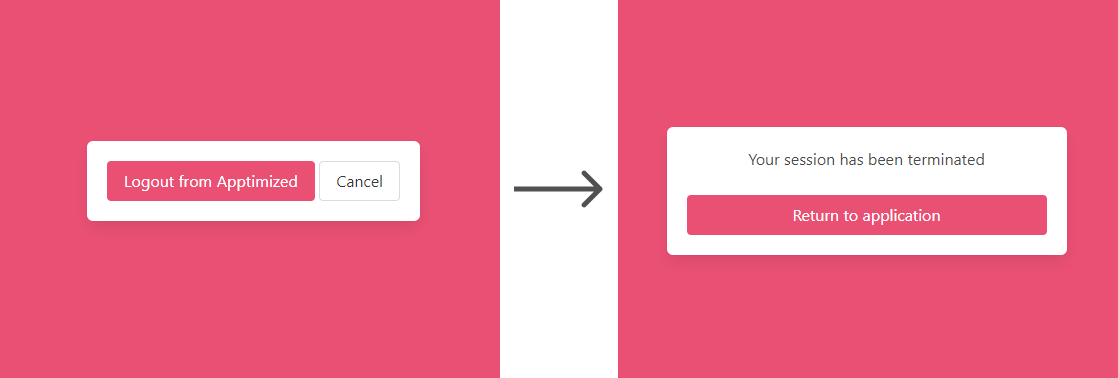
<span data-ccp-props="{"201341983":0,"335559739":160,"335559740":259}"><span class="TextRun SCXW5720100 BCX0" data-contrast="auto" lang="EN-US" xml:lang="EN-US"><span class="NormalTextRun SpellingErrorV2 SpellingErrorHighlight SCXW5720100 BCX0">Apptimized</span><span class="NormalTextRun SCXW5720100 BCX0"> shows the following screen when successful:</span></span><span class="EOP SCXW5720100 BCX0" data-ccp-props="{"201341983":0,"335559739":160,"335559740":259}"> </span></span>

[![sso_01_3.png](https://docs.apptimized.com/uploads/images/gallery/2022-10/scaled-1680-/n3tRc57hzscFFHCM-sso_01_3.png)](https://docs.apptimized.com/uploads/images/gallery/2022-10/n3tRc57hzscFFHCM-sso_01_3.png)